
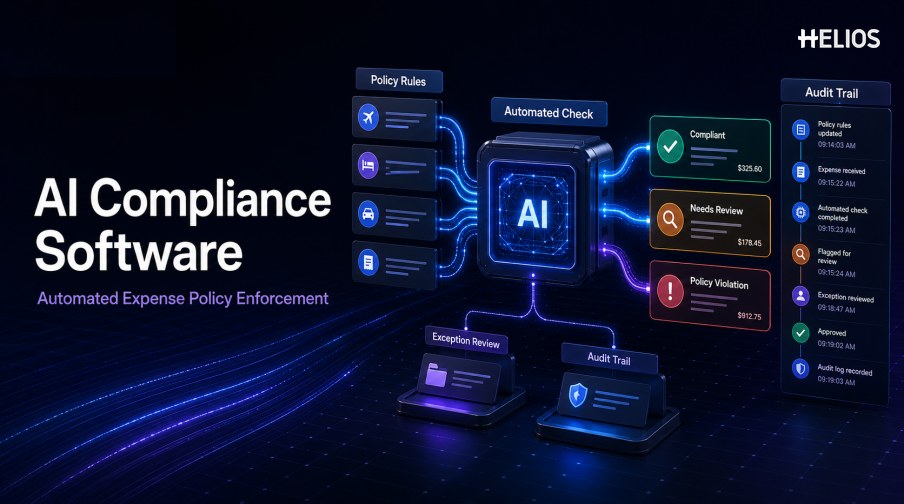
Expense policies define what employees can spend, which evidence they must provide, who approves a claim, and how exceptions are handled. The challenge is applying those rules consistently across receipts, reports, departments, entities, currencies, and business situations without turning every submission into a manual audit.
AI compliance software can combine configurable rules, document recognition, contextual checks, risk signals, and workflow automation. It can identify missing evidence or possible policy violations, explain the relevant condition, and route the record to the appropriate reviewer. A controlled system also records the source data, rule version, decision, correction, and final outcome.
This guide explains how AI compliance tools support automated expense policy enforcement and how Helios Built-In Policy Compliance, Automated Policy Control, and Spark AI connect compliance with submission, review, approval, accounting, and reporting.
What Is AI Compliance Software for Expenses?
AI compliance software for expenses evaluates claims, receipts, invoices, user context, and workflow events against company requirements. The software may use deterministic rules for explicit limits and evidence requirements, while AI can help interpret documents, identify subtle risks, summarize exceptions, and prioritize records for review.
The goal is not to remove accountable judgment. It is to make routine checks consistent, surface relevant exceptions earlier, and provide reviewers with the evidence and policy context required for a documented decision.
Expense Policies That Can Be Automated
AI compliance tools are most effective when policies are expressed as clear, testable conditions.
- Receipt and invoice requirements. Check whether evidence is attached for the amount, category, country, payment method, or employee group.
- Spending limits. Apply per-item, per-day, per-trip, per-category, or cumulative thresholds with approved tolerances.
- Category and merchant restrictions. Identify prohibited, restricted, or higher-risk expense types and merchants.
- Date and timing rules. Check transaction dates, trip periods, submission deadlines, weekend spending, and late claims.
- Role and location rules. Apply different allowances by position, department, entity, location, traveler type, or business purpose.
- Approval requirements. Confirm that the correct approver, escalation, pre-approval, or secondary review occurred.
- Coding requirements. Validate entity, category, cost center, project, tax, currency, and other required dimensions.
- Exception documentation. Require a reason, supporting document, or designated reviewer when a policy exception is requested.
A Simple Automated Compliance Workflow
A governed expense-compliance process can follow these stages:
- Capture the claim and evidence. Collect expense fields, receipts or invoices, employee context, trip details, payment information, and attachments.
- Extract and normalize data. OCR reads document fields while dates, currencies, amounts, taxes, and identifiers are converted into expected formats.
- Apply policy rules. The system tests evidence, limits, categories, merchants, dates, roles, approvals, and coding requirements.
- Add contextual or AI-assisted checks. Document content, historical patterns, duplicate signals, and unusual combinations can inform review priority.
- Explain the result. Show the relevant policy, source values, rule outcome, confidence, and missing or conflicting information.
- Route the exception. Send the record to the correct manager, finance reviewer, compliance owner, or escalation path.
- Record the decision. Retain comments, corrections, approvals, rejections, exception reasons, and timestamps.
- Carry approved data downstream. Move the controlled record into accounting, reimbursement, reporting, and monitoring.
How AI Compliance Tools Identify Policy Violations
Different detection methods address different types of noncompliance.
- Deterministic rule failures. A required receipt is missing, an amount exceeds a limit, or an approval step was skipped.
- Document-to-claim conflicts. The receipt date, merchant, currency, tax, or total differs from the submitted values.
- Duplicate indicators. Images and key fields resemble another submitted or reimbursed record.
- Contextual anomalies. The amount, timing, frequency, merchant, or category differs from an appropriate employee, peer, trip, or historical pattern.
- Policy-language assistance. A conversational tool can help users and reviewers locate relevant guidance, subject to approved policy content and access.
- Risk prioritization. Materiality, severity, confidence, and multiple signals can determine which records need earlier or deeper review.
Audit Trail, Explainability, and Human Oversight
Automated enforcement must remain understandable and reviewable.
- Versioned policy evidence. Retain the exact policy and rule version that applied when the expense was evaluated.
- Source-backed explanations. Show the receipt or invoice, submitted value, recognized value, threshold, and reason for the result.
- Correction history. Record original data, automated proposals, user edits, reviewer changes, and final approved values.
- Decision ownership. Identify who approved, rejected, returned, or accepted an exception and under which authority.
- Segregation of duties. Permissions should prevent incompatible users from controlling submission, approval, policy changes, and finance posting.
- Appeal and exception paths. Employees and reviewers need a documented way to provide context and resolve legitimate exceptions.
- Monitoring records. Track rule triggers, false alerts, overrides, processing time, recurring violations, and policy changes.
How to Select and Implement AI Compliance Software
Implementation should begin with policy clarity and representative testing.
- Create a policy inventory. List every expense rule, owner, scope, exception, evidence requirement, and effective date.
- Separate rules from judgment. Identify which conditions are deterministic and which require context or authorized discretion.
- Test representative claims. Include compliant expenses, known violations, legitimate exceptions, multiple entities, currencies, and difficult documents.
- Measure control quality. Track coverage, useful-alert rate, missed issues, overrides, reviewer time, and repeat exceptions.
- Validate workflow fit. Test submission, OCR, policy, approval, finance review, accounting, retries, reporting, and audit retrieval.
- Govern changes. Assign owners for rule creation, testing, approval, publication, monitoring, and retirement.
- Train users. Explain policy expectations, automated checks, correction steps, exception routes, and reviewer responsibilities.
How Helios and Spark AI Support Expense Compliance
Helios presents Built-In Policy Compliance and Automated Policy Control as core expense-management capabilities, alongside OCR capture, flexible approvals, accounting integration, and reporting. Spark AI adds conversational assistance and policy-aware claim review. Together, these capabilities support five compliance needs:
- Create structured evidence. OCR captures relevant receipt and invoice data for confirmation instead of relying only on manual entry.
- Enforce configured spending policies. Automated Policy Control checks reimbursement requests against company requirements.
- Assist policy-aware review. Approval Copilot checks claims against company policy and helps reviewers focus on relevant issues.
- Route exceptions through accountable approvals. Configurable workflows can reflect roles, departments, cost centers, and business conditions.
- Retain downstream visibility. Accounting-entry generation, dashboards, and customizable reporting connect decisions with finance outcomes.
Helios also presents itself as an enterprise-grade provider with global experience and information-security credentials. Buyers should validate policy coverage, document accuracy, exception handling, explanations, permissions, audit history, integrations, security, reporting, and implementation scope against their own requirements.
FAQs About AI Compliance Software
What is the difference between AI compliance software and policy rules?
Policy rules test explicit requirements. AI compliance software may combine those rules with document recognition, contextual analysis, risk signals, explanations, and workflow automation.
Can AI compliance tools approve every compliant expense automatically?
Only if the organization has defined a low-risk, authorized straight-through path. Material, uncertain, conflicting, or exception cases should retain appropriate human review.
What makes an expense audit trail complete?
It should include the source record, documents, extracted and corrected values, applicable policy version, check results, explanation, reviewer actions, timestamps, approvals, accounting outcome, and final status.
How can companies reduce false policy alerts?
Clarify rules, improve source data, use appropriate tolerances and context, test legitimate exceptions, analyze reviewer overrides, and retire controls that create noise without useful outcomes.
How does Spark AI support compliance?
Spark AI states that it audits expenses against company policies and includes an Approval Copilot for policy-aware claim review. Organizations still define policies, access, workflows, and decision authority.
Organizations can evaluate Helios and Spark AI compliance workflows with representative expenses, policy versions, legitimate exceptions, review roles, audit-history requirements, and downstream accounting tests.