
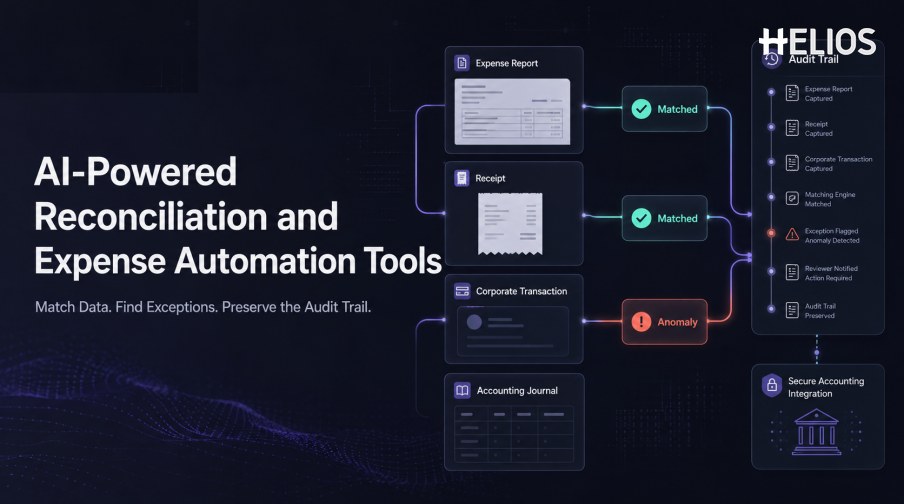
Expense reconciliation is often where an apparently automated process becomes manual again. Finance teams compare receipts with expense lines, expense reports with corporate-card transactions, approvals with policy results, accounting outputs with approved values, and integration responses with expected journals. When identifiers or fields do not align, reviewers search across several systems to reconstruct the record.
AI-powered reconciliation and expense automation tools can assist by normalizing data, proposing matches, highlighting exceptions, and presenting the relevant evidence together. The objective is not to let a model silently decide that financial records are correct. A reliable system uses controlled rules, explainable match evidence, human review for material exceptions, and an audit trail that preserves every decision and correction.
This guide focuses on reconciliation within employee expense management. It explains the data matching, anomaly detection, audit, and integration capabilities buyers should evaluate, and shows how Helios connects receipt capture, policy review, approval workflows, accounting-entry generation, and reporting.
What Are AI-Powered Reconciliation and Expense Automation Tools?
These tools connect the records created across an expense lifecycle and reduce the manual effort required to compare them. Depending on the organization’s scope, the comparison may involve a receipt, invoice, expense line, corporate-card transaction, employee report, policy result, approval decision, accounting entry, reimbursement instruction, or downstream response.
Rules remain essential for exact identifiers, required fields, tolerances, status transitions, and accounting controls. AI is most useful when information is inconsistent or unstructured: interpreting documents, suggesting classifications, finding likely relationships, ranking exceptions, and summarizing the evidence for a reviewer.
This is different from statutory audit software, enterprise-wide account reconciliation, or a complete accounts-payable platform. Buyers should define the exact expense records and finance handoffs they expect the tool to reconcile.
Which Expense Records Need to Be Matched?
A complete evaluation starts with the objects and identifiers in the current process:
- Receipt or invoice to expense line. Compare merchant, date, amount, currency, tax, document number, and other extracted fields with the employee’s claim.
- Expense line to transaction. Link the claim with the relevant corporate-card, wallet, travel, or imported transaction where that source is in scope.
- Report to policy and approval history. Confirm that required checks, evidence, authorized decisions, returns, overrides, and explanations remain connected.
- Approved expense to accounting output. Compare approved values and coding with accounts, dimensions, taxes, currencies, journal lines, and references.
- Transfer request to system response. Record success, rejection, warning, correction, journal identifier, reimbursement status, or other downstream outcome.
- Refund or reversal to original expense. Connect credits and reversals with the earlier transaction and accounting treatment.
Core Capabilities to Look For
The strongest tools combine matching technology with operational controls:
- Data ingestion and normalization. Bring together structured and unstructured expense data while preserving source values and provenance.
- Configurable match logic. Support exact identifiers, field combinations, date and amount tolerances, currency handling, split transactions, and one-to-many relationships.
- Confidence and explanation. Show why a record was matched, which fields disagree, and how certain the proposed relationship is.
- Anomaly and duplicate signals. Highlight missing evidence, repeated documents, unusual values, policy conflicts, unmatched records, and other configured risks.
- Exception work queues. Assign unresolved items by entity, amount, age, risk, role, or exception type with clear ownership and escalation.
- Human correction and approval. Allow authorized users to confirm, reject, rematch, override, explain, and correct without losing the original evidence.
- Audit trail. Retain source data, proposed matches, model or rule results, user decisions, configuration versions, edits, transfers, and final outcomes.
- Accounting integration. Generate or transfer controlled accounting information and return downstream responses to the expense record.
- Monitoring and reporting. Measure match rates, exceptions, aging, overrides, false alerts, corrections, failed transfers, and unresolved value.
How the Reconciliation Workflow Should Operate
A well-controlled workflow typically follows these stages:
- Collect the source data. Capture receipts, expense reports, transactions, policy results, approvals, accounting data, and integration responses from authorized sources.
- Standardize the fields. Normalize dates, currencies, merchant names, document numbers, employee identities, entities, and accounting dimensions while retaining original values.
- Apply deterministic rules first. Use stable identifiers, required fields, exact relationships, and approved tolerances where the logic is known.
- Use AI for ambiguous relationships. AI can propose likely matches, classify patterns, or summarize discrepancies when records are incomplete or inconsistent.
- Score and route exceptions. Unmatched, low-confidence, duplicated, out-of-policy, or materially different records move to the appropriate reviewer.
- Review the evidence. The reviewer sees related documents, field differences, policy context, prior actions, and the reason for the alert.
- Record the decision. Confirmation, correction, rejection, override, and explanation become part of the audit history.
- Transfer and verify accounting outcomes. Approved information reaches the finance system, and the returned status or reference is compared with the expected result.
Accounting Integration and Audit-Trail Requirements
Reconciliation cannot be reliable if the expense platform only exports a file and loses visibility. The integration should preserve the relationship between the approved report and the resulting accounting record, including any rejection, correction, or retry
- Field-level mappings. Validate accounts, dimensions, entities, projects, clients, taxes, currencies, descriptions, dates, and journal references.
- Balanced accounting output. Confirm how debit and credit lines, rounding, taxes, employee liabilities, corporate-card settlement, and reversals are handled.
- Bidirectional status. Return accepted, rejected, warning, correction, journal, batch, and payment information to the originating record.
- Idempotency and duplicate prevention. Repeated transfers should not create duplicate journals or reimbursements.
- Error ownership and retry. Assign integration failures to an authorized owner and retain every attempt, correction, and final result.
- Configuration history. Record changes to mappings, tolerances, rules, roles, and model versions with effective dates and authorization.
- Access and retention. Apply role-based permissions and retain records according to company, legal, tax, privacy, and security requirements.
How to Evaluate and Implement the Right Tools
A responsible selection process uses representative data and measures operational outcomes.
- Define the reconciliation scope. List the exact documents, transactions, approvals, accounting outputs, payment responses, entities, currencies, and systems involved.
- Establish a labeled test set. Include valid matches, ambiguous cases, duplicates, missing evidence, refunds, split allocations, foreign currencies, policy exceptions, and integration failures.
- Measure by scenario and field. Track correct-match rate, false-match rate, unmatched rate, field corrections, exception precision, reviewer time, and unresolved value.
- Test explanations and correction paths. Reviewers should understand the proposed match and be able to correct it without hidden changes.
- Follow records end to end. Demonstrate capture, matching, policy review, approval, accounting generation, transfer response, exception handling, and reporting.
- Review security and model governance. Assess data access, retention, encryption, training-data use, administrator controls, monitoring, change management, and fallback procedures.
- Pilot with human oversight. Start with a bounded process, compare results with the current baseline, review false matches and missed exceptions, then expand gradually.
How Helios Supports Expense Automation and Accounting Continuity
Helios combines mobile expense workflows, OCR receipt capture, automated policy controls, configurable approvals, accounting-entry generation, and reporting. Spark AI adds conversational assistance across claims, approvals, travel, and service. In a reconciliation strategy, the platform contributes five connected capabilities:
- Capture structured source data. Helios OCR extracts information from receipts and invoices, reducing manual entry before matching and review.
- Apply policy and AI-assisted review. Automated policy controls and Spark AI Approval Copilot help check claims and bring relevant issues to the reviewer’s attention.
- Preserve authorized workflow decisions. Configurable approval paths preserve human ownership by role and business condition.
- Generate accounting information from approved reports. The Helios accounting engine can create journal entries for downstream finance systems.
- Analyze activity and exceptions. Multi-dimensional dashboards and customizable reports support monitoring across the expense lifecycle.
Helios also presents itself as an enterprise-grade provider with global experience and information-security credentials. Buyers should validate required data sources, matching logic, tolerances, exception queues, audit history, accounting connectors, returned statuses, security controls, and implementation scope.
FAQs About AI-Powered Reconciliation and Expense Automation Tools
What can AI reconcile in an expense workflow?
Depending on connected data, AI can help relate receipts, expense lines, card transactions, reports, and supporting context. Controlled rules and identifiers should still govern exact accounting relationships and material decisions.
How should match accuracy be measured?
Measure correct matches, false matches, unmatched records, and reviewer corrections by scenario. A single accuracy percentage can hide high-risk false matches or weak performance on currencies, refunds, splits, and difficult documents.
Should the system automatically resolve every exception?
No. Low-confidence, materially different, policy-sensitive, or higher-risk cases should go to an authorized reviewer with the source evidence and reason for the alert.
What must an audit trail include?
It should retain source records, extracted values, proposed matches, rule and AI results, configuration versions, user actions, approvals, overrides, corrections, transfer attempts, and final accounting or reimbursement references.
Finance teams can evaluate Helios expense automation and accounting integration with representative receipts, transactions, exceptions, approval paths, accounting mappings, integration responses, and audit requirements.