
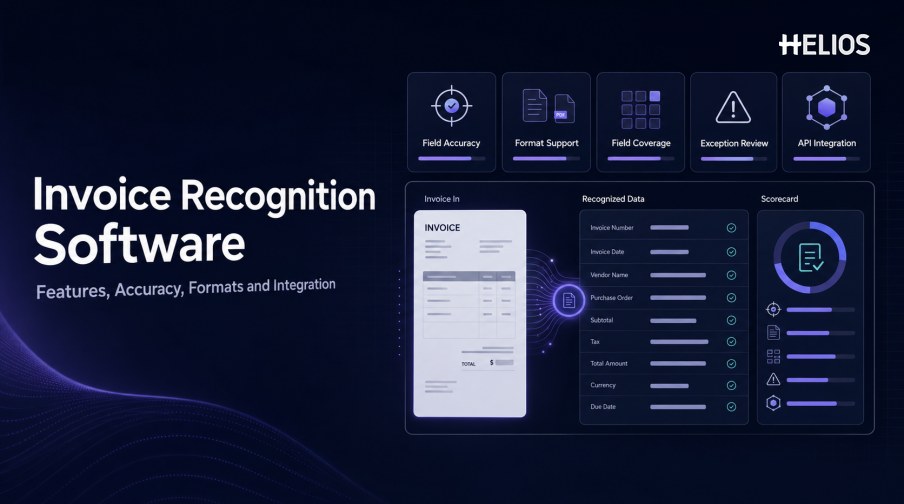
Invoice recognition software can look similar in a product demonstration: upload a document, wait a few seconds, and see fields appear. The real differences emerge when the system processes the organization’s actual invoices, languages, layouts, currencies, taxes, exception cases, and downstream integrations.
The best invoice recognition software is therefore the product that performs reliably in the intended workflow, not the one with the broadest marketing claim. Buyers should evaluate field-level accuracy, document coverage, validation and correction paths, operational controls, accounting integration, security, and the effort required to maintain the system after launch.
This guide summarizes the capabilities and metrics that matter, provides a practical selection process, and explains how Helios OCR connects recognized invoice data with expense control, approval, accounting, and reporting.
What Does Invoice Recognition Software Do?
Invoice recognition software converts invoices from PDFs, scans, photos, or other supported formats into structured business data. It combines image preparation, OCR, layout analysis, field extraction, normalization, validation, review, and integration.
A complete product should do more than display recognized text. It should identify the required invoice fields, show the source beside the result, indicate uncertainty, support correction, retain an audit history, and move confirmed data into the next expense or finance step.
Core Features to Evaluate
Strong invoice recognition software should combine the following capabilities:
- Multiple capture channels. Support mobile photos, image uploads, PDFs, scans, email or portal intake, and any other channels used in the target process.
- Image preprocessing. Rotate, crop, deskew, denoise, improve contrast, detect page boundaries, and separate multi-page documents.
- OCR and layout understanding. Read words, lines, tables, and spatial relationships instead of relying only on fixed templates.
- Configurable field coverage. Extract supplier, identifiers, dates, currency, amounts, taxes, line items, payment details, and country-specific fields as required.
- Confidence and exception handling. Show uncertain fields, route exceptions, allow correction, and preserve the original recognition result.
- Validation rules. Check required fields, arithmetic, formats, duplicates, master data, policy conditions, and tolerances.
- Human review experience. Place the source image and extracted data together and minimize the steps needed to correct a field.
- Integration and auditability. Send confirmed data to expense or finance systems and retain every source, edit, decision, transfer, and outcome.
How to Measure Invoice Recognition Accuracy
A single accuracy percentage is rarely sufficient. Results depend on the field, document type, language, layout, image quality, normalization rules, and whether the metric counts characters, fields, or complete documents.
- Field exact-match rate. Measure how often the proposed value exactly matches the approved reference value.
- Normalized-match rate. Count values as correct after defined normalization, such as date or decimal format conversion.
- False-value rate. Track fields populated with an incorrect value, especially totals, currencies, tax, dates, and invoice numbers.
- Missing-field rate. Measure required fields that the software leaves blank.
- Correction rate. Track how often users modify each field and how much time the correction requires.
- Straight-through completion. Measure the percentage of documents that reach the next stage without manual field correction.
- Exception precision and recall. Evaluate whether the system flags meaningful issues without overwhelming reviewers or missing material problems.
Formats, Languages, and Document Coverage
Coverage claims should be tested against the exact documents in scope.
- File formats. Confirm PDF, JPEG, PNG, TIFF, multi-page files, embedded images, and any email or archive formats required.
- Image conditions. Test low resolution, skew, shadows, glare, folds, stamps, handwriting, faded print, and mobile photographs.
- Invoice layouts. Include tables, long line-item lists, multiple tax rates, credit notes, foreign-language documents, and unusual templates.
- Languages and scripts. Measure actual field performance for every important language rather than relying only on a supported-language list.
- Currencies and tax fields. Validate symbols, codes, decimal separators, tax identifiers, regional formats, and conversion-related data.
- Line-item requirements. Confirm maximum pages, rows, columns, repeated headers, merged cells, and field relationships.
Integration, Security, and Operational Fit
Recognition quality can be undermined by weak integration or poor exception handling. Buyers should follow one invoice from capture to its final expense or accounting outcome.
- Expense and approval integration. Recognized fields should populate claims and support policy checks, routing, review, and status updates.
- Accounting integration. Validate accounts, dimensions, taxes, currencies, journal structure, references, responses, and error handling.
- Identity and master data. Connect employees, suppliers, entities, departments, cost centers, projects, categories, and tax tables.
- APIs and batch interfaces. Assess authentication, limits, latency, retry behavior, idempotency, versioning, and monitoring.
- Security and privacy. Review encryption, access control, retention, data location, administrator privileges, incident response, and model-data handling.
- Operational monitoring. Track volume, processing time, corrections, exceptions, failures, backlog, and service availability.
How to Select the Best-Fit Invoice Recognition Software
There is no responsible universal winner. Use a documented test and selection process.
- Define the business scope. List document sources, volumes, fields, languages, countries, currencies, tax needs, users, systems, and service expectations.
- Create a representative test set. Include common and difficult documents, exceptions, rare layouts, multi-page invoices, and poor images.
- Agree on metrics and acceptance thresholds. Measure critical fields separately and define when human review is mandatory.
- Run the same test across candidates. Use identical documents, normalization rules, scoring methods, and reviewer instructions.
- Evaluate correction and exception workflows. Time how long users need to verify, correct, explain, and resolve difficult cases.
- Demonstrate end-to-end integration. Follow recognized data through policy, approval, accounting, error response, correction, and reporting.
- Compare total operating cost. Include licensing, implementation, configuration, integrations, review labor, support, training, and ongoing maintenance.
- Pilot before expansion. Start with a bounded set of documents and users, compare results with the baseline, and correct recurring issues.
How Helios Fits an Invoice Recognition Software Evaluation
Helios combines mobile expense workflows, OCR invoice capture, automated policy controls, configurable approvals, accounting-entry generation, and reporting. Spark AI adds conversational assistance across claims, approvals, travel, and service. Buyers can evaluate the platform against five important criteria:
- Practical document capture. Users can photograph a receipt or upload an invoice, and OCR populates relevant details.
- Recognition connected with controls. Extracted fields enter automated policy and approval workflows rather than remaining in a separate OCR tool.
- Visible human review. Employees and finance reviewers can confirm information and handle exceptions within the expense process.
- Accounting continuity. Approved expense reports can generate accounting entries for downstream systems.
- Enterprise reporting and AI assistance. Dashboards, customizable reporting, and Spark AI copilots support monitoring and user interaction.
Helios also presents itself as an enterprise-grade provider with global experience and information-security credentials. A buyer should still validate field-level accuracy, document formats, languages, currencies, taxes, line items, exception handling, APIs, accounting connectors, security controls, service coverage, and implementation scope.
FAQs About Invoice Recognition Software
What is the best invoice recognition software?
The best-fit product is the one that meets the organization’s field, document, workflow, integration, security, service, and cost requirements on representative invoices. There is no universal winner.
What accuracy percentage should buyers require?
Use field-level and document-level metrics on a labeled test set. A single percentage can hide false values in high-risk fields such as total, tax, currency, date, and invoice number.
Which invoice formats should software support?
Support should match the actual process, including required PDF and image formats, multi-page documents, mobile photos, scans, languages, currencies, and tax layouts.
Why is exception handling important?
Some documents will be unclear, incomplete, unusual, or inconsistent. Reviewers need confidence information, source evidence, correction tools, ownership, escalation, and an audit history.
How should invoice recognition software integrate with accounting?
Confirmed fields should pass through controlled mappings for accounts, dimensions, taxes, currencies, and journal data, with errors and downstream statuses returned to the original record.
Finance teams can evaluate Helios invoice recognition software with a representative document set, field-level scoring, exception scenarios, integrations, and accounting requirements.