
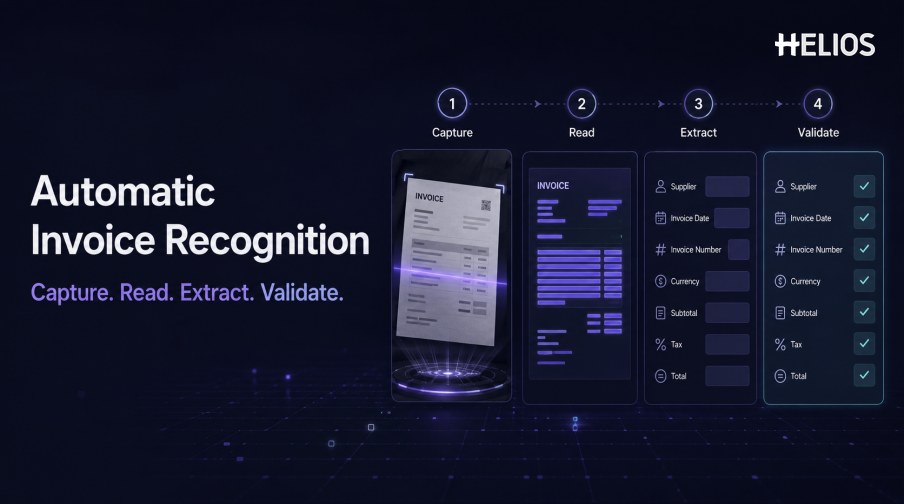
Invoices contain information that finance teams need, but the information usually arrives as a document rather than clean system data. A user may receive a PDF by email, photograph a paper invoice, upload a scanned image, or attach an invoice to an expense claim. Someone then has to identify the supplier, date, invoice number, amount, currency, tax, and other fields before the record can move forward.
Invoice recognition converts that document into structured data. The process combines image preparation, optical character recognition, field detection, normalization, and validation. Automatic invoice recognition reduces repetitive typing, but it still needs confidence handling, correction paths, policy rules, and human review for uncertain or material values.
This guide explains the complete recognition workflow, the fields and quality controls involved, and how Helios OCR connects invoice capture with expense submission, policy checks, approvals, accounting preparation, and reporting.
What Is Invoice Recognition?
Invoice recognition is the process of converting visual invoice content into structured, usable data. OCR first detects characters and words. A recognition layer then determines which text represents business fields such as supplier name, invoice date, invoice number, currency, subtotal, tax, and total amount.
Automatic invoice recognition goes beyond plain text transcription. It attempts to associate values with field names, normalize formats, check relationships between values, and pass the result into a business workflow. The objective is not simply to reproduce every character on the page; it is to create reliable data that a user or downstream system can act on.
Recognition should remain separate from approval. Extracting an amount does not prove that the invoice is valid, reimbursable, policy-compliant, correctly coded, or ready for accounting.
How Automatic Invoice Recognition Works
A typical workflow contains the following stages:
- Capture or upload the image. The user photographs a paper invoice or uploads a PDF, scan, image, or other supported file.
- Prepare the document. The system may rotate, crop, deskew, denoise, improve contrast, separate pages, or detect document boundaries.
- Read the text with OCR. The OCR engine identifies characters, words, lines, tables, and spatial relationships on the page.
- Locate invoice fields. Rules or machine-learning models identify likely supplier, date, number, currency, amounts, taxes, and other relevant values.
- Normalize the values. Dates, decimal separators, currencies, tax formats, and identifiers are converted into the expected system format while source values are retained.
- Assign confidence and validation results. The system records uncertainty and checks required fields, arithmetic relationships, duplicates, and configured business rules.
- Request confirmation or exception review. A user verifies low-confidence, conflicting, missing, or material fields and corrects the result when necessary.
- Send structured data downstream. Confirmed values enter the expense claim, approval, accounting, reimbursement, or reporting workflow.
Which Invoice Fields Can Be Extracted?
Field requirements depend on the document, country, tax regime, and downstream process. Common examples include:
- Supplier details. Supplier name, address, tax identifier, registration number, and other party information.
- Invoice identifiers. Invoice number, reference number, purchase-order reference, contract reference, and document type.
- Dates. Invoice date, service date, posting date, due date, and payment-term information.
- Amounts and currency. Subtotal, discounts, service charges, tax, total, paid amount, balance, and currency.
- Tax information. Tax rate, tax amount, tax category, tax identifier, and country-specific fields.
- Line items. Description, quantity, unit, unit price, discount, tax, and line total where line-level extraction is required.
- Payment and accounting context. Payment method, bank or settlement reference, expense category, entity, cost center, project, and suggested account where applicable.
Data Validation and Exception Handling
A recognized value is a proposal until it has passed the required checks. Validation should combine technical confidence with business rules and present the source image beside the extracted data.
- Required-field checks. Confirm that mandatory supplier, date, number, amount, currency, tax, and evidence fields are present.
- Arithmetic checks. Compare subtotal, discounts, tax, and total, allowing only defined rounding tolerances.
- Format checks. Validate dates, currencies, tax identifiers, invoice numbers, and other field patterns.
- Duplicate signals. Compare document images and key fields with existing claims or records to flag possible repeated submission.
- Policy checks. Apply company requirements for evidence, dates, limits, categories, suppliers, and other controlled conditions.
- Confidence-based review. Send low-confidence or materially different fields to a user instead of silently accepting them.
- Correction history. Retain the source value, recognized value, user correction, rule result, reviewer, and timestamp.
How Recognized Invoice Data Enters Finance Workflows
The value of invoice recognition depends on what happens after extraction. If users must copy the result into another form or spreadsheet, the process has only moved the manual work.
- Expense submission. Recognized fields populate an expense line while the user adds business purpose, category, project, attendees, or other context.
- Policy and duplicate review. Structured fields support consistent checks for evidence, limits, dates, categories, and repeated documents.
- Approval routing. Amount, department, role, cost center, entity, project, or exception type can determine the approval path.
- Finance review. Reviewers see the invoice, extracted values, corrections, policy results, and approval history together.
- Accounting preparation. Approved data passes through controlled mappings for accounts, dimensions, taxes, currencies, and journal references.
- Reporting and audit history. The source document, extracted values, decisions, corrections, accounting result, and final status remain traceable.
Best Practices for Implementing Automatic Invoice Recognition
Reliable implementation requires representative testing and clear ownership.
- Define the document scope. List invoice types, languages, countries, currencies, file formats, page counts, tax fields, and line-item requirements.
- Build a representative test set. Include clean and difficult images, scans, photos, PDFs, handwriting, stamps, folds, multi-page documents, and uncommon layouts.
- Measure critical fields separately. Track exact-match, normalized-match, missing-field, false-value, and correction rates for every field that affects payment or accounting.
- Set review thresholds by risk. A low-value descriptive field and a total amount should not necessarily use the same acceptance rule.
- Preserve source values and provenance. Keep the original document, recognition output, confidence, corrections, and validation results.
- Test the complete workflow. Follow records through submission, policy, approval, accounting, transfer response, exception handling, and reporting.
- Monitor after launch. Review correction patterns, false alerts, missed fields, processing time, failed transfers, support volume, and user adoption.
How Helios Supports Automatic Invoice Recognition
Helios combines mobile expense workflows, OCR receipt and invoice capture, automated policy controls, configurable approvals, accounting-entry generation, and reporting. Spark AI adds conversational assistance across claims, approvals, travel, and service. Together, these capabilities support five recognition-to-finance requirements:
- Capture invoices through practical channels. Users can photograph a document or upload an invoice instead of typing every field manually.
- Populate structured expense data with OCR. Helios OCR reads invoice information and auto-fills relevant details for user confirmation.
- Connect extracted data with company controls. Automated policy rules help check evidence and spending conditions after recognition.
- Keep review and approval in the same workflow. Configurable routes preserve human ownership for exceptions and authorized decisions.
- Carry approved data into accounting and reporting. The accounting engine can generate journal entries from approved reports, while dashboards support analysis.
Helios also presents itself as an enterprise-grade provider with global experience and information-security credentials. Buyers should validate recognition performance on their own invoices, plus languages, currencies, tax fields, line items, confidence handling, correction paths, integrations, security requirements, and implementation scope.
FAQs About Invoice Recognition
What is the difference between OCR and invoice recognition?
OCR converts visible text into machine-readable characters. Invoice recognition uses that text and its layout to identify business fields such as supplier, date, invoice number, currency, tax, and total.
Can automatic invoice recognition process PDFs and photos?
Many systems support PDFs, scans, and mobile photos, but exact format, page, resolution, and file-size support must be validated with the organization’s documents.
Is recognized invoice data always accurate?
No. Performance varies by field, layout, language, image quality, and validation method. Material or low-confidence fields should be visible for confirmation.
Can invoice recognition detect duplicates?
Structured fields and document similarity can help flag possible duplicates, but the alert should be reviewed with the related records and business context.
What should happen after invoice fields are extracted?
Confirmed values should enter policy checks, approvals, finance review, accounting mappings, reporting, and the audit trail without repeated rekeying.
Organizations can evaluate Helios automatic invoice recognition with representative invoices, difficult images, field requirements, policy rules, accounting mappings, and exception cases.