
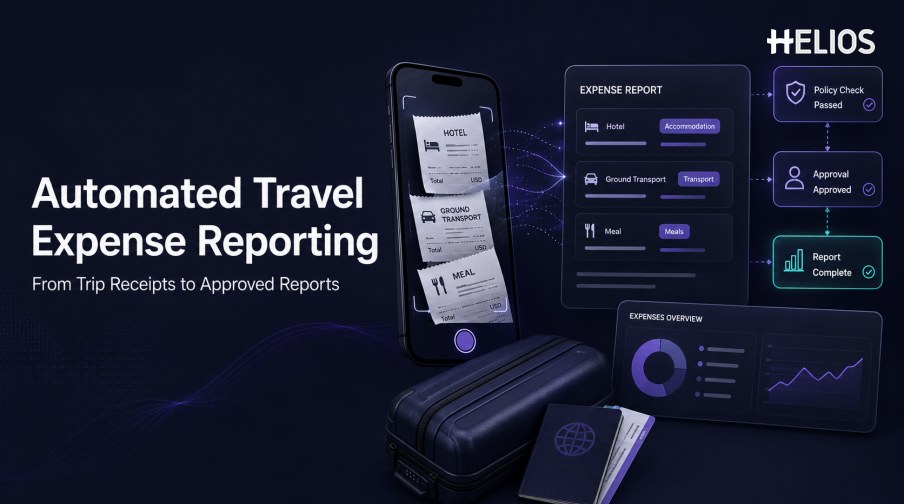
Business travel ends when the employee returns, but the administrative work often continues. Travelers search through wallets, email, mobile photos, and supplier portals for receipts. They type dates and amounts into a form, decide how to classify each purchase, reconstruct the business purpose, and wait for a manager or finance reviewer to find missing information. A short trip can create a long reporting task.
Automated travel expense reporting reduces this post-trip work by capturing evidence near the time of spend and keeping the information connected through classification, policy validation, approval, accounting, and reporting. The employee still confirms material details and reviewers retain decision authority, but the workflow no longer depends on rebuilding every expense from the beginning after travel.
This guide focuses on reporting and reimbursement for business-trip expenses rather than flight or hotel booking. It explains the documents, data, workflow, controls, and reports involved, and shows how Helios and Spark AI Claim Copilot can simplify travel expense preparation and review.
What Is Automated Travel Expense Reporting?
Automated travel expense reporting is the use of software to capture, organize, validate, approve, and report expenses incurred during an authorized business trip. The system creates structured expense lines from receipts or invoices, collects business context, applies company rules, assembles the lines into a report, routes the report to the correct reviewers, and prepares approved information for finance.
Automation does not mean that every expense is accepted without review. Deterministic rules can require evidence, enforce limits, and choose approval paths. OCR and AI can interpret documents, suggest fields, assist with classification, or highlight exceptions. Employees, managers, and finance teams remain responsible for confirmations, approvals, exceptions, and accounting judgments.
The main operational benefit is continuity. Information captured during the trip becomes part of the same record used after the trip, so the employee does not have to reconstruct the full itinerary and every transaction at the end.
Which Travel Expenses and Documents Should Be Captured?
The exact reimbursable categories depend on the company’s travel expense policy, destination, employee role, and trip purpose. A reporting system should support the organization’s categories without assuming that every travel-related purchase is reimbursable.
- Accommodation. Hotel folios, invoices, taxes, service charges, and approved incidental costs may need to be separated into distinct fields or categories.
- Ground transportation. Taxi, ride-hailing, rail, transit, mileage, toll, parking, and rental-car records may require route, purpose, or trip information.
- Meals and entertainment. Receipts may need business purpose, attendees, location, meal type, tax, tip, and per-person information.
- Air and rail changes. Change fees or other post-booking costs should be linked with the trip and supported by the required evidence.
- Connectivity and travel services. Internet, phone, visa, baggage, or other approved travel services may use separate limits and evidence rules.
- Foreign-currency expenses. The record should retain original amount and currency, conversion information, reimbursement currency, and any approved override.
- Missing-receipt or exception declarations. When policy permits an alternative declaration, the reason and approval history should remain connected to the expense.
How Automated Travel Expense Reporting Works
A connected workflow can begin during the trip and continue through finance processing:
- Capture evidence when the expense occurs. The traveler photographs a receipt or uploads an invoice instead of keeping every document for the end of the trip.
- Extract and verify document fields. OCR proposes merchant, date, amount, currency, tax, invoice number, and other relevant values for employee confirmation.
- Classify the expense. The system suggests or applies the appropriate category and asks for trip, project, client, cost center, or allocation data.
- Collect business context. Guided prompts request purpose, attendees, route, location, or explanations that cannot be inferred from the receipt alone.
- Validate completeness and policy. Configured rules check evidence, dates, categories, limits, foreign-currency logic, duplicates, and other company conditions.
- Assemble the travel expense report. Eligible expense lines and documents are grouped into a report for the relevant trip, employee, entity, and organizational dimensions.
- Route approvals and finance review. The report moves to managers, budget owners, finance reviewers, or specialists according to authority and exception type.
- Prepare accounting and reimbursement data. Approved information passes through controlled mappings for accounts, dimensions, taxes, currencies, and settlement references.
- Generate operational and management reporting. Dashboards summarize travel spend, categories, entities, policy exceptions, processing time, and final outcomes.
Expense Classification, Policy Checks, and Approval Controls
Classification is not only a reporting label. It can determine which limit applies, which evidence is required, who approves the expense, how tax is treated, and where the approved amount is posted. The workflow should therefore combine automation with visible correction and escalation paths.
- Category rules. Define accommodation, meals, transportation, mileage, connectivity, fees, and other allowed categories with clear effective dates.
- Evidence requirements. Specify when an itemized receipt, invoice, proof of payment, attendee list, route, or exception declaration is required.
- Limits and thresholds. Apply daily, per-transaction, per-person, city, country, role, or trip-specific limits where the policy requires them.
- Duplicate and date checks. Flag repeated documents or similar claims and confirm that expense dates are consistent with the business trip.
- Foreign-currency controls. Retain original values and document how conversion rate, rate date, rounding, reimbursement currency, and overrides are handled.
- Approval routing. Select managers, budget owners, finance reviewers, or specialists according to amount, department, role, cost center, entity, and exception type.
- Human oversight. Material exceptions, missing evidence, unusual claims, sensitive categories, overrides, and higher-risk decisions need authorized review.
From Approved Reports to Accounting and Travel-Spend Visibility
A travel expense report is not complete simply because a manager approved it. Finance still needs consistent coding, the correct entity and dimensions, appropriate tax and currency treatment, a traceable accounting result, and visibility into reimbursement or transfer status.
Management reporting should allow authorized users to move from a travel-spend summary to the underlying expense, document, policy result, approval history, and accounting reference. Clear definitions and refresh timing are as important as visual dashboards.
- Travel spend by organization. Analyze entities, regions, departments, cost centers, projects, clients, and travelers.
- Spend by category and destination. Compare accommodation, transport, meals, and other approved categories across destinations or trip types.
- Policy and exception trends. Monitor missing evidence, limit exceptions, category corrections, overrides, returns, and repeated issues.
- Process performance. Measure time from expense date to capture, submission, approval, accounting, and reimbursement.
- Accounting readiness. Identify approved but unposted reports, failed transfers, coding corrections, and records awaiting downstream confirmation.
- Source-to-outcome traceability. Keep receipts, expense lines, employee confirmations, approvals, journal references, and reimbursement outcomes connected.
Best Practices for Implementing Automated Travel Expense Reporting
A reliable implementation starts with policy clarity and representative travel scenarios.
- Map the current post-trip workload. Document receipt collection, missing information, rekeying, category corrections, policy review, approval delays, accounting handoffs, and employee questions.
- Clarify the travel expense policy. Standardize reimbursable categories, evidence, limits, currencies, exceptions, approval authority, and effective dates before automating them.
- Prepare organizational and accounting data. Validate employees, entities, departments, cost centers, projects, accounts, taxes, currencies, and approvers.
- Capture during travel where practical. Encourage employees to photograph receipts and add context close to the purchase rather than reconstructing the trip later.
- Test representative trips. Include domestic and international travel, difficult receipts, foreign currency, missing evidence, split allocations, refunds, duplicate risk, and policy exceptions.
- Keep correction and fallback paths. Users need to correct extracted information, explain exceptions, and continue work when automation or an integration is unavailable.
- Measure the full lifecycle. Track preparation time, first-pass completeness, correction rate, review time, approval time, reimbursement cycle, accounting errors, support volume, and adoption.
How Helios Supports Automated Travel Expense Reporting
Helios combines mobile expense submission, OCR receipt capture, automated policy controls, configurable approvals, accounting-entry generation, and reporting. Spark AI adds conversational assistance across claims, approvals, travel, and service. For post-trip reporting, these capabilities address five common sources of manual work:
- Capture travel receipts before they are lost. Employees can photograph receipts or upload invoices from mobile devices, while OCR populates relevant document fields.
- Reduce form-filling after the trip. Spark AI Claim Copilot allows employees to submit expenses through conversation and can prompt for required documents or context.
- Apply travel-expense rules consistently. Automated policy controls help check evidence, limits, categories, and other company conditions before reports reach downstream finance work.
- Route the report to the right reviewers. Configurable approval workflows can reflect department, role, cost center, and other organizational requirements.
- Connect approved reports with finance and analysis. The Helios accounting engine can generate journal entries from approved reports, while multi-dimensional dashboards and customizable reports support travel-spend visibility.
Helios also presents itself as an enterprise-grade provider with global experience and information-security credentials. Organizations should validate exact travel categories, receipt and invoice formats, currencies, tax fields, policy rules, approval roles, accounting connectors, reimbursement processes, security controls, and implementation scope.
FAQs About Automated Travel Expense Reporting
What is automated travel expense reporting?
It is a software-supported process that captures business-trip expenses, extracts receipt data, collects context, classifies items, applies policy rules, routes approvals, and prepares approved reports for finance and reimbursement.
Which documents should travelers submit?
Requirements depend on company policy. Common documents include itemized receipts, hotel folios, invoices, proof of payment, transport records, attendee information, mileage details, and approved missing-receipt declarations.
Can OCR classify every travel expense automatically?
OCR can extract document fields, and software may suggest a category. Employees should confirm uncertain or material values because the receipt may not contain business purpose, attendees, project, or policy context.
Does automation approve travel expenses without a manager?
Not necessarily. The system can validate configured rules and select a route, but approval authority should follow company policy. Exceptions and higher-risk claims need an authorized reviewer.
How does automation reduce work after a business trip?
Capturing receipts and context during travel allows the system to prepare expense lines before the employee returns. The traveler reviews and completes an existing record instead of sorting documents and retyping every expense from the beginning.
Organizations can evaluate Helios automated travel expense reporting with representative trips, receipts, currencies, policy exceptions, approval paths, accounting mappings, and reporting requirements.