
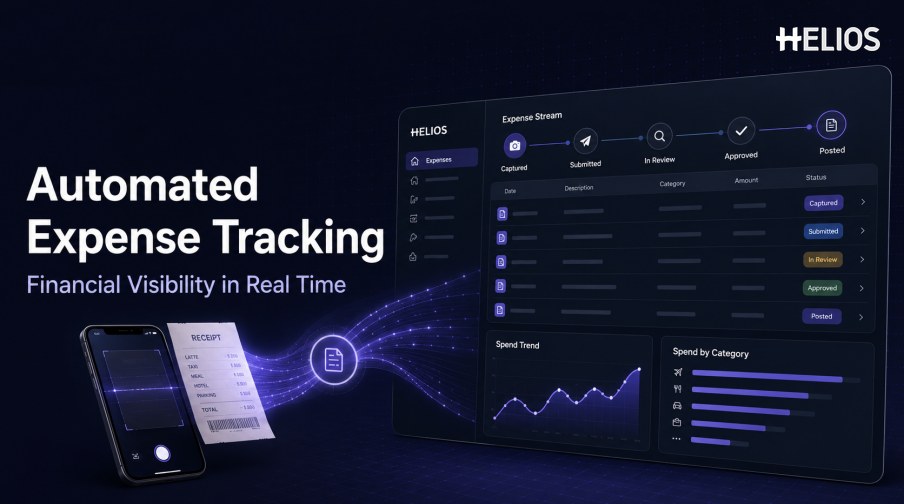
Finance teams cannot manage what they cannot see. In a manual expense process, the organization may know that money was spent but not whether the receipt has been captured, the report has been submitted, a policy exception is unresolved, an approver is delaying the claim, or the approved expense has reached accounting. Spreadsheets and email provide snapshots, not a dependable operational record.
Automated expense tracking creates a structured record for each expense and updates that record as it moves through submission, review, approval, accounting, reimbursement, and reporting. Instead of rebuilding the story at month-end, authorized users can see current status, supporting evidence, ownership, exceptions, and downstream outcomes from connected data.
This guide explains how automated expense tracking works, which data and status controls make it reliable, the analytical views that improve financial visibility, and how Helios supports receipt capture, workflow control, accounting continuity, and multi-dimensional reporting.
What Is Automated Expense Tracking?
Automated expense tracking is the continuous recording and status management of employee expenses as they move through a controlled process. The system creates a traceable expense record, connects it with receipts and business context, applies workflow events, and makes the resulting data available for operational and financial analysis.
Tracking is broader than storing a final expense report. A useful record shows what happened, when it happened, who is responsible for the next action, which policy or accounting conditions remain unresolved, and whether the expense has reached its intended downstream destination. Automation updates these details from system events rather than relying on a person to maintain a separate tracker.
Why Manual Expense Tracking Limits Financial Visibility
Manual methods create gaps between the underlying spend and the information available to finance:
- Unsubmitted expenses remain invisible. Receipts may sit in wallets, inboxes, or shared folders until an employee prepares a report.
- Status labels become inconsistent. Different teams use terms such as pending, approved, processed, or paid without a shared definition.
- Ownership is unclear. Employees, managers, finance reviewers, and accountants may not know who must take the next action.
- Evidence is separated from the record. Receipts, explanations, policy results, approvals, and accounting references are stored in different places.
- Month-end analysis arrives late. Finance consolidates exports only after operational problems have already delayed close or reimbursement.
- Exceptions are hard to prioritize. Routine claims and higher-risk items appear in the same queue without a consistent signal.
- Accounting outcomes are disconnected. A report may be approved while its journal transfer, coding correction, or reimbursement response remains unknown.
The Data Foundation for Reliable Expense Tracking
Visibility depends on a consistent data model. Each expense should retain the source document, employee, entity, merchant, date, amount, currency, category, business purpose, project or cost center, policy result, approval history, accounting coding, reimbursement status, and relevant system references.
Document capture is an important starting point because it turns a receipt or invoice into structured information. The employee should still be able to verify uncertain fields and add context that the document does not contain.
- Stable identifiers. Use persistent report, expense-line, receipt, transaction, journal, and payment references so records can be connected.
- Controlled status definitions. Define when a record is captured, submitted, incomplete, in review, awaiting approval, approved, posted, reimbursed, returned, or rejected.
- Time-stamped events. Record creation, edits, policy checks, assignments, decisions, transfers, errors, corrections, and final outcomes.
- Organizational dimensions. Attach entity, department, cost center, project, client, location, and manager data needed for analysis.
- Source-to-accounting linkage. Keep the receipt, employee confirmation, approvals, accounting mappings, journal reference, and reimbursement result connected.
How Automated Expense Tracking Works
A connected tracking workflow can follow these stages:
- Capture the expense. An employee photographs a receipt, uploads an invoice, imports a transaction, or creates a claim on mobile or web.
- Extract and confirm details. OCR proposes document fields, while the employee confirms material values and adds the required business context.
- Create the tracking record. The platform assigns identifiers, owner, entity, policy scope, accounting dimensions, and an initial status.
- Validate completeness and policy. Configured controls check evidence, dates, limits, categories, duplicates, required fields, and other company rules.
- Update workflow status. Assignments, reminders, returns, escalations, approvals, and comments update the same record with time-stamped events.
- Prepare and transfer accounting data. Approved expenses pass through controlled mappings for accounts, dimensions, taxes, currencies, and journal information.
- Record downstream responses. Transfer success, integration errors, corrections, reimbursement status, and final references return to the record.
- Refresh analytical views. Dashboards aggregate spend, status, exceptions, cycle time, accounting results, and organizational dimensions for authorized users.
Analytical Views That Improve Financial Visibility
A dashboard is useful only when its definitions, data freshness, and drill-down path are clear. Finance teams should be able to move from a headline metric to the underlying expense, evidence, owner, and status history.
- Spend by organization. Analyze expenses by entity, region, department, cost center, project, client, or manager.
- Spend by category and merchant. Identify concentration, recurring patterns, unusual changes, and categories that need policy attention.
- Workflow status. See captured but unsubmitted items, incomplete reports, review queues, pending approvals, returned claims, and approved expenses.
- Aging and cycle time. Measure time from expense date to submission, review, approval, accounting, and reimbursement.
- Policy and exception trends. Track missing evidence, limit exceptions, overrides, repeated corrections, and other configured control results.
- Accounting readiness. Monitor approved but unposted expenses, failed transfers, coding corrections, and records awaiting reconciliation.
- Forecast support. Use timely submitted and approved expense data as an input to accrual and cash-planning processes, subject to the organization’s accounting policy.
How to Implement Automated Expense Tracking
Implementation should improve decision quality as well as speed.
- Define the visibility questions. Identify which decisions require better information, such as approval aging, unsubmitted spend, policy exceptions, accounting readiness, or reimbursement delays.
- Map the lifecycle and owners. Document every status, transition, responsible role, handoff, fallback path, and downstream response.
- Standardize data and status definitions. Agree on categories, dimensions, identifiers, event timestamps, currency logic, and the meaning of each status.
- Connect source and finance systems. Validate identity, organizational, transaction, accounting, payment, and reporting interfaces.
- Apply role-based access. Employees, managers, shared services, finance, and administrators should see only the data and actions appropriate to their responsibility.
- Test exceptions and failures. Include missing receipts, corrections, refunds, duplicates, split allocations, foreign currencies, returns, delegation, and failed transfers.
- Measure data quality and adoption. Track missing fields, corrections, stale statuses, failed updates, dashboard freshness, support requests, and user behavior.
How Helios Supports Automated Expense Tracking
Helios combines mobile expense workflows, OCR receipt capture, automated policy controls, configurable approvals, accounting-entry generation, and reporting. Spark AI adds conversational assistance across claims, approvals, travel, and service. Together, these capabilities support five visibility requirements:
- Create structured records near the time of spend. Employees can submit expenses from mobile devices, while OCR captures information from receipts and invoices.
- Track control results with the expense. Automated policy controls help apply company spending rules before claims move deeper into the workflow.
- Make ownership and status more explicit. Configurable approval workflows can reflect department, role, cost center, and other business conditions.
- Connect approval with accounting. The Helios accounting engine can generate journal entries from approved expense reports, reducing a major visibility break between operations and finance.
- Turn tracked activity into analytical views. Multi-dimensional dashboards and customizable reports help finance teams analyze spend, while Spark AI supports more natural task completion and guidance.
Helios also presents itself as an enterprise-grade provider with global experience and information-security credentials. Organizations should validate data freshness, status definitions, dashboard drill-down, accounting responses, currency and tax logic, access controls, integrations, retention, and implementation scope for their environment.
FAQs About Automated Expense Tracking
What is the difference between expense tracking and expense reporting?
Expense reporting collects and presents expenses for review and approval. Expense tracking follows each expense and its status across capture, submission, policy review, approval, accounting, reimbursement, and analysis.
Can automated expense tracking show unsubmitted spend?
It can show records already captured through connected channels, such as uploaded receipts or imported transactions. It cannot show spending that has not reached any connected source, so submission behavior and data feeds still matter.
How current should an expense dashboard be?
The required refresh rate depends on the decision. Operational queues may need near-current status, while management reports may refresh on a schedule. Buyers should confirm timestamps, refresh logic, failed-update handling, and drill-down behavior.
Does automated tracking replace month-end controls?
No. It can provide earlier and more complete information, but finance remains responsible for accrual judgments, reconciliation, close procedures, exceptions, and accounting-policy decisions.
Which metrics indicate better financial visibility?
Track unsubmitted and incomplete expenses, status aging, approval time, exception rate, accounting-ready value, failed transfers, correction rate, reimbursement time, dashboard freshness, and the percentage of records with complete source-to-accounting linkage.
Finance teams can evaluate Helios automated expense tracking with representative receipts, workflow states, accounting outcomes, organizational dimensions, exceptions, and reporting requirements.