
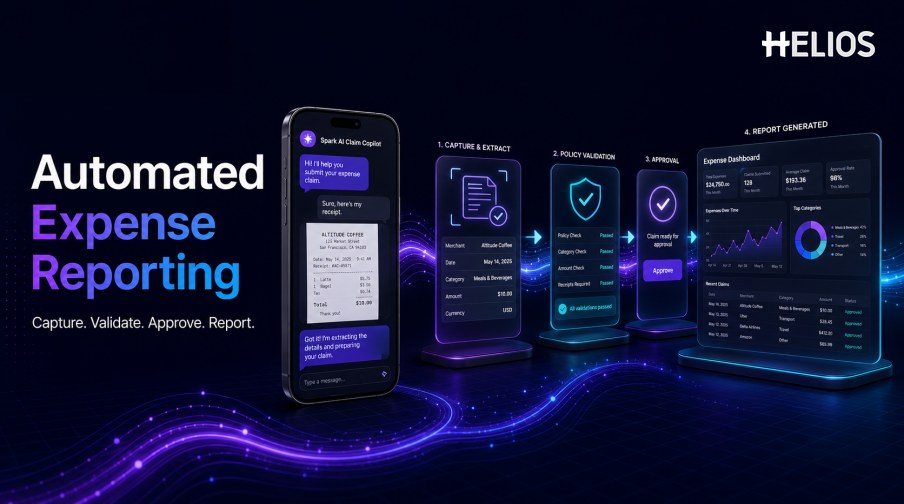
Traditional expense reports require employees to collect receipts, type document details, choose categories, remember policy rules, and wait for managers or finance teams to identify missing information. The final report may then be exported again for accounting and management analysis. This process is slow because the same expense is reconstructed several times.
Automated expense reporting captures information once and keeps it connected throughout the lifecycle. A system can recognize receipt fields, guide completion, validate configured rules, select an approval route, retain reviewer decisions, prepare accounting data, and generate operational reports. An automated expense report remains subject to employee confirmation and authorized review where judgment is required.
This guide explains how the workflow operates, why businesses adopt it, which controls protect accuracy, and how Helios and Spark AI Claim Copilot simplify submission, review, accounting preparation, and reporting.
What Is Automated Expense Reporting?
Automated expense reporting is the use of software to create, validate, route, approve, process, and analyze expense reports with less manual work. It combines document capture, structured fields, policy rules, approval workflows, accounting mappings, integrations, and reporting.
Automation does not mean that every claim is approved without people. Employees confirm captured information, managers exercise approval authority, finance handles material exceptions, and accountants remain responsible for financial judgments. Automation performs repeatable tasks and preserves the information needed for those decisions.
Core Capabilities Behind an Automated Expense Report
A complete process depends on several connected capabilities:
- Guided expense submission. Employees create a report through mobile, web, imported transactions, or conversational assistance.
- Receipt and invoice recognition. OCR extracts merchant, date, amount, currency, tax, invoice number, and other fields.
- Field completion. The system asks for business purpose, attendees, category, entity, project, cost center, allocation, or missing evidence.
- Rule validation. Configured controls check receipt requirements, limits, dates, categories, duplicate risk, and approval conditions.
- Approval routing. The report moves according to amount, department, role, entity, cost center, project, or exception type.
- Review support. Managers and finance see the source document, captured fields, employee edits, policy results, and exceptions together.
- Accounting preparation. Approved reports feed controlled mappings for accounts, dimensions, taxes, currencies, settlement references, and journals.
- Expense reporting and analytics. Dashboards show spend, exceptions, processing time, approval delays, reimbursements, departments, entities, categories, and trends.
How Automated Expense Reporting Works
The following sequence shows how one report can move from evidence to reporting:
- Begin the expense claim. The employee uploads a receipt, selects a transaction, or describes the expense to a guided assistant.
- Capture document fields. OCR proposes merchant, date, amount, currency, tax, and reference information.
- Confirm and complete the report. The employee verifies uncertain values and provides business purpose, category, attendees, project, or other required data.
- Validate rules. The workflow checks evidence, limits, dates, categories, duplicates, required fields, and other policy conditions.
- Route the approval. The system selects the appropriate manager, budget owner, finance reviewer, or specialist.
- Support the decision. Reviewers receive a summary of the report, supporting documents, policy results, and relevant exceptions.
- Approve and prepare accounting. Authorized decisions are recorded, and approved data is mapped for reimbursement and accounting.
- Generate status and management reports. Dashboards update with spend, report status, exceptions, approvals, processing time, and downstream outcomes.
Why Businesses Need Automated Expense Reporting
The value is operational when it improves measurable parts of the process:
- Faster employee submission. Receipt capture and guided fields reduce repetitive typing and navigation.
- Higher report completeness. Prompts collect evidence and business context before a report reaches approval.
- More consistent policy validation. Rules apply the same evidence, limit, category, date, and approval conditions across reports.
- Shorter approval cycles. Clear routing and fewer corrections reduce avoidable queue delays.
- More focused finance review. Routine complete claims follow a lighter path while exceptions receive closer attention.
- Better accounting data. Approved reports preserve coding, evidence, approvals, mappings, transfer status, and audit history.
- Timelier management information. Dashboards update from the structured workflow instead of waiting for manual spreadsheet consolidation.
Reporting Outputs and Metrics to Monitor
Automated expense reporting should serve employees, managers, finance, accounting, and leadership with different views.
- Employee status. Show reports awaiting information, approval, finance review, accounting, reimbursement, return, or rejection.
- Approval operations. Track queue volume, aging, delegation, approval time, returns, escalations, and bottlenecks.
- Policy performance. Analyze missing receipts, limit violations, category exceptions, duplicate alerts, overrides, and recurrence.
- Finance productivity. Measure first-pass completeness, review time, correction rate, support volume, and exception resolution.
- Accounting continuity. Monitor mapped entries, transfer responses, rejected records, reconciliation breaks, and accounting corrections.
- Management spend. Analyze categories, departments, entities, projects, clients, merchants, currencies, and trends.
Best Practices for Reliable Automated Expense Reporting
Implementation should improve speed without weakening evidence, approval, or accounting controls.
- Define required report data. Clarify documents, fields, categories, business purpose, attendees, allocations, entities, projects, taxes, and currencies.
- Configure explicit policy rules. Use deterministic controls for mandatory evidence, limits, approval authority, valid categories, and accounting requirements.
- Require confirmation where uncertainty matters. Employees should verify captured amounts, dates, currencies, taxes, and other material fields.
- Preserve human approval. Material exceptions, sensitive expenses, accounting judgments, and overrides need authorized responsibility.
- Retain an end-to-end audit trail. Record documents, extracted fields, corrections, policy results, approvals, mappings, transfers, and later changes.
- Test representative reports. Include difficult receipts, missing evidence, duplicates, refunds, split allocations, foreign currencies, policy exceptions, and rejected integrations.
- Provide correction and fallback. Users need a clear manual path when a document is unsupported or automation is unavailable.
- Measure and improve. Compare processing time, completeness, exceptions, review effort, approval time, accounting corrections, support volume, and adoption with the baseline.
How Helios and Spark AI Support Automated Expense Reporting
Helios combines mobile expense workflows, OCR receipt capture, automated policy control, configurable approvals, accounting-entry generation, and reporting. Spark AI adds conversational assistance through travel, claim, approval, and service copilots. For automated expense reporting, five capabilities are especially relevant:
- Conversational report submission. Claim Copilot lets employees begin reimbursement requests through natural-language interaction and guided evidence collection.
- Automated receipt field capture. Employees can photograph a receipt or upload an invoice, and OCR populates relevant expense details.
- Policy and completeness validation. Configured controls identify missing information and out-of-policy conditions before downstream processing.
- Approval and accounting continuity. Approval workflows organize review, while approved reports can generate accounting entries for finance processing.
- Multi-dimensional reporting and AI guidance. Dashboards and customizable reports provide visibility, while Spark AI helps users complete tasks and access relevant answers.
Helios also presents itself as an enterprise-grade provider with global experience and information-security credentials. Buyers should validate exact receipt formats, languages, policy rules, approval roles, accounting connectors, reporting dimensions, data handling, AI oversight, and implementation scope.
FAQs About Automated Expense Reporting
What is an automated expense report?
It is an expense record created and processed with software-assisted capture, field completion, rule validation, routing, approval, accounting preparation, and reporting. Employees and authorized reviewers still confirm information and make material decisions.
Can automated expense reporting read receipts?
Yes. OCR can extract merchant, date, amount, currency, tax, invoice number, and other fields. Users should be able to verify and correct uncertain values before submission.
Can employees submit expense reports through AI chat?
A conversational claim assistant can collect the expense description, prompt for required documents and context, and prepare the report for employee confirmation and company review.
Does automation automatically approve every report?
No. The system may validate rules and route work, but approval authority should follow company policy. Material exceptions and higher-risk decisions need an authorized person.
Which metrics matter most?
Track preparation time, first-pass completeness, extraction corrections, policy-exception rate, review time, approval time, reimbursement cycle time, accounting corrections, support volume, overrides, and adoption.
Businesses can explore Helios automated expense reporting with representative receipts, policy rules, approval paths, accounting fields, dashboards, and employee scenarios.