
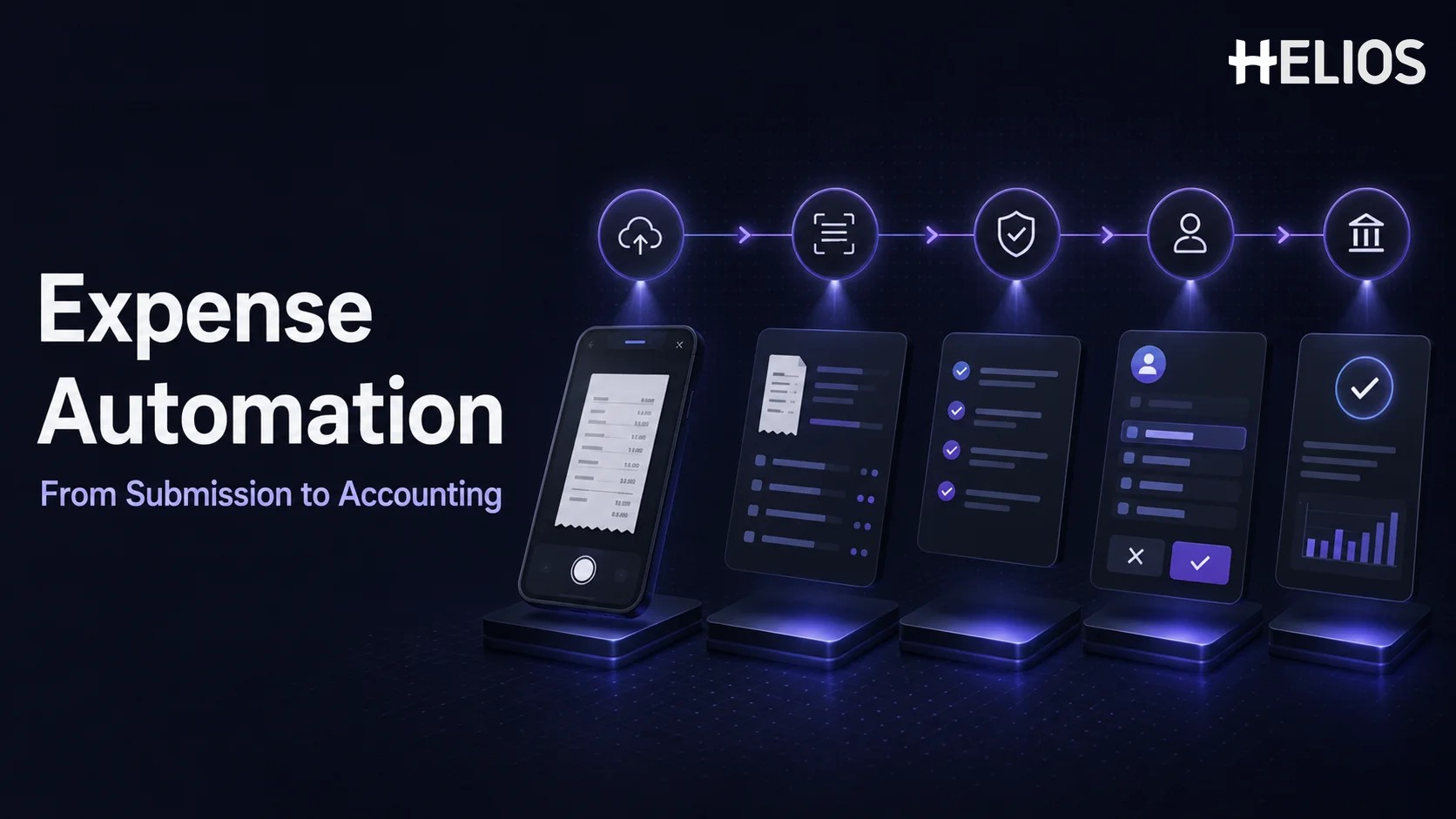
Expense reporting often becomes inefficient one small task at a time. Employees type information from receipts, managers search for context before approving claims, finance checks the same fields again, and accounting re-enters approved data into another system. Each task may take only a few minutes, but together they create delays, errors, and limited visibility across the business.
Expense automation connects those tasks in one controlled workflow. Instead of using software only as a digital claim form, businesses can automate receipt capture, policy validation, review queues, approval routing, accounting entries, and reporting. This guide explains how automated expense reporting works from submission to accounting, which capabilities matter, and how to select and implement an expense reporting system.
What Is Expense Automation?
Expense automation is the use of software, business rules, integrations, and AI to reduce manual work throughout the expense lifecycle. A structured claim enters the system once, supporting documents remain connected to it, and the information moves through validation, review, approval, and accounting without being repeatedly copied between email, spreadsheets, and finance applications.
True automation does more than replace paper with an online form. An automated expense reporting process should capture data, identify missing information, apply policy, route work to the correct owner, preserve an audit trail, and send approved information to accounting. Employees and managers still make business decisions, but the system handles predictable administrative steps and highlights the exceptions that need attention.
The term expense report tools can describe anything from a receipt scanner to a complete enterprise platform. A basic tool may solve one problem, while an end-to-end expense reporting system connects submission, controls, approvals, accounting, and analytics. The right scope depends on the organization’s current bottlenecks and the systems that must exchange data.
How to Automate Expense Reporting from Submission to Accounting
A practical expense automation workflow consists of seven connected stages. Each stage should remove repetitive work while keeping policy decisions, approvals, and financial ownership visible.
- Standardize employee submission. Employees begin in a mobile app or web portal and enter the business purpose, merchant, date, amount, currency, category, project, and cost center required by company policy. Guided fields and clear instructions prevent free-form submissions from creating extra review work later.
- Capture and classify receipt data automatically. The employee photographs a receipt or uploads an invoice. OCR extracts fields such as merchant, invoice number, date, amount, tax, and currency. The system can suggest a category or match the document to the claim, while the employee confirms the captured information before submission.
- Validate information and apply policy rules. The expense reporting system checks required fields, receipt thresholds, spending limits, dates, categories, duplicate information, and other company rules. Compliant claims can continue, while missing data and policy exceptions are clearly flagged for correction or review.
- Automate finance review around exceptions. Finance should not spend the same amount of time on every claim. Automated controls can separate routine compliant expenses from unusual or higher-risk items, allowing reviewers to focus on missing documentation, incorrect coding, duplicates, and material exceptions.
- Route claims and support faster approvals. Approval paths can be determined by department, role, entity, cost center, amount, project, or expense type. Managers receive the claim, receipt, policy status, and relevant context in one place, then approve, reject, delegate, or return the request without relying on separate email threads.
- Generate accounting data and post approved expenses. After final approval, the system converts the claim into accounting-ready data. Employee, entity, account, tax code, department, cost center, project, and other dimensions can be mapped to journal entries or exported through an integration with the accounting or ERP platform.
- Reconcile, report, and improve the workflow. Accounting status, supporting documents, approvals, and changes should remain connected to the expense record. Finance teams can then analyze spend and process performance, identify recurring exceptions, and update policies or routing rules as the organization evolves.
Key Capabilities for Automated Expense Reporting
Effective automated expense reporting depends on capabilities that work together. When comparing platforms, look for the following features:
- Mobile and web submission. Employees can create, edit, and track claims from a convenient interface without waiting to return to a desk.
- OCR and intelligent data capture. Receipt and invoice fields are extracted automatically, reducing repetitive entry and transcription errors.
- Policy and data validation. The system checks required information, documentation, spending limits, duplicates, categories, and other company controls.
- Exception-based review. Finance queues prioritize claims that are incomplete, unusual, incorrectly coded, or outside policy instead of treating every report the same way.
- Configurable approval workflows. Claims follow defined paths based on the organization’s structure, thresholds, and areas of financial responsibility.
- Accounting and ERP integration. Approved expenses move into finance systems with the dimensions, tax information, and documentation needed for posting and reconciliation.
- Dashboards and reporting. Finance leaders can analyze spend, exceptions, submission time, approval time, review time, and other process indicators.
- Audit trails and access controls. The platform records submissions, changes, reviews, approvals, exports, and user access so each expense remains traceable.
- AI-assisted workflows. AI can support data capture, claim review, policy questions, approval decisions, coding suggestions, and employee guidance.
The best expense report tools are not necessarily those with the longest feature list. The most valuable system automates the specific handoffs where the organization currently loses time or control and remains simple enough for employees, approvers, finance users, and system owners to use consistently.
Which Businesses Benefit Most from Expense Automation?
A very small business with occasional claims may be able to use a simple tracker for a limited period. Expense automation becomes more valuable when report volume, organizational complexity, or financial-control requirements begin to grow.
An automated expense reporting system is especially relevant for:
- Growing businesses that are adding employees, departments, approvers, or cost centers faster than finance can scale manual work.
- Travel-heavy organizations that process frequent airfare, hotel, meal, transportation, and other business travel expenses.
- Midsize and large enterprises that require consistent policies, separation of duties, clear audit trails, and reliable reporting.
- Multi-entity or international teams that must standardize core processes while handling different entities, currencies, taxes, policies, and local requirements.
- Finance teams with repetitive workloads that spend too much time typing receipt data, checking routine fields, chasing approvals, correcting coding, or preparing journal entries.
Warning signs include employees submitting incomplete reports, managers being unable to see the next action, finance reviewing every claim manually, or accounting receiving expense data separately from the original receipt and approval record. These problems indicate that individual tools are not forming a connected workflow.
Benefits of Expense Automation
Automation creates value when it improves both processing speed and financial control. Common benefits include:
- Faster report completion. Guided submission and automated receipt capture reduce the time employees spend preparing claims.
- Fewer errors and incomplete reports. Required fields, validation, and structured data identify problems before they move deeper into the workflow.
- More consistent policy compliance. Rules are applied at the same stage for every claim, while exceptions remain visible for judgment and documentation.
- Shorter review and approval cycles. Focused queues, clear ownership, and automated routing reduce manual follow-up between employees, managers, and finance.
- Less accounting rework. Approved information can generate entries or flow into the general ledger without repeated copying and recoding.
- Better spend visibility. Current dashboards help finance understand expenses by category, employee, department, entity, project, and time period.
- Stronger auditability. Receipts, validation results, approvals, coding, changes, and accounting status remain attached to the same record.
Useful measurements include time to submit, missing-receipt rate, policy-exception rate, returned-report rate, finance review time, approval time, accounting error rate, and hours spent on manual processing. Recording these metrics before implementation creates a baseline for evaluating the impact of expense automation.
How to Choose an Expense Reporting System
Begin with the current process and map every handoff from the employee to accounting. Identify where information is entered more than once, where ownership becomes unclear, and which exceptions require genuine human judgment. Then test each platform against real reports rather than relying only on a standard demonstration.
- Workflow coverage. Confirm that the system supports submission, OCR, validation, finance review, approvals, accounting, reporting, corrections, and exception handling in one connected process.
- Employee and manager usability. Users should be able to submit or approve an expense quickly without extensive training or repeated navigation.
- Automation depth. Evaluate which fields, rules, queues, reminders, approval paths, accounting mappings, and reports can be automated and which still require manual work.
- Configuration and scalability. The expense reporting system should accommodate new departments, entities, policies, thresholds, currencies, and approval structures over time.
- Integration capabilities. Check connections with accounting, ERP, HR, travel, card, payment, identity, and other systems involved in the expense lifecycle.
- Reporting quality. Finance should be able to analyze both company spend and operational performance using the dimensions that matter to the business.
- Security and auditability. Review authentication, access controls, encryption, retention, change history, approval records, and enterprise security credentials.
- Regional requirements. Global organizations should verify currency, tax, data residency, language, entity, and country-specific processing requirements.
- Implementation and support. Ask how policies, integrations, data, testing, training, launch, issue resolution, and future configuration changes will be managed.
A useful evaluation follows one realistic report from receipt upload through accounting. Include a compliant expense, a missing receipt, an out-of-policy item, a coding correction, a delegated approval, and a multi-entity scenario. This reveals whether the promised automation works under normal and exceptional conditions.
How to Implement Expense Automation
Software should not automate an unclear process. Before configuration, document expense categories, receipt requirements, spending limits, exception rules, approval roles, accounting mappings, tax treatment, entity structure, and reporting ownership. Decide which claims can follow a straight-through path and which must receive additional review.
Next, define the integrations and data owners. Employee and organizational data may come from HR or identity systems, while approved expenses must reach accounting with consistent dimensions. Pilot the workflow with representative employees, approvers, finance reviewers, and accounting scenarios. After launch, review process metrics and user feedback, then refine rules rather than treating the initial configuration as permanent.
How Helios Supports End-to-End Expense Automation
Helios combines employee-friendly submission, intelligent data capture, policy control, configurable approvals, finance processing, accounting automation, reporting, and AI assistance in one expense environment. Its capabilities align with several requirements businesses commonly prioritize when automating expense reporting:
- Mobile-first submission and AI-powered receipt capture. Employees can submit expenses through a mobile experience, while OCR extracts information from receipts and invoices to reduce manual entry.
- Automated policy control. Helios can check claims against company spending rules and identify missing information or policy exceptions earlier in the workflow.
- Configurable workflows and AI-assisted approval. Approval paths can be organized around roles, departments, cost centers, and other business requirements. Approval Copilot helps reviewers evaluate claims and relevant policy information.
- Accounting automation and multi-dimensional reporting. Approved expense reports can generate accounting entries, while dashboards and customizable reports give finance teams a more connected view of spending and process performance.
- AI support across the expense lifecycle.** **Spark AI includes travel, claim, approval, and service copilots that help users submit reports, review claims, ask policy questions, and complete expense tasks through a conversational experience.
Helios also presents itself as an enterprise-grade provider with global experience and information security credentials. Organizations should still confirm the integrations, country coverage, currency handling, tax requirements, accounting mappings, and implementation scope that apply to their own process. A tailored demonstration is the best way to validate the full path from employee submission to accounting.
FAQs About Expense Automation
What is expense automation?
Expense automation uses software, rules, integrations, and AI to reduce manual work in expense submission, receipt capture, validation, review, approvals, accounting, and reporting. The goal is a connected process with clear ownership and traceable exceptions.
How does automated expense reporting work?
Employees submit structured expense data and supporting documents, OCR captures receipt details, the system validates policy and routes review or approval, and approved information is converted into accounting-ready entries. Dashboards and audit trails preserve visibility throughout the workflow.
Which parts of expense reporting can be automated?
Common automation opportunities include receipt data extraction, required-field checks, duplicate detection, policy validation, review queues, reminders, approval routing, accounting mappings, exports, status updates, and recurring reports. Exceptions and business judgment still require appropriate human oversight.
Does expense automation replace finance review?
No. It changes where finance spends time. Routine compliant reports can move through a more efficient path, while finance concentrates on missing documents, unusual transactions, policy exceptions, coding issues, and higher-risk claims.
How should businesses compare expense report tools?
Map the current workflow, identify the main bottlenecks, and test each platform with real compliant and exceptional claims. Evaluate end-to-end coverage, usability, configuration, controls, integrations, reporting, security, regional fit, and implementation support rather than comparing feature counts alone.
The right expense reporting system should reduce repetitive work without hiding financial responsibility or exceptions. Organizations evaluating an intelligent, enterprise-focused approach can explore Helios expense automation and request a demonstration based on their own submission, review, approval, accounting, and reporting requirements.