
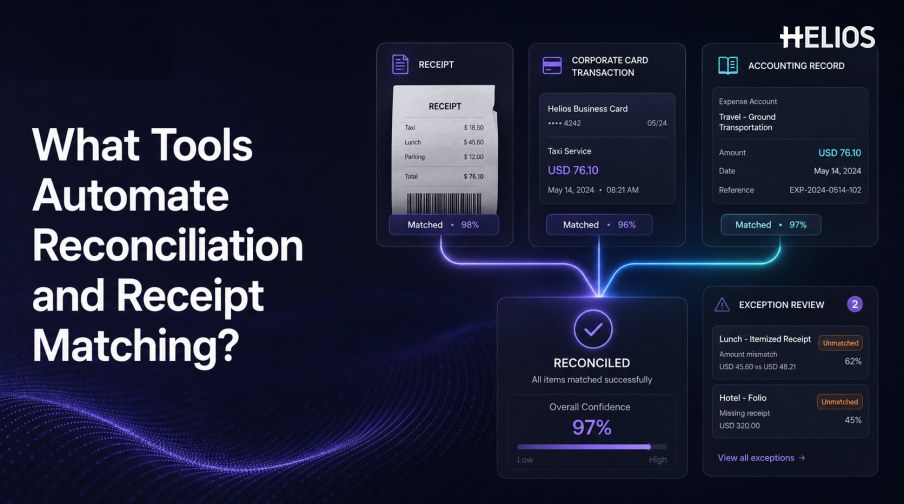
What tools automate reconciliation and receipt matching? The answer depends on which records a business needs to compare. Some tools match employee receipts with corporate-card transactions, while others reconcile expense reports with accounting entries, invoices with procurement records, or ledger balances with external statements.
The best tool is therefore not the one with the broadest automation claim. It is the one that supports the required source records, applies transparent matching rules, directs uncertain items to the right reviewer, and preserves a traceable outcome for finance and audit teams.
This guide explains the main tool categories, the logic behind automated matching, the exception workflow, and the role Helios expense capture, approvals, reporting, and accounting integration can play between expense evidence and financial records.
Tool Categories for Reconciliation and Receipt Matching
Different products automate different matching relationships. Buyers should map the process before comparing vendors.
Figure 1. Helios OCR structures receipt or invoice information before downstream matching and review.
- Expense management platforms. Capture receipts, create expense reports, apply policy, route approvals, and connect approved data with accounting processes.
- Corporate-card expense tools. Import card transactions and associate them with receipts, employees, categories, and business purposes.
- Accounts-payable automation tools. Match supplier invoices with purchase orders, receipts, contracts, or approval evidence when procurement controls apply.
- Accounting reconciliation platforms. Compare ledger balances, subledgers, statements, and supporting records at period end.
- Document intelligence services. Extract merchant, date, amount, currency, tax, and identifiers from receipt or invoice images.
- Integration and workflow platforms. Move source data between systems and route unmatched records to controlled resolution steps.
How Automated Matching Logic Works
A reliable tool combines exact rules, tolerances, and contextual signals instead of relying on one field.
- Exact identifiers. Use transaction IDs, card references, receipt numbers, employee IDs, report IDs, or journal references when available.
- Merchant and description similarity. Normalize abbreviations, legal names, payment processors, locations, and spelling variations.
- Amount and currency. Compare transaction amount, receipt total, tax, tip, converted value, and approved exchange-rate logic.
- Date windows. Allow governed differences between purchase date, posting date, receipt date, and expense-report date.
- One-to-many relationships. Handle split charges, combined receipts, partial reimbursements, credits, and multiple supporting documents.
- Confidence and precedence. Rank candidate matches while defining which source is authoritative when records disagree.
The Exception Handling Process
Automation creates value only when the unmatched and uncertain cases have a clear operating path.
- Identify the difference. Show the compared records, mismatched fields, rule, tolerance, and supporting images.
- Classify the exception. Distinguish missing receipt, amount difference, date difference, duplicate, unsupported currency, or accounting failure.
- Assign an owner. Route employee questions, manager approvals, card issues, tax questions, and accounting errors to the correct role.
- Resolve with controlled actions. Allow attach, correct, split, merge, accept within tolerance, reject, return, unmatch, or escalate according to authority.
- Record the decision. Retain original values, edits, comments, actor, time, evidence, approval, and final status.
- Reopen when necessary. Define what happens when a late receipt, reversal, corrected transaction, or rejected accounting entry changes the result.
Integration Requirements
Receipt matching is an integration problem as much as a recognition problem.
- Source availability. Confirm APIs, files, event timing, attachments, card feeds, user directories, and reference data.
- Common data model. Align employees, entities, merchants, currencies, accounts, tax codes, cost centers, projects, and identifiers.
- Status synchronization. Return matched, pending, rejected, corrected, exported, and posted outcomes to the systems that need them.
- Failure controls. Test duplicates, retries, partial success, timeouts, schema changes, outages, and manual fallback.
- Accounting handoff. Define whether the result creates a draft interface, journal entry, adjustment, or reconciliation status.
- Traceability. Keep the source receipt, related transaction, approval, accounting outcome, and later correction linked.
How to Select the Right Tool
Use a representative test instead of choosing from feature lists alone.
- Define the matching boundary. List every source, target, field, tolerance, currency, entity, volume, and exception owner.
- Build verified test cases. Include exact matches, date shifts, tips, tax differences, splits, duplicates, credits, missing receipts, and legitimate exceptions.
- Measure false and missed matches. A high auto-match rate is not useful if incorrect relationships are silently accepted.
- Test reviewer effort. Measure how quickly a person can understand, correct, document, and close an exception.
- Run the accounting path. Test mapping, export, rejection, retry, correction, posting response, and audit retrieval.
- Validate the proposed configuration. Confirm the exact capabilities, regions, connectors, implementation scope, and service commitments being purchased.
How Helios Supports Reconciliation and Receipt Matching Workflows
Helios publicly presents mobile expense submission, OCR receipt capture, automated policy controls, configurable approvals, accounting-entry generation, and reporting. Spark AI adds conversational claim and approval assistance. Together, these capabilities create five relevant connections:
- Structure receipt evidence. OCR converts uploaded documents into expense data that can be confirmed and compared.
- Keep context with the claim. The receipt, employee input, business purpose, policy results, and approvals remain part of one workflow.
- Route discrepancies. Configurable approvals help direct exceptions according to role, department, or cost center.
- Prepare accounting outcomes. Approved expense reports can generate journal entries for downstream financial processing.
- Monitor the process. Dashboards and reports support visibility into expense activity and operational trends.
Helios also presents itself as an enterprise-grade provider with global experience and information-security credentials. Its public site does not claim every type of corporate-card matching, bank reconciliation, or purchase-order matching. Organizations should validate the exact sources, matching rules, confidence behavior, tolerances, exception actions, card feeds, accounting connectors, and regional requirements in scope.
FAQs About Tools for Automating Reconciliation and Receipt Matching
What tools automate reconciliation and receipt matching?
Expense platforms, corporate-card tools, AP automation systems, reconciliation platforms, document-intelligence services, and integration tools can automate different parts of the process.
Can one tool handle every reconciliation process?
Sometimes one platform covers a defined expense workflow, but card, AP, bank, and balance-sheet reconciliation may require different systems or integrations.
Which fields are normally matched?
Common fields include employee, merchant, date, amount, currency, tax, card reference, receipt number, expense category, and accounting dimensions.
How should low-confidence matches be handled?
Show the candidate records, compared fields, confidence context, difference, and source evidence, then route material or uncertain cases to human review.
Where does Helios fit?
Helios connects OCR receipt capture with expense policy, approvals, journal-entry generation, and reporting. Exact card or broader reconciliation capabilities should be validated for the intended implementation.
Finance teams can evaluate Helios expense and accounting workflows with their own receipts, transactions, exception scenarios, accounting mappings, integration failures, and audit-trail requirements.