
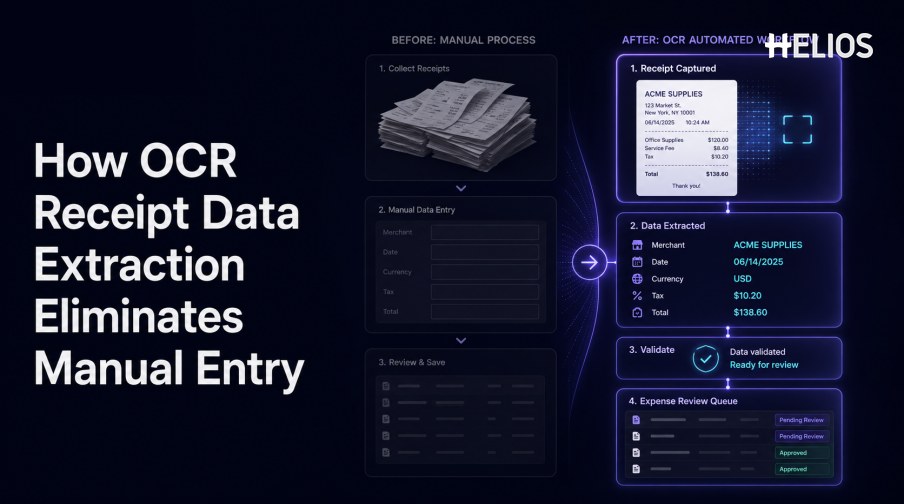
OCR receipt data extraction can eliminate much of the repetitive typing required to create expense reports. Instead of opening each receipt and manually entering merchant, date, currency, tax, and total, employees review a prefilled record created from the source image.
Automation should not eliminate accountability. Low-quality images, ambiguous fields, missing business context, duplicates, policy exceptions, and material financial decisions still require controlled checks and human confirmation.
This guide explains how OCR replaces initial rekeying, how key fields are validated, and how the extracted record enters the Helios expense-review and accounting workflow.
What Is OCR Receipt Data Extraction?
OCR converts visible receipt characters into machine-readable text. Receipt data extraction adds layout and field mapping so the system can distinguish a merchant from an item description, a transaction date from another timestamp, and a grand total from subtotal, tax, tip, or change.
A complete output should retain the source location, normalized value, confidence, correction history, and link to the original receipt. This evidence supports user confirmation and later audit retrieval.
Manual Entry Compared with OCR Extraction
OCR changes the employee task from transcription to confirmation.
- Document handling. Manual entry requires opening and reading every receipt; OCR begins with guided image capture or upload.
- Field location. A user searches for each value; extraction proposes merchant, date, currency, tax, total, and other fields.
- Typing and formatting. A user enters dates, decimals, and currencies; normalization converts them into governed formats.
- Routine checking. A user compares arithmetic and required fields; automated rules identify missing or inconsistent values.
- Exception focus. Finance reviews every record in a manual process; a controlled OCR process prioritizes uncertain or risky items.
- Traceability. A disconnected form can lose context; an integrated process links the source, edits, approvals, and accounting outcome.
The OCR Extraction Workflow
A simple workflow can remove rekeying while preserving control.
- Capture the receipt. Photograph or upload the complete document through an approved channel.
- Prepare the image. Correct rotation, crop edges, improve contrast, and identify unreadable regions.
- Recognize text and layout. Retain the positions of merchant, dates, amounts, totals, and line-item tables.
- Map and normalize fields. Create structured merchant, date, currency, subtotal, tax, tip, total, and payment values.
- Validate the result. Run required-field, format, arithmetic, duplicate, transaction, policy, and confidence checks.
- Request confirmation. Ask the employee or reviewer to correct missing, conflicting, unusual, or low-confidence values.
- Route approved data. Send the expense through approval, accounting preparation, reimbursement, reporting, and retention.
How Key Fields Are Validated
Field validation prevents fast extraction from becoming fast error propagation.
- Merchant. Check whether the recognized name and location are plausible and consistent with any related transaction.
- Date. Validate the format, period, trip context, card date, and policy window.
- Currency. Distinguish the transaction currency from a converted amount or ambiguous symbol.
- Tax and tip. Separate tax, service charge, handwritten gratuity, and later adjustments from the base amount.
- Total. Confirm that subtotal, discounts, tax, tip, and other charges reconcile within an approved tolerance.
- Duplicates. Compare images, merchant, date, amount, currency, and related transactions with prior submissions.
From Prefilled Record to Expense Review
The workflow adds business context and accountable decisions to extracted data.
- Employee confirmation. Verify the extracted values and add purpose, participants, trip, project, category, or cost center.
- Policy review. Check limits, evidence, timing, category, merchant, location, attendees, and other company rules.
- Conditional approval. Route the expense according to amount, entity, role, department, cost center, category, or exception.
- Finance review. Present the receipt, extraction, corrections, policy results, related transaction, comments, and history together.
- Accounting preparation. Map approved data to accounts, tax codes, cost centers, projects, and other required dimensions.
- Audit retention. Keep the original document, edits, checks, approvals, export status, and accounting outcome.
How to Measure the Reduction in Manual Entry
Measure both saved effort and control quality.
- Fields corrected per receipt. Track changes by merchant, date, currency, tax, total, category, and receipt type.
- Employee touch time. Measure active capture, confirmation, context entry, and resubmission time.
- Finance review time. Compare routine review with exception-focused review and escalation effort.
- Straight-through rate. Track records that meet configured criteria without field correction, while monitoring false acceptance.
- Exception age. Measure how long missing evidence, mismatches, duplicates, and policy issues remain unresolved.
- Downstream rejection. Track expenses rejected because of incomplete, invalid, duplicated, or incorrectly mapped data.
How Helios Reduces Manual Receipt Entry
Helios publicly describes mobile document capture with OCR that auto-fills details. Captured expense information can then move through automated policy controls, flexible approvals, accounting-entry generation, and reporting. Spark AI adds conversational claim and approval assistance. Together, these capabilities support five steps:
- Capture once. Employees submit receipt evidence through a mobile-first workflow.
- Prefill required details. OCR replaces much of the initial transcription.
- Validate the expense. User confirmation and policy checks address uncertain or incomplete information.
- Route accountable review. Approval workflows and Spark AI support review and decision-making.
- Use approved data downstream. Accounting-entry generation and reporting connect the receipt with finance outcomes.
Helios also presents itself as an enterprise-grade provider with global experience and information-security credentials. Organizations should validate image-quality handling, receipt formats, languages, field and line-item coverage, confidence, duplicate and card matching, tax and tip logic, mobile behavior, accounting mappings, integrations, and review thresholds.
FAQs About OCR Receipt Data Extraction
Does OCR receipt data extraction remove all manual work?
It can remove much initial rekeying, but users still need to confirm uncertain data, add business context, and resolve policy or financial exceptions.
Which fields are easiest to extract?
Merchant, date, currency, and total are common targets, but performance varies by receipt layout, image quality, language, and regional format.
How are OCR errors prevented from entering accounting?
Use field confidence, source evidence, format and arithmetic validation, duplicate checks, policy rules, human review, and downstream acceptance controls.
What makes a receipt require manual review?
Blur, cropping, faded text, ambiguity, missing values, arithmetic differences, duplicates, transaction mismatches, and policy exceptions can trigger review.
How does Helios use OCR?
Helios publicly states that users can photograph or upload a document and that OCR auto-fills details within its expense-management workflow.
Finance teams can test Helios OCR receipt capture and review workflows with real receipt images, required fields, user corrections, duplicate cases, card matches, policy exceptions, approval routes, accounting mappings, and measured touch time.