
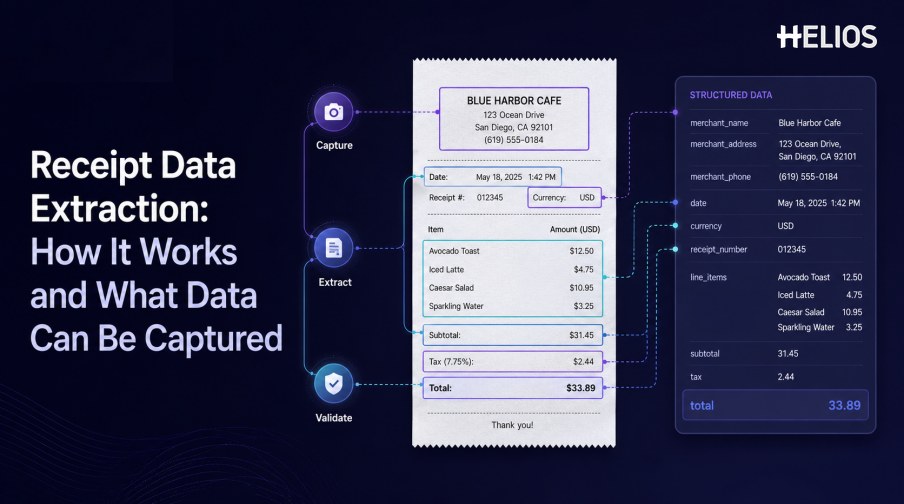
Receipt data extraction converts information in a receipt photograph, scan, PDF, or other supported image into structured fields that an expense system can validate and process. It replaces part of the work of reading a document and typing merchant, date, currency, tax, and total into a form.
Extraction involves more than recognizing characters. The system must identify the meaning and location of each value, reconstruct any item table, normalize regional formats, show uncertainty, and retain the source evidence for correction and audit.
This article explains the workflow, common fields, validation requirements, and downstream uses, then connects them with Helios OCR-based receipt capture.
What Is Receipt Data Extraction?
Receipt data extraction produces machine-readable key-value fields and, where needed, line-item tables. A complete output may include recognized text, normalized values, page coordinates, confidence, source highlights, corrections, and processing status.
Extraction is one component of expense management. It does not by itself establish business purpose, approve the expense, assign accounting, authorize reimbursement, or resolve policy exceptions.
How Receipt Data Extraction Works
A controlled extraction pipeline moves from source image to validated data.
- Capture and preserve the receipt. Store the original image, capture channel, timestamp, pages, and relevant metadata.
- Prepare the image. Correct rotation, crop edges, improve contrast, reduce noise, and identify unreadable regions.
- Recognize text and layout. Read characters and retain the positions of headers, values, totals, and tables.
- Map fields. Identify merchant, date, currency, subtotal, tax, total, and other required values.
- Normalize formats. Standardize dates, decimals, currencies, tax rates, identifiers, and signs.
- Validate and request correction. Run completeness, arithmetic, duplicate, policy, and confidence checks.
- Send approved data downstream. Route the expense for approval, accounting, reimbursement, reporting, and retention.
Merchant, Date, and Transaction Fields
Header information identifies where and when the expense occurred.
- Merchant identity. Name, address, location, category, tax identifier, phone number, or website where required.
- Receipt identifiers. Receipt number, order number, transaction reference, terminal, or store identifier.
- Date and time. Transaction date, time, service date, or stay period with normalized local formats.
- Currency. Printed currency symbol or code, plus any documented conversion context.
- Payment details. Payment method, card suffix, authorization code, or transaction reference when authorized.
- Business context. Trip, project, participant, purpose, entity, department, or cost center may be added by the user or another system.
Amounts, Tax, and Line Items
Financial fields require both extraction and consistency checks.
- Subtotal. The amount before tax, tip, discount, service charge, or other adjustments according to the receipt convention.
- Tax. Tax rate, taxable base, tax amount, category, or regional label where shown.
- Tip and service charge. Separate printed, handwritten, or later-added gratuity from the base amount.
- Discounts and credits. Capture coupons, discounts, refunds, deposits, loyalty offsets, and negative values.
- Total. The final amount charged or due, distinguished from subtotal, amount tendered, and change.
- Line items. Description, quantity, unit price, tax, discount, and row total where detailed extraction is needed.
Validation, Exceptions, and Audit Evidence
Recognized values remain candidates until they pass appropriate checks.
- Required-field validation. Identify missing merchant, date, currency, amount, category, purpose, or evidence.
- Arithmetic validation. Compare subtotal, tax, tip, discount, service charge, and total within approved tolerances.
- Duplicate detection. Compare images and key values with earlier expenses or card transactions.
- Policy validation. Check limits, categories, dates, locations, participants, business purpose, and receipt requirements.
- Human correction. Show the source region and candidate value for uncertain, conflicting, or material fields.
- Audit trail. Retain the original extraction, corrections, reviewer, decision, timestamps, approvals, exports, and final status.
Business Uses for Extracted Receipt Data
Structured receipt data supports controlled tasks across the expense lifecycle.
- Expense form prefilling. Reduce manual entry and ask the employee to confirm only required fields and context.
- Card reconciliation. Compare receipt values with an authorized corporate-card transaction where supported.
- Policy and fraud checks. Evaluate limits, duplicates, mismatches, unusual merchants, and missing evidence.
- Approval routing. Use entity, amount, department, role, cost center, category, or exception type.
- Accounting preparation. Map approved data to account, tax code, cost center, project, and journal-entry dimensions.
- Spend analysis. Analyze merchant, category, tax, entity, department, location, and trend data.
How Helios OCR Supports Receipt Data Extraction
Helios publicly states that users can photograph or upload a document and that its OCR technology auto-fills details. The structured expense record can then move through policy controls, approvals, accounting-entry generation, and reporting. Spark AI adds conversational claim and approval assistance. This creates five relevant connections:
- Capture the source. Employees can submit receipt evidence through a mobile-first expense workflow.
- Extract relevant details. OCR reduces rekeying by filling document information.
- Confirm and validate. Users and policy checks can address missing or inconsistent data.
- Route the expense. Configurable approvals send records and exceptions to accountable roles.
- Use approved data. Accounting-entry generation and reporting connect extraction with finance outcomes.
Helios also presents itself as an enterprise-grade provider with global experience and information-security credentials. Buyers should validate exact receipt formats, languages, merchant fields, tax, tips, line items, confidence, duplicate and card matching, normalization, accounting mappings, mobile behavior, integrations, and regional requirements.
FAQs About Receipt Data Extraction
What is the difference between OCR and receipt data extraction?
OCR recognizes characters. Receipt data extraction determines which text represents merchant, date, currency, tax, total, line items, and other structured fields.
Can receipt data extraction capture line items?
Many systems can, but long, faded, wrapped, or irregular tables are more difficult. Test descriptions, quantities, prices, tax, and row structure separately.
Which receipt fields matter most?
Merchant, date, currency, subtotal, tax, tip, discount, and total are common, but requirements should follow the expense, tax, and accounting process.
How is extracted data validated?
Use required-field, format, arithmetic, duplicate, transaction, policy, confidence, and reference-data checks with human review for exceptions.
What does Helios OCR do?
Helios publicly describes document upload or photography with OCR that auto-fills details within its expense-management workflow.
Organizations can assess Helios receipt OCR and expense processing using representative receipts, required fields, taxes, tips, line-item cases, languages, user corrections, approval routes, accounting mappings, and field-level quality measures.