
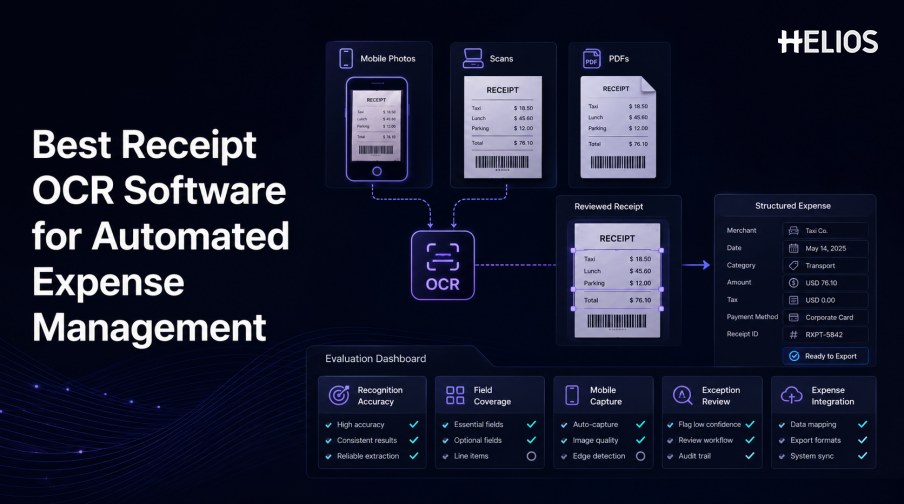
Receipt OCR software converts mobile photographs, scans, PDFs, and other supported receipt images into structured expense data. Strong products reduce rekeying, expose uncertain values, support fast correction, and transfer approved records into expense and accounting workflows.
The best choice is the product that performs reliably on the organization’s actual receipts. A generic recognition score may conceal weak results on taxes, currencies, tips, handwritten additions, long receipts, poor images, or the fields finance needs most.
This guide explains the main selection criteria and shows how Helios OCR-based capture connects receipt recognition with mobile submission, policy controls, approval, accounting, and reporting.
What Receipt OCR Software Should Cover
A complete solution ingests the source image, improves readability, recognizes text, maps values to expense fields, normalizes formats, validates the result, supports correction, and preserves the source with every downstream action.
Some products are document engines; others are embedded in expense platforms. Finance teams should decide whether they need an OCR API, a standalone capture service, or an end-to-end expense experience.
Recognition Accuracy and Document Coverage
Test accuracy by field, receipt type, and image condition.
- Critical field accuracy. Measure merchant, date, currency, subtotal, tax, tip, and total separately.
- Line-item performance. Test row detection, wrapped descriptions, quantities, prices, discounts, tax, and totals when item detail is required.
- Image variation. Include blur, glare, shadows, crumpling, faded thermal paper, rotation, cropping, long receipts, and multiple pages.
- Receipt diversity. Use restaurants, hotels, taxis, retail, fuel, parking, subscriptions, and other relevant categories.
- Regional formats. Test languages, scripts, currencies, date and decimal formats, tax labels, and merchant conventions.
- Evidence and confidence. Require source highlighting and uncertainty indicators for material fields.
Field Coverage and Validation
Capture only the fields needed by the governed process.
- Merchant information. Name, address, location, tax identifier, category, and receipt number where required.
- Transaction data. Date, time, currency, subtotal, discounts, tax, tip, service charge, and total.
- Payment references. Payment type, card suffix, transaction identifier, or card match where authorized.
- Expense context. Business purpose, participant, trip, project, entity, department, and cost center may be added by the user or workflow.
- Validation. Check required fields, arithmetic, duplicate images, transaction matches, policy, and approved reference data.
- Normalization. Convert dates, currencies, decimals, tax values, and categories into accepted structures.
Mobile Capture and User Experience
Good OCR can still fail operationally if capture and correction are difficult.
- Capture guidance. Help users frame edges, improve focus, reduce glare, and retake unreadable images.
- Fast confirmation. Show the source region beside each candidate value and minimize unnecessary fields.
- Multiple receipts. Support batch capture, attachment order, split expenses, combined reports, and long receipts where required.
- Status visibility. Show saved draft, missing evidence, returned claim, pending approval, approved, exported, and reimbursed states.
- Accessibility and localization. Evaluate supported devices, languages, date and currency presentation, and usable text sizes.
- Offline and retry behavior. Confirm what happens when capture, upload, or synchronization is interrupted.
Exception Handling and Expense Integration
Recognition becomes valuable when exceptions and downstream transfers are controlled.
- Review queues. Prioritize low-confidence, missing, duplicate, mismatched, high-value, or out-of-policy records.
- Controlled correction. Retain the original result, corrected value, source evidence, user, timestamp, and reason.
- Approval routing. Use entity, role, department, cost center, amount, category, and exception conditions.
- Accounting mapping. Map approved expenses to accounts, tax codes, cost centers, projects, and other required dimensions.
- Integration reliability. Test APIs, files, connectors, attachments, rejected records, retries, duplicates, and reconciliation.
- Audit trail. Link the source receipt to extraction, corrections, checks, approvals, export, and accounting outcome.
How to Select Receipt OCR Software
A controlled pilot provides better evidence than a polished demonstration.
- Define requirements. List receipt types, countries, fields, volumes, mobile platforms, validations, workflows, systems, and service levels.
- Build a representative test set. Include common receipts, difficult images, languages, currencies, taxes, long receipts, and legitimate exceptions.
- Set field-level criteria. Weight material identifiers, dates, currency, tax, total, line items, and correction effort.
- Run end-to-end tests. Test capture, extraction, correction, duplicate handling, policy, approval, export, retry, and audit retrieval.
- Measure operating effort. Include user touch time, finance review, administration, integrations, support, and change management.
- Scale progressively. Begin with assisted capture and expand automation only where quality and controls support it.
How Helios Supports Receipt OCR and Expense Management
Helios publicly states that users can photograph or upload a document and that OCR auto-fills details. Helios also provides mobile submission, policy controls, approval workflows, accounting-entry generation, and reporting. Spark AI adds conversational claim and approval support. These capabilities address five selection criteria:
- Mobile capture. Employees can submit expense evidence from a phone.
- OCR field filling. Document information enters a draft expense record for confirmation.
- Policy and exception control. Automated rules and approvals govern the next step.
- Accounting connection. Approved expense reports can generate journal entries.
- Operational visibility. Dashboards and reports support finance analysis.
Helios also presents itself as an enterprise-grade provider with global experience and information-security credentials. Buyers should validate exact receipt formats, languages, field and line-item coverage, image correction, confidence, duplicate and card matching, offline use, device support, tax requirements, accounting mappings, integrations, and implementation scope.
FAQs About Receipt OCR Software
What does receipt OCR software extract?
Common fields include merchant, date, time, currency, subtotal, tax, tip, discount, total, payment reference, and sometimes line items.
How should accuracy be measured?
Measure critical fields separately on representative receipts and track corrections, document success, exception rate, and downstream acceptance.
Why is mobile capture important?
Most employees receive receipts away from a desk. Immediate, guided capture reduces lost evidence and poor-quality images.
Does OCR remove the need for review?
No. Unreadable, ambiguous, missing, duplicate, mismatched, unusual, or material records may require accountable review.
How does Helios relate to receipt OCR?
Helios publicly describes mobile document capture with OCR auto-fill inside an expense-management platform.
Finance teams can evaluate Helios receipt OCR and expense workflows using real mobile images, critical fields, difficult receipts, user corrections, policy exceptions, approval routes, accounting mappings, and integration failures.