
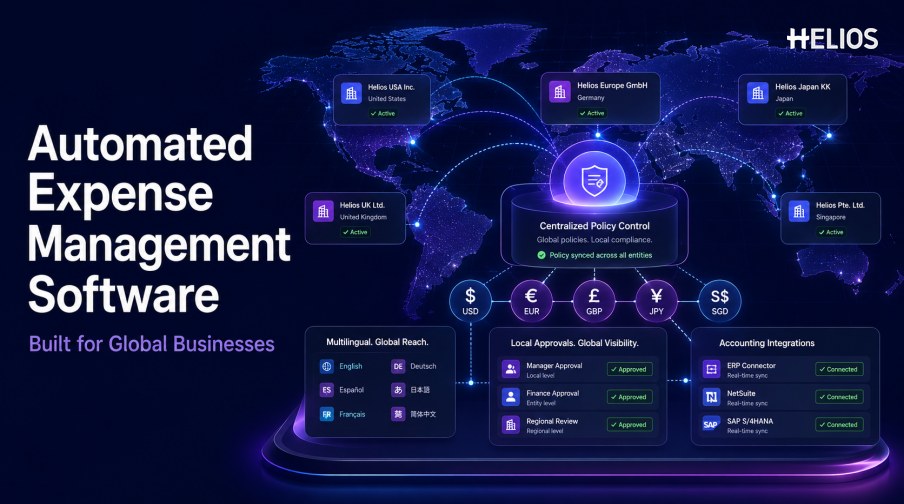
Global businesses need expense processes that remain consistent across entities while respecting local operating requirements. Employees may submit receipts in different languages and currencies, managers may approve across time zones, finance teams may use separate accounting structures, and regional policies may require different evidence, tax fields, limits, or escalation paths.
Automated expense management software can create a shared operating model for these activities. The best-fit platform centralizes core controls and reporting while allowing appropriate configuration for entities, departments, roles, cost centers, projects, currencies, and local workflows. It should also preserve a complete trail from source document to approval, accounting handoff, and reimbursement outcome.
This guide explains the capabilities, global-readiness criteria, integrations, implementation controls, and evaluation questions that matter. It also shows how Helios supports enterprise expense workflows, accounting preparation, reporting, and AI-assisted interaction across the expense lifecycle.
What Global Businesses Need from Automated Expense Management Software
A global platform must do more than convert currency or translate an interface. It must represent the organization’s entities, employees, approval authority, policies, accounting dimensions, tax data, settlement methods, and reporting structure. Central finance needs visibility, while local teams need workflows that reflect how their region operates.
The goal is controlled flexibility: one governed platform with shared standards, configurable regional requirements, traceable exceptions, and reliable data movement into downstream finance systems.
Core Capabilities for Global Expense Operations
Strong automated expense management software should provide the following connected capabilities:
- Multi-entity organization. The platform represents legal entities, business units, departments, employees, approval roles, cost centers, and projects.
- Multi-currency processing. Claims retain original currency, conversion logic, reimbursement currency, accounting currency, and relevant rate information.
- Document and language coverage. Receipt capture, user experience, policy guidance, and support should work for the documents and languages in scope.
- Global and local policy controls. Shared corporate rules can coexist with entity, country, category, role, or project-specific requirements.
- Flexible approval workflows. Routing reflects amount, department, role, entity, cost center, project, exception type, and delegation needs.
- Expense accounting. Approved reports generate the required accounts, dimensions, taxes, currencies, intercompany references, and settlement data.
- Integration architecture. The platform connects with identity, HR, card, travel, payment, ERP, accounting, and reporting systems.
- Central reporting with local detail. Finance can analyze global spend while drilling into entities, regions, departments, categories, exceptions, and processing performance.
Global Readiness Criteria to Validate
Product claims should be tested against the organization’s actual geographic scope.
- Entity and hierarchy depth. Confirm the number of entities, organizational levels, shared-service models, and cross-entity approval relationships supported.
- Currencies and exchange rates. Validate supported currencies, rate sources, rate dates, overrides, rounding, reimbursement logic, and accounting treatment.
- Languages and documents. Test the user interface, policy guidance, OCR capture, receipt formats, invoice fields, and support model for every important region.
- Tax and evidence requirements. Confirm required fields, tax codes, receipt thresholds, invoice references, retention, and local audit needs.
- Regional policy variation. Determine how global standards, local limits, category rules, exceptions, and effective dates are configured and governed.
- Time zones and delegation. Review approval deadlines, reminders, absence delegation, regional support, and follow-the-sun operations.
- Data location and security. Assess identity, permissions, encryption, retention, data residency, administrator access, incident response, and model-data handling.
- Implementation coverage. Clarify which countries, entities, integrations, currencies, policies, and support activities are included in the proposed scope.
How a Global Automated Expense Workflow Operates
A common global process can follow these stages while applying local configuration where required:
- Identify the employee and entity. The platform uses identity and organizational data to determine policies, currencies, accounting structures, and approval routes.
- Capture the expense. The employee uploads a receipt or invoice, imports a transaction, or creates a guided claim on mobile or web.
- Extract and confirm fields. OCR captures document data, and the user confirms uncertain values and supplies business context.
- Apply global and local policy. The system checks shared standards and entity, country, category, role, or project-specific requirements.
- Route regional approvals. Managers, budget owners, finance reviewers, and specialists receive work based on configured authority and exceptions.
- Prepare entity-specific accounting. Approved data maps to the correct accounts, dimensions, tax fields, currencies, and settlement references.
- Transfer and reconcile outcomes. Integration responses, reimbursement status, journal references, and corrections remain connected to the expense.
- Consolidate reporting. Central finance analyzes spend and process performance across entities while preserving local detail.
Accounting and Integration Requirements
Integration quality often determines whether global automation removes work or moves it elsewhere.
- Identity and HR data. Employees, managers, entities, departments, roles, cost centers, and employment status must remain current.
- Corporate-card and transaction feeds. Card activity should connect with receipts, claims, policy controls, settlement, and reconciliation.
- ERP and accounting systems. Validate accounts, dimensions, tax codes, currencies, journal structure, references, response messages, and error handling.
- Payment and reimbursement. Confirm supported settlement methods, currencies, batches, status updates, rejected payments, and employee communication.
- Master-data governance. Define ownership and synchronization for categories, projects, clients, entities, accounts, rates, and policy tables.
- Audit and monitoring. Retain data versions, rule changes, employee edits, approvals, overrides, integration attempts, errors, and corrections.
How to Choose the Best-Fit Platform
There is no responsible universal winner for every global organization. Evaluate platforms with representative documents, workflows, and systems.
- Define the geographic and entity scope. List countries, entities, employees, languages, currencies, tax needs, policies, and support expectations.
- Map the current process and baseline. Measure manual entry, correction rates, approval delays, reimbursement time, accounting work, and reporting effort.
- Test real regional cases. Use local receipts, difficult images, currencies, taxes, policy exceptions, approval delegations, and accounting outputs.
- Follow one expense end to end. A demonstration should cover capture, policy, approval, accounting, transfer response, reconciliation, and reporting.
- Evaluate configuration governance. Confirm how global and local policies, roles, master data, workflows, and changes are controlled.
- Review security and service coverage. Assess data handling, availability, support hours, regional expertise, implementation ownership, and escalation.
- Pilot before global rollout. Begin with representative entities, compare results with the baseline, correct recurring issues, and expand in stages.
How Helios Supports Automated Expense Management for Global Businesses
Helios provides mobile expense workflows, OCR receipt capture, automated policy controls, configurable approvals, accounting-entry generation, and reporting. Spark AI adds conversational copilots for travel, claims, approvals, and service. For global organizations, these capabilities support five important requirements:
- Mobile expense work across locations. Employees can manage business trips, submit expenses, and approvers can act from mobile devices.
- Automated capture and policy enforcement. OCR populates receipt and invoice fields, while configured controls apply company spending rules.
- Flexible organizational workflows. Approval flows can be configured around department, role, cost center, and complex business scenarios.
- Accounting continuity across finance systems. Approved reports can generate accounting entries and connect with downstream accounting platforms.
- Enterprise reporting and AI assistance. Multi-dimensional dashboards, customizable reporting, and Spark AI copilots support visibility and user interaction across the lifecycle.
Helios also presents itself as an enterprise-grade provider with global experience and information-security credentials. Buyers should validate exact country coverage, languages, currencies, local tax fields, policy configuration, data location, accounting integrations, regional support, and implementation scope.
FAQs About Automated Expense Management Software for Global Businesses
What makes expense management software suitable for global businesses?
It should support the required entities, currencies, languages, document formats, policies, approval structures, accounting dimensions, integrations, security requirements, and centralized reporting.
Can one platform support global and local expense policies?
A configurable platform can apply shared corporate standards while supporting entity, country, category, role, or project-specific rules. Governance is needed to control who changes each layer.
How should multi-currency expenses be handled?
The system should retain original currency, conversion rate and date, reimbursement currency, accounting currency, rounding, overrides, and a clear audit history for the applied logic.
Why are accounting integrations important globally?
Global organizations may use different accounting structures or systems. Approved expenses must reach the correct accounts, dimensions, taxes, currencies, entities, and journal references without repeated rekeying.
What should a global pilot include?
Test representative entities, local documents, languages, currencies, tax fields, policy exceptions, approval delegation, accounting responses, reimbursement status, security controls, and regional support.
Global finance teams can evaluate Helios automated expense management with representative entities, currencies, documents, policies, approval structures, accounting systems, and regional requirements.