
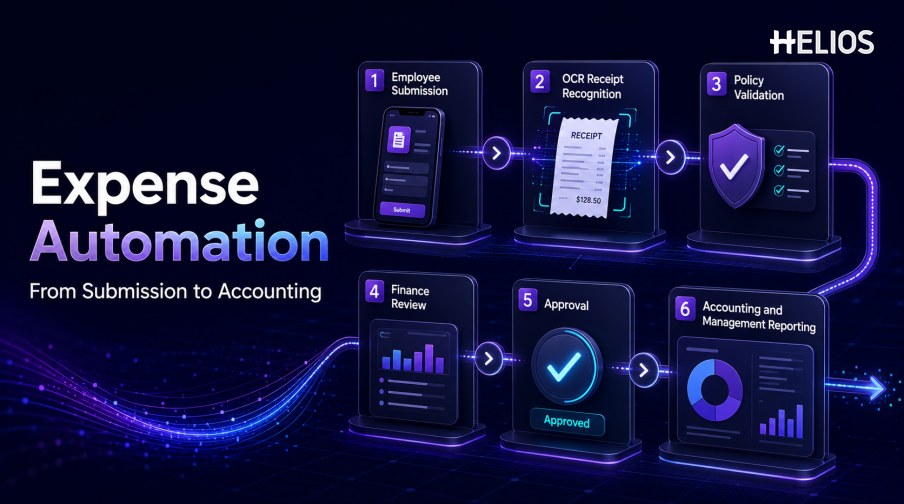
Expense processes often appear digital while still depending on manual work. Employees type information from receipts, managers search for policy context, finance teams repeat checks, accountants rekey approved data, and reporting teams export spreadsheets to understand what happened. Every handoff creates another opportunity for missing information, delay, or inconsistency.
Expense automation connects these stages so that data captured during submission can support recognition, policy validation, review, approval, accounting, reimbursement, and reporting. Automated expense management does not mean removing people from financial decisions. It means applying rules and technology to repeatable work while preserving human responsibility for exceptions, approvals, accounting judgments, and control outcomes.
This guide explains the full workflow, the process gaps expense automation should solve, the controls required for reliable implementation, and how Helios supports mobile submission, OCR capture, policy enforcement, approval routing, accounting preparation, and management reporting.
What Is Expense Automation?
Expense automation is the use of software to reduce manual tasks across employee expenses, reimbursements, approvals, finance review, accounting, and reporting. The system captures structured information, applies company rules, moves work to the correct owner, records decisions, prepares downstream data, and keeps the source evidence connected to the final result.
Automation may be deterministic or AI-assisted. Deterministic rules require receipts, enforce limits, select approval routes, and map approved categories to accounts. AI can interpret receipts, suggest fields, summarize claims, answer policy questions, or highlight unusual patterns. A mature process combines both approaches with human oversight.
Manual Operations and Process Breaks Expense Automation Should Solve
A useful automation program starts with visible operational friction:
- Repeated data entry. Employees and finance teams copy merchant, date, amount, tax, currency, category, and reference data between documents and systems.
- Incomplete submissions. Missing receipts, business purpose, attendees, project details, or allocation data cause reports to move backward.
- Late policy checks. Out-of-policy conditions are discovered after the employee has submitted the report or after a manager has approved it.
- Unclear approval ownership. Reports wait in queues because routing does not reflect amount, department, role, entity, cost center, project, or exception type.
- Uniform review effort. Finance spends the same time on ordinary compliant claims and higher-risk exceptions.
- Disconnected accounting preparation. Approved expenses are exported, recoded, and rekeyed before they can enter the finance system.
- Weak status visibility. Employees and managers cannot see whether a report is awaiting information, approval, finance review, accounting, or payment.
- Fragmented reporting. Operational expense activity, policy exceptions, accounting outcomes, and processing metrics sit in separate spreadsheets.
Core Capabilities of Automated Expense Management
The strongest systems connect the following capabilities rather than treating them as isolated features:
- Mobile and web submission. Employees create claims, attach evidence, and check status without waiting to return to a desktop workflow.
- Receipt and invoice recognition. OCR captures merchant, date, amount, currency, tax, invoice number, and other required fields.
- Guided field completion. The system asks for business purpose, participants, category, project, cost center, or other missing context.
- Policy and duplicate controls. Configured rules check evidence, limits, dates, categories, duplicates, and other company conditions.
- Flexible approval routing. Reports move according to amount, department, role, entity, cost center, project, risk, or exception type.
- Finance review and exception handling. Reviewers see the source evidence, policy result, employee corrections, and relevant exceptions together.
- Accounting preparation and integration. Approved data feeds controlled mappings for accounts, dimensions, taxes, currencies, settlement references, and journal entries.
- Dashboards and audit history. The platform tracks spend, processing time, exceptions, approvals, edits, transfers, and final outcomes.
How Expense Automation Works from Submission to Reporting
A complete workflow can be organized into the following stages:
- Capture the expense. The employee photographs a receipt, uploads an invoice, imports a transaction, or begins a claim through a guided assistant.
- Extract and confirm information. The system proposes document fields and asks the employee to verify uncertain values.
- Complete business context. Required purpose, attendees, project, client, entity, cost center, and allocation details are collected.
- Validate policy and completeness. Rules check evidence, limits, valid dates, categories, duplicate risk, required fields, and other company conditions.
- Route the report. The workflow selects the appropriate manager, budget owner, finance reviewer, or specialist.
- Review and decide. Authorized reviewers approve, return, reject, or escalate the expense with evidence and policy results visible.
- Prepare accounting records. Approved data passes through controlled mappings to generate journal-ready accounting information.
- Transfer, reimburse, and reconcile. The record moves to the finance or payment process, and transfer responses are compared with the expected outcome.
- Report and improve. Dashboards show spend, exceptions, processing time, approval delays, correction rates, entities, departments, categories, and trends.
Business Benefits of Expense Automation
Automation value should be measured against the previous process rather than assumed from feature availability.
- Less manual entry. Captured data and controlled mappings reduce repeated typing from receipts through accounting.
- Higher first-pass completeness. Guided prompts collect required evidence and context before the report enters a review queue.
- More consistent compliance. Configured controls apply the same evidence, limit, category, date, and approval rules across claims.
- Faster approvals and reimbursement. Clear routing and fewer corrections reduce avoidable queue delays.
- More focused finance review. Routine items can follow a lighter path while exceptions receive appropriate attention.
- Better accounting continuity. Approved expenses retain their source evidence, coding, approvals, mappings, and transfer history.
- Stronger management visibility. Structured expense data supports timely analysis without rebuilding the entire process in spreadsheets.
Best Practices for Implementing Expense Automation
Reliable automated expense management requires process design, data preparation, and ongoing ownership:
- Map the current lifecycle. Document submission channels, rekeying, corrections, policy checks, approval routes, accounting handoffs, payment status, and reports.
- Define the target outcome and baseline. Measure preparation time, correction rate, review effort, approval time, reimbursement cycle, and accounting errors.
- Clarify policies and master data. Standardize categories, limits, evidence requirements, employees, entities, cost centers, projects, accounts, taxes, and currencies.
- Separate mandatory rules from AI assistance. Use deterministic controls for required conditions and AI for interpretation, suggestions, and prioritization.
- Preserve human oversight. Material exceptions, accounting judgments, overrides, sensitive expenses, and higher-risk decisions need authorized ownership.
- Test representative cases. Include ordinary claims, missing receipts, duplicates, refunds, split allocations, foreign currencies, policy exceptions, and failed integrations.
- Provide correction and fallback paths. Users need an easy way to edit information, explain exceptions, and complete work when automation is unavailable.
- Monitor after launch. Track corrections, false alerts, missed issues, overrides, delays, failed transfers, support volume, and adoption.
How Helios Supports End-to-End Expense Automation
Helios combines mobile expense workflows, OCR capture, automated policy controls, configurable approvals, accounting-entry generation, and reporting. Spark AI adds conversational assistance across claims, approvals, travel, and service. Together, the platform addresses five common process breaks:
- Reduce submission and data-entry friction. Employees can capture receipts on mobile, while OCR populates relevant fields and guided workflows collect missing context.
- Move policy checks earlier. Automated controls help enforce company rules before out-of-policy or incomplete claims reach downstream finance work.
- Route approvals around the organization. Configurable workflows can reflect department, role, cost center, and other business requirements.
- Connect approved reports with accounting. The Helios accounting engine can generate accounting entries from approved expense reports.
- Create visibility across the lifecycle. Multi-dimensional dashboards, customizable reports, and Spark AI assistance help users complete tasks and access relevant guidance.
Helios also presents itself as an enterprise-grade provider with global experience and information-security credentials. Organizations should validate exact policy logic, approval roles, accounting connectors, currencies, tax requirements, security controls, data handling, and implementation scope for their environment.
FAQs About Expense Automation
What is the difference between expense automation and expense management software?
Expense management software provides the system for claims, approvals, accounting, reimbursement, and reporting. Expense automation describes how that system reduces manual work through rules, integrations, document capture, and AI assistance.
Can expense automation process receipts automatically?
OCR can extract fields and prepare an expense line, but employees should confirm uncertain or material values. The workflow must also collect business context and apply policy rules.
Does automated expense management remove finance review?
No. Automation can reduce repetitive checks and prioritize exceptions, while finance remains responsible for material policy exceptions, accounting judgments, overrides, reconciliation, and higher-risk decisions.
How does expense automation connect with accounting?
Approved expense data can pass through controlled mappings for accounts, dimensions, taxes, currencies, and settlement references, then transfer to the finance system with status and audit history retained.
Which metrics show whether expense automation is working?
Track preparation time, first-pass completeness, extraction corrections, policy-exception rate, review time, approval time, reimbursement cycle time, accounting corrections, failed transfers, support volume, and user adoption.
Businesses can evaluate Helios expense automation with representative receipts, policies, approval paths, accounting rules, integrations, and reporting requirements.