
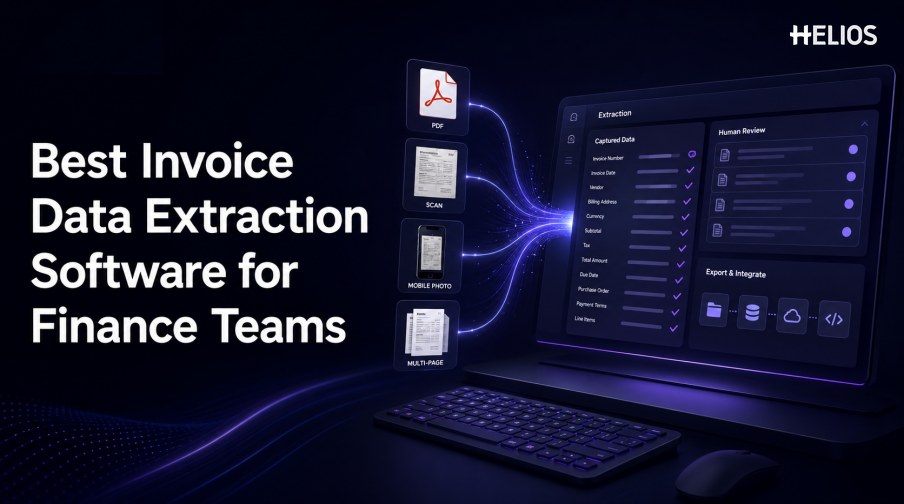
Invoice data extraction software converts invoices in PDFs, scans, photographs, and other supported formats into structured finance data. The right product can reduce rekeying, make document evidence easier to review, and send approved information into expense, accounting, reporting, or archival processes.
The best option is not determined by one headline accuracy percentage. Finance teams need reliable results on their own documents, configurable field coverage, visible confidence, efficient human review, controlled exports, security, and a practical operating model for exceptions.
This guide explains the criteria finance teams should test and shows how Helios OCR-based invoice capture connects extraction with policy controls, approval workflows, accounting-entry generation, and reporting.
What Invoice Data Extraction Software Does
Invoice data extraction software reads a document, identifies business fields, normalizes the values, and presents structured data for validation or downstream use. A complete record may include the original image, extracted text, field names, normalized values, page coordinates, confidence, corrections, and processing status.
Extraction is only one part of financial processing. Approval, accounting, supplier controls, purchase-order matching, payment, and tax determination may be handled by adjacent modules or separate systems. Buyers should define the required boundary before comparing products.
Accuracy and Document Format Support
Testing should represent the documents finance receives in production.
- Field-level accuracy. Measure supplier, invoice number, dates, currency, subtotal, tax, total, and other critical fields separately.
- Line-item accuracy. Test row detection, descriptions, quantities, units, prices, discounts, tax, and row totals where detailed extraction is required.
- Input formats. Confirm native PDF, image PDF, JPEG, PNG, mobile photograph, multi-page document, and any structured invoice formats in scope.
- Document quality. Include rotated pages, low contrast, shadows, handwriting, stamps, overlapping text, compression, and partial images.
- Language and regional variation. Use relevant scripts, currencies, date formats, decimal conventions, tax labels, and supplier layouts.
- Evidence and confidence. Require field-level source highlighting and uncertainty indicators so reviewers can understand why a value needs attention.
Configurable Fields and Validation
Field coverage must follow the organization’s downstream controls.
- Header fields. Configure supplier, addresses, tax identifiers, invoice number, dates, references, payment terms, and currency.
- Financial values. Capture subtotal, discounts, freight, tax base, rates, tax amount, withholding, rounding, and total as required.
- Custom fields. Support business-specific references such as contract, project, trip, employee, entity, cost center, or service period.
- Normalization. Convert dates, currencies, decimals, identifiers, and code values into accepted formats without losing the source evidence.
- Arithmetic checks. Recalculate line amounts, subtotal, taxes, and total within documented tolerances.
- Reference checks. Compare extracted values with approved entity, employee, supplier, account, project, tax, or policy data where applicable.
Human Review and Exception Management
A strong review experience limits the effort that remains after extraction.
- Side-by-side evidence. Display the source region beside the candidate value so reviewers do not search the entire page.
- Prioritized queues. Route missing, low-confidence, conflicting, duplicate, or materially unusual fields to the appropriate owner.
- Controlled correction. Let authorized users edit values while retaining the original result, editor, timestamp, and reason.
- Approval routing. Use entity, role, department, cost center, amount, category, or exception type to determine the next reviewer.
- Status visibility. Show whether a record is awaiting evidence, correction, approval, export, retry, or reconciliation.
- Learning feedback. Understand whether corrections improve templates or models and how changes are tested before production use.
Export, Integration, and Governance Standards
Structured data creates value only when it reaches authorized systems reliably.
- Export options. Evaluate supported APIs, files, connectors, batch methods, schemas, and attachment handling.
- Mapping controls. Confirm entity, account, tax, category, cost center, project, and other dimension mappings.
- Failure handling. Test rejected records, duplicate messages, retries, idempotency, unavailable systems, and reconciliation.
- Traceability. Keep the source invoice linked to extracted fields, corrections, approvals, exports, accounting outcome, and later adjustments.
- Access and security. Review role-based access, segregation of duties, encryption, retention, residency, monitoring, and incident response.
- Operational reporting. Track accuracy, correction rate, exception age, processing time, export failure, and downstream acceptance.
How to Select Invoice Data Extraction Software
A repeatable selection process turns product claims into measurable evidence.
- Define the process boundary. List documents, channels, fields, volumes, countries, validations, reviewers, exports, systems, and service levels.
- Build a representative test set. Include common layouts, difficult images, multiple pages, languages, currencies, taxes, line items, and legitimate exceptions.
- Set weighted acceptance criteria. Prioritize critical fields, reviewer effort, integration reliability, security, and downstream acceptance.
- Run end-to-end scenarios. Test ingestion, extraction, correction, validation, routing, approval, export, failure recovery, and audit retrieval.
- Calculate total operating effort. Include configuration, correction, administration, integrations, training, support, upgrades, and change control.
- Pilot before scaling. Begin with assisted extraction and measured human confirmation, then expand automation where performance supports it.
How Helios Supports Invoice Data Extraction Workflows
Helios publicly states that users can photograph or upload an invoice and that OCR auto-fills details. Its expense-management platform also provides policy controls, configurable approvals, accounting-entry generation, and reporting. Spark AI adds conversational assistance for claims and approvals. These published capabilities support five selection needs:
- Capture documents. Users can submit invoice images or files through an expense workflow.
- Reduce manual entry. OCR fills relevant invoice information for confirmation.
- Control exceptions. Policy checks and configurable approvals route records to accountable reviewers.
- Connect approved data with accounting. The accounting engine generates journal entries from approved expense reports.
- Monitor outcomes. Multi-dimensional dashboards and customizable reports support finance visibility.
Helios also presents itself as an enterprise-grade provider with global experience and information-security credentials. Buyers should validate exact document formats, languages, field and line-item coverage, confidence, correction experience, export methods, tax logic, duplicate controls, integrations, regional requirements, and implementation scope.
FAQs About Invoice Data Extraction Software
What is invoice data extraction software?
It converts invoice images or files into structured fields and tables that can be validated, reviewed, routed, exported, and used by financial workflows.
Is overall accuracy enough to compare products?
No. Test critical fields, line items, difficult documents, correction effort, document success, and downstream acceptance separately.
Why is human review still necessary?
Unusual layouts, poor images, missing data, ambiguity, conflicts, and material financial outcomes can require authorized confirmation.
Which integrations should finance teams test?
Test the exact API, file, connector, accounting mapping, failure, retry, reconciliation, and audit-trail scenarios required in production.
How does Helios relate to invoice data extraction?
Helios publicly describes OCR-based invoice upload and auto-fill within expense management, plus policy, approval, accounting-entry, and reporting capabilities.
Finance teams can evaluate Helios invoice OCR and expense workflows with representative invoices, field-level measures, correction cases, approval routes, accounting mappings, export failures, and complete audit-trail requirements.