
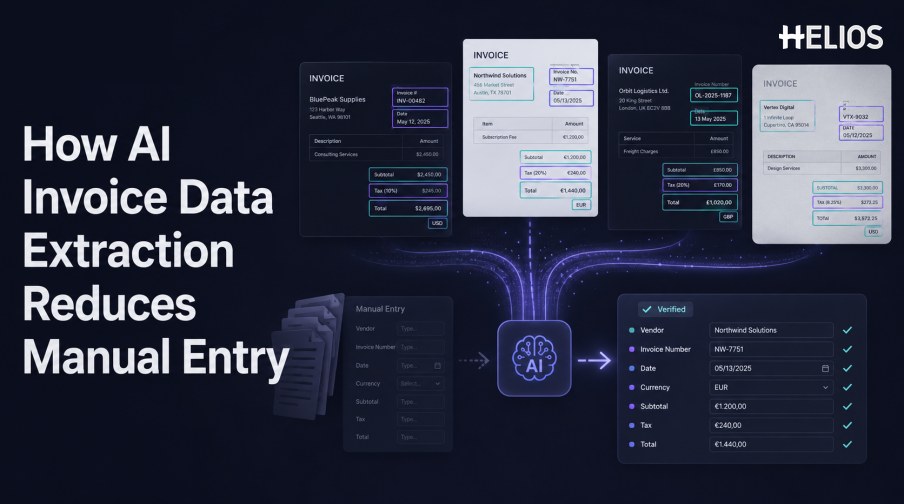
Manual invoice entry requires finance users to open a document, locate each value, interpret the layout, type the data, check the result, and correct errors. The work repeats across suppliers, currencies, languages, and formats, while every handoff creates another opportunity for inconsistency.
AI invoice data extraction reduces this effort by reading text and layout, identifying business fields, normalizing values, validating relationships, and sending uncertain cases to a reviewer. The goal is not unattended acceptance of every output. It is a controlled process in which people focus on exceptions instead of retyping reliable information.
This article explains the extraction workflow and connects it with Helios OCR-based invoice capture, policy controls, approvals, accounting integration, and reporting.
What Is AI Invoice Data Extraction?
AI invoice data extraction converts invoice documents into structured fields and tables. OCR reads the characters, layout analysis preserves where they appear, and models or rules determine which values represent supplier, invoice number, dates, currency, subtotal, tax, total, and line items.
The output should remain linked to its source. A reviewer needs to see the original document, candidate value, confidence or reason for review, normalized result, and any later correction.
How AI Recognizes Fields Across Different Layouts
Invoice layouts vary, but the underlying business concepts are often consistent.
- Image preparation. Detect pages, correct rotation, crop borders, improve contrast, and identify unreadable regions.
- Text recognition. Convert visible characters into machine-readable text while retaining page coordinates.
- Layout understanding. Identify headers, address blocks, labels, values, tables, totals, and footnotes based on visual relationships.
- Semantic field mapping. Interpret labels such as invoice date, bill date, document date, or issued on as the appropriate business field.
- Table reconstruction. Recover line-item rows and align descriptions, quantities, unit prices, tax, and amounts.
- Normalization. Convert dates, currencies, decimals, tax rates, and identifiers into governed formats.
Validation Turns Extraction into Usable Data
A recognized value is a candidate until checks establish that it is usable.
- Required-field checks. Confirm that essential identifiers, dates, currency, and amounts are present.
- Arithmetic checks. Compare line amounts, subtotal, discounts, tax, and total within approved tolerances.
- Format checks. Validate dates, tax identifiers, invoice-number patterns, currency codes, and decimal conventions.
- Reference-data checks. Compare entity, employee, supplier, project, category, cost center, or tax values with approved records where applicable.
- Duplicate screening. Compare images and key fields with previous invoices or claims before reimbursement or posting.
- Confidence thresholds. Automatically accept low-risk fields only when evidence and policy support the configured threshold.
Where Manual Work Is Reduced
AI changes the type of work rather than removing all human responsibility.
- Less rekeying. Users confirm prefilled fields instead of typing every value from the source.
- Faster document sorting. Classification separates invoices, receipts, supporting records, and unrelated files.
- Fewer routine comparisons. Rules recalculate totals and flag missing or conflicting information.
- Focused review. Queues prioritize low-confidence, unusual, high-value, duplicate, or out-of-policy cases.
- Consistent downstream data. Normalization and mappings reduce format variation before approval or accounting.
- Improved traceability. The source, extracted value, correction, reviewer, decision, and export status remain connected.
A Simple AI Invoice Data Extraction Workflow
A practical workflow can be introduced in controlled stages.
- Submit the invoice. Upload a PDF or image, capture a photograph, or use another governed channel.
- Extract and normalize. Read text and layout, map required fields, and standardize the values.
- Run validation. Check completeness, format, arithmetic, reference data, duplicates, and policy context.
- Confirm exceptions. Ask the submitter or finance reviewer to correct uncertain or conflicting values.
- Route for approval. Use amount, entity, department, role, cost center, category, or exception conditions.
- Prepare the accounting outcome. Map approved expense data to the required accounts and dimensions.
- Export and reconcile. Transfer the result, monitor failures, and confirm acceptance by the target system.
How to Measure the Reduction in Manual Entry
Measure work and control quality before and after implementation.
- Fields corrected per document. Count changes by field and segment to identify weak layouts or values.
- Touch time. Measure active capture, correction, review, approval, and accounting preparation time.
- Straight-through rate. Track the share of records that meet configured criteria without manual field correction.
- Exception rate and age. Monitor how many records enter review and how long they remain unresolved.
- Downstream rejection. Measure records rejected because of missing, invalid, duplicated, or incorrectly mapped data.
- Audit retrieval. Confirm how quickly finance can reproduce source evidence, changes, decisions, and final outcomes.
How Helios Reduces Manual Invoice Entry
Helios publicly describes invoice upload or photo capture with OCR that auto-fills details. Captured information can move through automated policy controls, flexible approvals, accounting-entry generation, and reporting. Spark AI can add conversational claim and approval assistance. Together, these capabilities support five practical steps:
- Capture once. Submit invoice evidence through the expense workflow instead of re-entering the source.
- Prefill fields. OCR reduces the initial data-entry burden.
- Confirm exceptions. Users and finance teams focus on uncertain or noncompliant information.
- Route approvals. Configurable workflows move records according to accountable business conditions.
- Use approved data downstream. Accounting-entry generation and reporting connect capture with finance outcomes.
Helios also presents itself as an enterprise-grade provider with global experience and information-security credentials. Organizations should validate exact field and line-item coverage, layouts, languages, confidence, correction behavior, duplicate checks, tax rules, accounting mappings, integrations, and automation thresholds using their own documents.
FAQs About AI Invoice Data Extraction
How does AI invoice data extraction differ from OCR?
OCR recognizes characters. AI extraction also interprets layout and meaning, maps text to business fields, normalizes values, and supports validation and exception handling.
Can AI process every invoice without review?
Not reliably. Poor images, unusual layouts, ambiguous fields, missing data, conflicts, and material outcomes may require human confirmation.
How does AI handle new invoice layouts?
Layout-aware models can generalize across patterns, while rules, templates, or human correction may still be needed for unusual formats.
Which metric best shows reduced manual entry?
Use a combination of corrected fields, active touch time, straight-through rate, exception age, and downstream rejection.
What does Helios OCR provide?
Helios publicly states that users can photograph or upload an invoice and that OCR auto-fills details within its expense-management workflow.
Organizations can test Helios OCR-based invoice capture with representative layouts, difficult images, required fields, user corrections, policy exceptions, approval routes, accounting mappings, and measured touch time.