
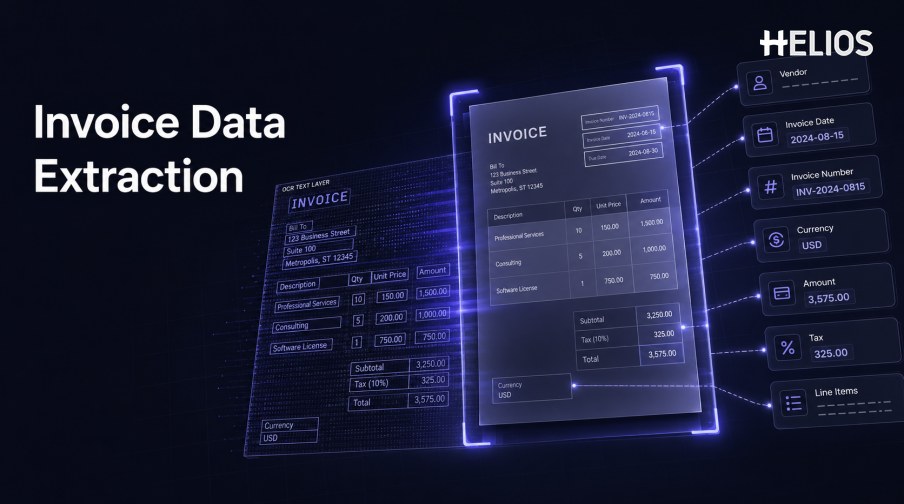
Invoice data extraction is the process of converting information in invoice images, PDFs, scans, or photographs into structured fields that software can validate, route, analyze, and send to financial systems. It replaces part of the manual work of reading a document and typing values into a form.
Extraction quality depends on more than whether the characters are visible. The system must identify which text is the supplier, invoice number, date, currency, subtotal, tax, total, or line item; retain the source evidence; and handle different layouts, languages, and document quality.
This guide explains the main extraction methods, common fields, end-to-end workflow, accuracy measures, and business uses, then connects them with Helios OCR-based invoice capture.
What Is Invoice Data Extraction?
Invoice data extraction creates machine-readable key-value fields and tables from an invoice. A complete output can include document text, field names, normalized values, page coordinates, confidence, line items, and links back to the original image.
Extraction is one component of invoice processing. It does not by itself approve an expense, verify business purpose, assign accounting, authorize payment, or resolve an exception. Those activities require validation and workflow controls around the extracted data.
Main Invoice Data Extraction Methods
Modern systems may combine several methods.
- Manual entry. A user reads each invoice and types the required values; it is flexible but time-consuming and error-prone.
- Template extraction. Fixed coordinates or rules capture fields from known layouts; it can be precise but requires maintenance when formats change.
- OCR plus rules. OCR reads text while labels, patterns, keywords, and proximity rules identify fields such as dates, totals, and invoice numbers.
- Machine-learning extraction. Models learn visual and semantic patterns across varied layouts and classify text into business fields.
- Large-model or multimodal assistance. AI can help interpret complex layouts and context, but outputs still require validation, grounding, and appropriate controls.
- Embedded structured data. Electronic invoice formats may provide fields directly, reducing image recognition while still requiring validation and mapping.
- Human-in-the-loop extraction. Low-confidence or unusual values are sent to a person for confirmation or correction.
Common Fields Extracted from Invoices
Field requirements should follow the downstream business process.
- Supplier information. Legal name, address, tax identifier, bank or payment information where authorized, and supplier reference.
- Invoice identifiers. Invoice number, purchase-order reference, contract reference, account number, and document type.
- Dates and terms. Invoice date, service period, due date, payment terms, and delivery date where relevant.
- Currency and totals. Currency, subtotal, discounts, shipping, tax, withholding, rounding, paid amount, and total due.
- Tax fields. Tax registration numbers, rates, categories, taxable base, tax amount, and regional fields required by the process.
- Line items. Description, product or service code, quantity, unit, unit price, discount, tax, amount, and allocation information.
- Accounting dimensions. Entity, account, category, cost center, project, department, location, and other fields may be captured or assigned later.
A Simple Invoice Data Extraction Workflow
Extraction should preserve evidence and make uncertainty visible.
- Ingest and preserve the document. Store the original file, capture channel, timestamp, and relevant source metadata.
- Prepare the image. Detect pages, correct rotation, crop, improve contrast, and identify poor-quality regions.
- Recognize text and layout. Read characters and retain their page position, grouping, table structure, and visual context.
- Identify and normalize fields. Map text to business fields and convert dates, currencies, decimals, identifiers, and tax values to expected formats.
- Validate the extraction. Check required fields, arithmetic, duplicates, reference data, context, and field confidence.
- Request correction where needed. Show the source location and candidate value so an authorized user can confirm or edit it.
- Send structured data downstream. Move approved values into expense, approval, accounting, analytics, or archival workflows.
- Retain the history. Record original output, corrections, reviewer actions, final values, and downstream status.
Accuracy, Validation, and Quality Measurement
Quality should be measured against the needs of the financial workflow.
- Character accuracy. Measures recognized text but does not show whether the correct business field was identified.
- Field exact-match accuracy. Checks whether a normalized field exactly matches the labeled value for supplier, number, date, currency, amount, or tax.
- Line-item accuracy. Measures row detection, column alignment, descriptions, quantities, prices, tax, and totals separately.
- Document success rate. Tracks whether each document reaches the required completeness and quality threshold.
- Correction effort. Measures how many fields users change and how long confirmation takes.
- Downstream acceptance. Confirms whether approval and accounting systems accept the data without later correction.
- Performance by segment. Compare layouts, suppliers, languages, currencies, image quality, pages, and document types to expose weak areas.
Business Use Cases for Extracted Invoice Data
Structured fields become valuable when they support controlled downstream tasks.
- Expense submission. Auto-fill employee or business expense records and request confirmation of missing context.
- Policy and duplicate checks. Compare amounts, dates, suppliers, categories, identifiers, and images with requirements and prior records.
- Approval routing. Use entity, amount, department, cost center, category, or exception type to determine the workflow.
- Accounting preparation. Map approved values to accounts, tax codes, cost centers, projects, and journal-entry proposals.
- Tax and audit support. Retrieve source documents and structured tax fields with corrections and approval history.
- Spend analytics. Analyze suppliers, categories, taxes, entities, departments, and trends using consistent dimensions.
How Helios OCR Supports Invoice Data Extraction
Helios publicly states that users can photograph or upload an invoice and that its OCR technology auto-fills details. The captured data can then move through policy controls, approval workflows, accounting-entry generation, and reporting. Spark AI adds conversational claim and approval support. This creates five relevant extraction-to-workflow connections:
- Capture the source. Users can submit a photo or uploaded invoice through the expense workflow.
- Extract relevant details. OCR reduces manual entry by filling invoice information.
- Confirm and control the data. Users and policy checks can validate the structured expense record.
- Route the result. Configurable approval flows move records and exceptions to accountable roles.
- Use approved data downstream. Accounting-entry generation and reporting connect extraction with finance outcomes.
Helios also presents itself as an enterprise-grade provider with global experience and information-security credentials. Buyers should validate exact field and line-item coverage, accuracy, confidence, document formats, languages, tax requirements, normalization, duplicate controls, correction experience, integrations, and broader invoice-processing scope.
FAQs About Invoice Data Extraction
What is the difference between OCR and invoice data extraction?
OCR recognizes characters. Invoice data extraction identifies which recognized text represents supplier, invoice number, date, currency, totals, tax, line items, and other structured fields.
Can invoice data extraction capture line items?
Many systems can, but table extraction is more complex than header fields. Test row and column structure, descriptions, quantities, prices, tax, and totals separately.
Which fields should be extracted?
Extract the fields required for validation, approval, accounting, tax, payment, reporting, and audit—no more and no less than the governed process needs.
How is extraction accuracy improved?
Use better source images, representative training or configuration, field-level validation, reference data, confidence thresholds, controlled correction, and production monitoring.
What does Helios OCR do?
Helios publicly describes invoice upload or photo capture with OCR that auto-fills details within its expense-management workflow.
Organizations can assess Helios invoice OCR and expense processing with representative documents, critical fields, line-item cases, multiple languages and currencies, user corrections, approval routes, accounting mappings, and field-level quality measures.