
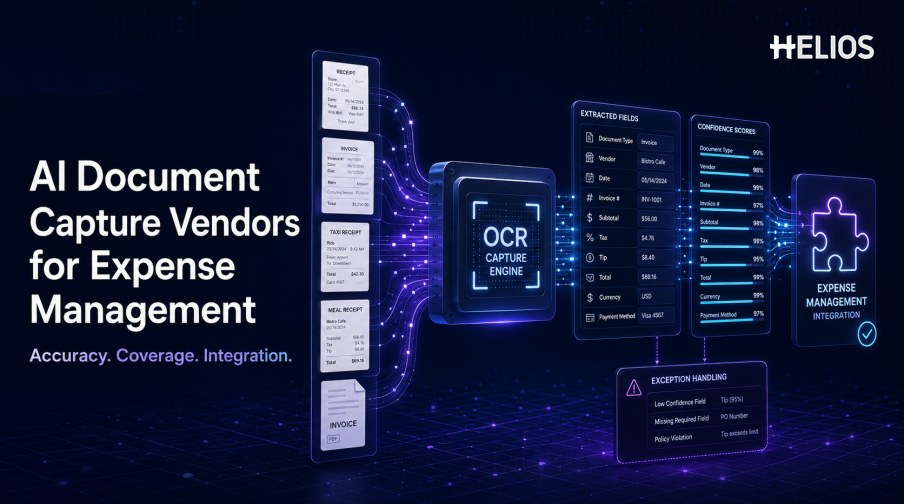
Receipt and invoice capture is often the first AI capability an expense team evaluates. The promise is straightforward: upload a document, extract the important fields, and populate an expense record without manual typing. The operational reality is more demanding because documents vary by country, language, currency, merchant, tax format, image quality, and expense type.
AI document capture vendors for expense management should therefore be compared on more than a polished OCR demonstration. Buyers need evidence about field accuracy, document coverage, confidence handling, user correction, duplicate risk, policy context, accounting integration, security, and performance on the organization’s own documents.
This guide provides a practical evaluation framework rather than an unsupported ranking. It explains what top-performing solutions should do, how to test vendors, and how Helios OCR receipt capture connects document extraction with claims, policy controls, approvals, accounting preparation, and reporting.
What Is an AI Document Capture Vendor for Expense Management?
An AI document capture vendor provides technology that converts receipts, invoices, and related expense evidence into structured data. Depending on the product, the service may identify document type, merchant, date, amount, currency, tax, invoice number, payment method, line items, and other fields.
Capture alone is only one stage. In a complete expense workflow, the extracted values must be confirmed, supplemented with business context, checked against policy, routed for approval, mapped to accounting fields, retained with the original evidence, and transferred to downstream finance processes. A vendor that performs well in a laboratory may still create work if correction, workflow, and integration are weak.
The Most Important Vendor Evaluation Metrics
Use a defined scorecard and distinguish field-level performance from document-level completion.
- Field accuracy. Measure correct extraction for merchant, date, total, currency, tax, invoice number, and every field that matters to the workflow.
- Document completion rate. Track how often a document produces all required fields without manual correction, not only average accuracy across easy fields.
- Document and format coverage. Test receipts, invoices, e-receipts, photographed documents, PDFs, different layouts, languages, currencies, and tax formats.
- Image-quality tolerance. Evaluate shadows, folds, blur, low contrast, rotation, cropping, long receipts, small print, and damaged documents.
- Confidence and uncertainty handling. Low-confidence fields should be visible and easy to verify rather than silently accepted.
- Exception handling. The workflow should support missing fields, unreadable documents, unsupported formats, mismatched totals, and user correction.
- Duplicate-document controls. Assess how the product identifies repeated images or similar receipts without treating an alert as proof of duplicate reimbursement.
- Processing speed and reliability. Measure normal and peak response times, failure rates, retries, availability, and monitoring.
- Integration quality. Confirm how extracted data, source images, confidence, corrections, and processing status enter the expense and accounting workflow.
- Security and governance. Review access, encryption, retention, data location, administrator controls, model-data handling, incident response, and audit history.
How AI Document Capture Works in an Expense Claim
A production workflow normally includes more steps than a single extraction request:
- Acquire the document. The employee photographs a receipt, uploads a PDF or image, forwards a digital invoice, or selects an existing attachment.
- Prepare the image. The system detects orientation, document boundaries, image quality, and whether preprocessing or a new image is needed.
- Classify the document. The model identifies the document type and selects the appropriate extraction logic.
- Extract fields. OCR and document understanding capture relevant values and preserve field-level confidence or uncertainty.
- Validate relationships. The workflow checks totals, tax, currency, dates, duplicate risk, and other internal or policy conditions.
- Request confirmation. The employee reviews uncertain values, corrects mistakes, and supplies missing business purpose, category, attendees, or project data.
- Route exceptions. Unreadable documents, missing evidence, policy violations, or unsupported formats receive a clear resolution path.
- Connect downstream processes. The confirmed expense continues to approval, reimbursement, accounting preparation, reporting, and audit retention.
How to Run a Fair Vendor Test
A representative test set is more useful than vendor-selected sample receipts.
- Define required fields. Separate mandatory fields, optional fields, calculated values, and fields that another system supplies.
- Build a representative document set. Include countries, languages, currencies, merchants, categories, receipt sizes, invoices, digital documents, and difficult images.
- Create verified ground truth. Have qualified reviewers record the correct value for every tested field.
- Measure at field and document level. Report precision by field and the percentage of documents completed without correction.
- Test exceptions deliberately. Include unreadable images, duplicates, missing totals, conflicting tax values, unsupported formats, and manual edits.
- Observe the correction experience. Measure how quickly a user can find, understand, and correct uncertain output.
- Test the full integration. Confirm that data, images, confidence, corrections, errors, and status appear correctly in the expense system.
- Run a controlled pilot. Compare processing time, correction rate, support volume, completeness, and user adoption with the previous process.
Integration Questions Vendors Must Answer
Strong extraction is valuable only when the result can move safely through the expense lifecycle.
- Claim creation. Can captured fields create or update an expense line without losing the original document?
- User confirmation. Can employees see the source region, confidence, and proposed value and correct it easily?
- Policy controls. Can the expense system apply receipt requirements, limits, dates, categories, duplicate alerts, and required business context?
- Approval context. Do reviewers receive the document, captured fields, employee edits, policy results, and material exceptions together?
- Accounting preparation. Can validated values support category, account, tax, currency, entity, cost center, project, and settlement mappings?
- Audit history. Are the original file, extraction version, corrections, user actions, approvals, and downstream status retained?
- Error operations. How are timeouts, unsupported files, repeated submissions, partial results, retries, and vendor outages handled?
- Reporting. Can teams analyze capture volume, correction rate, low-confidence fields, document failures, processing time, and adoption?
Common Evaluation Mistakes
Avoid decisions based on a narrow demonstration or a single accuracy percentage.
- Testing only clean vendor samples. Real employee photos and local documents expose the operational difficulty.
- Reporting one blended accuracy score. A high score can hide poor performance on tax, currency, invoice number, or other critical fields.
- Ignoring user correction time. A system that captures quickly but is difficult to correct may increase total effort.
- Treating confidence as certainty. Confidence should guide confirmation and review, not replace evidence or control.
- Separating OCR from workflow. Capture must connect with claims, policy, approval, accounting, reporting, and audit retention.
- Skipping security review. Expense documents may contain personal, travel, tax, merchant, and payment information.
- Failing to plan fallback. Employees and finance teams need a manual path when a document is unsupported or the service is unavailable.
How Helios Supports AI Document Capture for Expenses
Helios combines mobile expense workflows, OCR receipt capture, automated policy controls, configurable approvals, accounting preparation, and reporting. Spark AI adds conversational assistance across claims, approvals, travel, and service. For document capture, this creates five practical points of value:
- AI-powered receipt and invoice capture. Employees photograph a receipt or upload an invoice, and OCR extracts relevant information to populate expense details.
- Mobile-first confirmation. Users can capture evidence near the time of purchase and review the populated information before submission.
- Capture connected with policy. Extracted fields enter a workflow where configured controls can check evidence, dates, categories, limits, and other company rules.
- Capture connected with approval and accounting. Reviewers receive the expense context, and approved reports can generate accounting entries for downstream processing.
- Capture connected with reporting and AI assistance. Dashboards support analysis, while Spark AI copilots help users complete claims, review documents, and access guidance.
Helios also presents itself as an enterprise-grade provider with global experience and information-security credentials. Buyers should validate recognition performance on their own receipts and invoices, plus languages, currencies, tax fields, exceptions, correction paths, integrations, security requirements, and implementation scope.
FAQs About AI Document Capture Vendors for Expense Management
What accuracy should an AI document capture vendor achieve?
There is no responsible universal percentage because performance varies by field, document type, language, image quality, and test method. Measure every critical field and the percentage of documents completed without correction on your own representative set.
Which receipt fields should be tested?
At minimum, test merchant, date, total, currency, tax, invoice or receipt number, and any payment or category fields required by the workflow. Add country-specific and accounting fields where relevant.
How should low-confidence fields be handled?
The proposed value, source document, and uncertainty should be visible. Users need a fast correction path, and material fields should not be silently accepted solely because a model produced an answer.
Can document capture detect duplicate receipts?
A system can flag repeated files or similar content, but the alert is a review signal rather than proof of duplicate reimbursement. Reviewers need the related records and context.
Why does integration matter as much as OCR accuracy?
The captured data must enter claims, policy checks, approvals, accounting mappings, reporting, and the audit trail. Weak integration can recreate manual entry even when extraction is accurate.
Teams comparing document capture options can evaluate Helios AI-powered receipt capture with a representative set of receipts, invoices, difficult images, exception cases, policy rules, and downstream accounting requirements.