
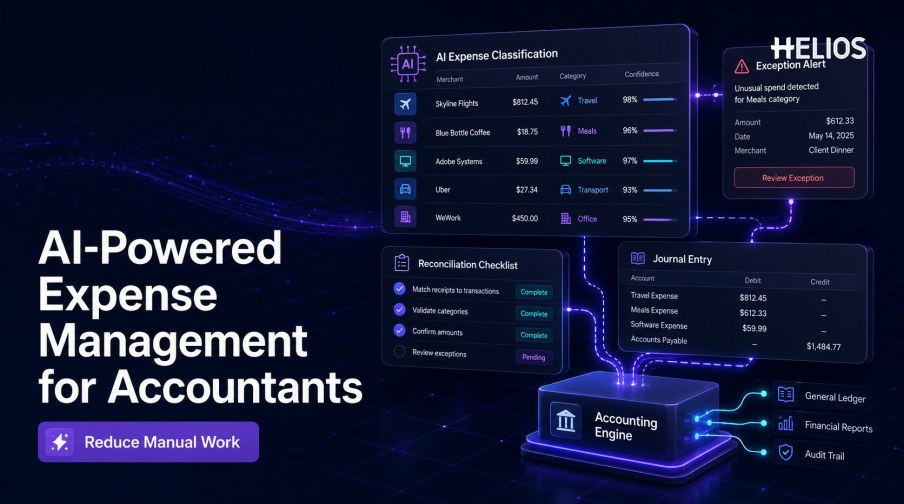
Accounting teams often receive expense information only after employees, managers, and policy checks have already touched it. Yet the final record may still contain incomplete descriptions, inconsistent categories, missing dimensions, duplicate documents, unsupported exceptions, or fields that do not match the accounting structure. Accountants then spend time correcting information that originated earlier in the process.
AI-powered expense management for accountants applies document intelligence, classification assistance, exception signals, and conversational support to this workflow. The objective is not autonomous accounting. It is to prepare more complete expense data, direct human attention to meaningful exceptions, and connect approved reports with controlled accounting rules so that less information needs to be rekeyed or reviewed repeatedly.
This guide explains where AI can reduce manual work, how an expense can move from receipt to accounting, which controls should remain deterministic, and how Helios and Spark AI support receipt capture, review, accounting preparation, and reporting.
What Is AI-Powered Expense Management for Accountants?
AI-powered expense management for accountants is the use of AI-assisted capture, interpretation, review, and analysis within employee expense and reimbursement processes. It works alongside policy rules, approval authority, accounting mappings, and finance-system integrations. The strongest design keeps the source receipt, extracted data, employee edits, policy results, approvals, accounting preparation, and transfer history connected to one expense record.
AI and automation have different jobs. Automation applies defined instructions, such as requiring a receipt above a threshold or mapping a category to an account. AI interprets less structured inputs, such as a photographed receipt, a natural-language business purpose, or an unusual pattern. Accountants remain responsible for material judgments, exceptions, posting controls, and reconciliation outcomes.
Where Manual Accounting Work Enters the Expense Process
Manual effort usually accumulates at handoffs. Common examples include:
- Rekeying receipt data. Merchant, date, amount, tax, currency, and invoice references are copied from attachments into expense or accounting fields.
- Correcting classifications. Expense categories, accounts, tax treatments, projects, clients, entities, or cost centers are repaired after submission.
- Repeating policy review. Finance checks documents and limits that could have been validated before the report reached accounting.
- Searching for missing context. Accountants ask for business purpose, attendees, project details, or explanations of exceptions.
- Preparing journal information. Approved claims are reshaped into debit, credit, dimension, currency, and settlement fields.
- Reconciling transfers. Teams compare expense reports, reimbursement records, card activity, integration responses, and ledger postings.
- Building management reports. Data is exported and reformatted because operational expense information and accounting outcomes are disconnected.
Core AI Capabilities That Matter to Accountants
Useful AI should reduce specific work without weakening control. Important capabilities include:
- Receipt and invoice recognition. OCR captures key fields while retaining the original document for confirmation and review.
- Classification suggestions. AI proposes categories, accounts, tax treatments, and dimensions from the document and business context, subject to permitted master data.
- Completeness prompts. Employees are asked for missing receipts, business purpose, participants, allocation details, or exception explanations before submission.
- Exception prioritization. Reviewers receive signals for missing evidence, policy violations, possible duplicates, unusual values, or uncertain classifications.
- Accounting preparation. Validated and approved expenses feed controlled mappings that create journal-ready debit, credit, tax, currency, and dimension data.
- Conversational analysis. Finance users can ask targeted questions about spend, exceptions, processing time, and recurring patterns without rebuilding every report manually.
How the Accountant-Focused Workflow Works
A controlled end-to-end workflow can be organized into the following stages:
- Capture source evidence. The employee photographs a receipt, uploads an invoice, or begins a claim through a guided interface.
- Extract and confirm data. AI reads the document and proposes merchant, date, amount, currency, tax, and reference fields. The employee confirms uncertain values.
- Complete coding context. The workflow supplies allowed categories, entities, cost centers, projects, clients, and other dimensions.
- Validate policy and completeness. Configured rules check required fields, evidence, limits, dates, categories, duplicates, and approval requirements.
- Route and review exceptions. The report reaches the appropriate manager or finance reviewer, with relevant evidence and exceptions summarized.
- Approve and prepare accounting. Approved data passes through controlled mappings to create balanced, journal-ready accounting information.
- Transfer and reconcile. The record moves to the finance or reimbursement process, and transfer status is compared with the expected outcome.
- Report and improve. Dashboards track spend, exceptions, correction rates, processing time, and accounting handoff quality.
Benefits for Accounting and Finance Teams
The business case should be measured in process outcomes rather than the number of AI features enabled.
- Less manual entry. Captured fields and controlled mappings reduce repeated typing between receipts, reports, and accounting records.
- Fewer avoidable corrections. Completeness prompts and earlier policy checks prevent routine issues from arriving at the accounting stage.
- More focused review. Accountants can concentrate on exceptions, uncertainty, and material decisions instead of rereading every ordinary claim.
- Faster close support. Consistent coding, transfer visibility, and fewer unresolved expense items reduce last-minute investigation.
- Stronger traceability. The source document, edits, policy result, approval, mapping, journal preparation, and transfer history remain connected.
- Better management visibility. Structured expense data supports analysis by category, department, entity, project, exception type, and processing stage.
Best Practices for Reliable Accounting Automation
AI assistance should operate inside clear accounting and control boundaries:
- Standardize master data first. Clarify accounts, categories, entities, projects, cost centers, tax codes, currencies, and settlement rules.
- Keep mandatory controls deterministic. Use configured rules for approval authority, required evidence, valid mappings, segregation of duties, and posting conditions.
- Require confirmation when confidence is low. Users should be able to verify extracted values and understand why a record needs attention.
- Preserve a complete audit trail. Record source documents, edits, recommendations, overrides, approvals, mappings, transfer responses, and corrections.
- Test difficult accounting cases. Include refunds, split allocations, multiple currencies, tax variations, missing receipts, duplicate documents, and intercompany dimensions.
- Design reconciliation ownership. Define who investigates failed transfers, mismatched totals, duplicate postings, rejected records, and unresolved reimbursements.
- Monitor quality after launch. Track extraction corrections, coding overrides, exception accuracy, reconciliation breaks, and accounting corrections.
- Expand only after the first workflow is stable. Prove one high-volume use case before adding more entities, countries, document types, or AI-assisted decisions.
How Helios and Spark AI Reduce Manual Work for Accountants
Helios combines mobile expense workflows, OCR receipt capture, automated policy control, configurable approvals, accounting-entry preparation, and reporting. Spark AI adds conversational claim, approval, travel, and service assistance. Together, these capabilities support five accountant-focused requirements:
- Capture data before it reaches accounting. OCR extracts receipt and invoice information so employees and finance teams do not repeatedly type the same fields.
- Improve first-pass completeness. Guided claims and policy controls help collect supporting documents, business context, and valid expense details earlier.
- Focus review on exceptions. Approval Copilot supports policy-aware document review so reviewers can concentrate on relevant issues and evidence.
- Connect approved expenses with accounting. The Helios accounting engine can generate accounting entries from approved reports, reducing manual journal preparation.
- Analyze outcomes across the lifecycle. Multi-dimensional dashboards and customizable reports provide visibility into spend, processing, exceptions, and recurring patterns.
Helios also presents itself as an enterprise-grade provider with global experience and information-security credentials. Buyers should still validate exact accounting connectors, journal structures, tax logic, currencies, entity requirements, reconciliation methods, security controls, and implementation scope for their environment.
FAQs About AI-Powered Expense Management for Accountants
Does AI replace accountants in expense management?
No. AI can capture fields, suggest classifications, summarize exceptions, and assist analysis, but accountants remain responsible for material judgments, controls, reconciliations, posting decisions, and exceptions.
Can AI create accounting entries from expense reports?
AI may assist classification and interpretation, while controlled accounting mappings create the journal-ready debit, credit, tax, currency, and dimension data. Approved mappings and integration controls should determine what is posted.
How does AI help with reconciliation?
AI can help identify missing records, unusual differences, or patterns that deserve attention. Reconciliation still requires defined matching logic, authoritative data sources, ownership, investigation, and documented resolution.
What should accounting teams measure?
Track extraction correction rate, coding overrides, first-pass completeness, exception accuracy, review time, failed transfers, reconciliation breaks, duplicate-posting incidents, accounting corrections, and user adoption.
What is the safest way to start?
Begin with a high-volume, measurable workflow such as receipt capture or coding preparation. Test real documents and exceptions, retain human approval, and compare results with a pre-launch baseline before expanding.
Accounting teams evaluating a controlled, enterprise-focused approach can review Helios AI-powered expense management and request a demonstration using their own receipts, mappings, approval paths, reconciliation cases, and reporting requirements.