
Expense reports create friction when employees must retype receipt details, choose unfamiliar categories, remember policy requirements, and respond to repeated requests for missing information. Managers and finance teams then spend time checking routine fields, locating attachments, and deciding which reports deserve closer review.
AI expense reports use document recognition, conversational assistance, pattern analysis, and workflow automation to reduce that friction. AI can read a receipt, propose expense fields, ask for missing context, summarize a claim, and highlight exceptions. Configured rules still control mandatory evidence, limits, approvals, and accounting requirements, while people remain responsible for material decisions.
This guide explains how AI supports submission and review, where the technology adds value, which controls should remain visible, and how Helios and Spark AI Claim Copilot can simplify the process from initial claim to approved accounting record.
What Are AI Expense Reports?
AI expense reports are digital expense records prepared or reviewed with AI assistance. The technology may include OCR, document understanding, natural-language interfaces, classification models, and anomaly signals. It can reduce manual preparation, but the report still belongs inside a structured expense management process with defined policies, approval roles, accounting mappings, and audit history.
The distinction between suggestion and control matters. AI can propose a category or summarize an exception. A configured rule can require a receipt, enforce a limit, or route a report to an authorized approver. An employee confirms captured information, and a manager or finance reviewer decides how to handle material exceptions.
Core Capabilities Behind AI Expense Reports
An effective workflow combines several connected capabilities:
- Conversational claim creation. mployees describe the expense in natural language and receive prompts for business purpose, participants, project information, or required evidence.
- Receipt and invoice recognition. OCR extracts merchant, date, amount, currency, tax, invoice number, and other fields from uploaded documents.
- Field completion and classification. AI proposes categories and dimensions from the receipt and business context, subject to allowed master data and accounting rules.
- Policy-aware prompts. The workflow identifies missing receipts, incomplete fields, spending limits, date issues, duplicate risk, and other configured conditions before submission.
- Review summaries. Managers and finance teams receive a concise view of the claim, supporting evidence, policy results, and relevant exceptions.
- Accounting handoff. Approved expense data feeds controlled mappings and integrations so it can support reimbursement, card clearing, journal preparation, and reporting.
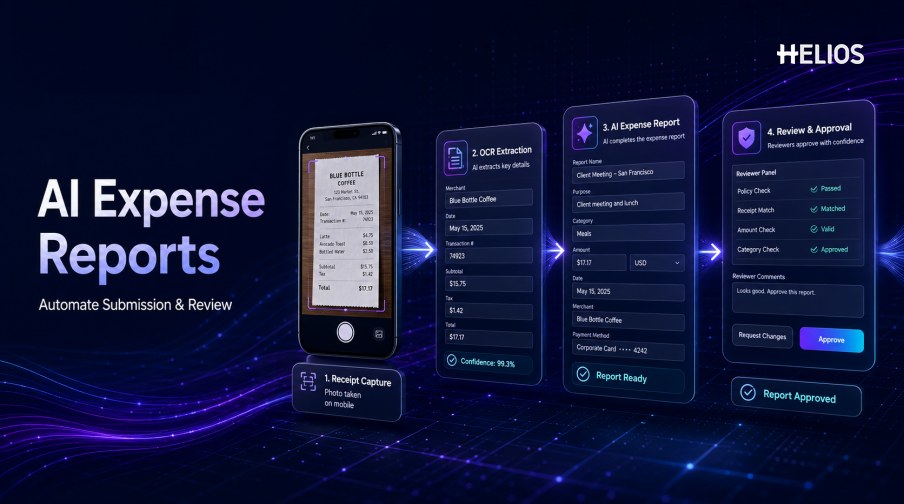
How AI Automates Expense Submission and Review
The following sequence shows how one AI-assisted report can move through the process:
- Start the claim. The employee opens a mobile or web workflow, uploads a document, or describes the expense to a conversational assistant.
- Capture the evidence. The original receipt or invoice is attached to the record and remains available for verification.
- Extract key fields. AI reads merchant, date, amount, currency, tax, and reference data, then presents the result for confirmation.
- Complete missing context. The assistant asks for business purpose, attendees, category, project, cost center, or an explanation when required.
- Check policy and completeness. Configured controls compare the report with receipt rules, limits, valid dates, categories, duplicates, and approval conditions.
- Route the report. The system selects the manager, budget owner, finance reviewer, or specialist according to company rules.
- Support review. AI summarizes the report and highlights relevant evidence, uncertainty, or exceptions without making the final decision.
- Approve and process. The authorized reviewer approves, returns, rejects, or escalates the report; approved data continues to accounting and payment workflows.
Typical Use Cases for AI Expense Reports
Organizations should start with concrete bottlenecks and measurable outcomes.
- High-volume employee reimbursement. Receipt capture and guided fields reduce repetitive typing across many small claims.
- Mobile expense submission. Traveling employees photograph receipts and complete required information near the time of purchase.
- Missing-information prevention. Prompts collect evidence and context before the report enters an approval queue.
- Policy question support. Employees ask whether a category is eligible, which document is required, or how a limit applies.
- Risk-based review. Routine complete reports follow a lighter path while unusual, incomplete, or higher-risk items receive attention.
- Multi-entity coding. Structured fields help route categories, entities, cost centers, projects, taxes, and currencies into the correct downstream process.
Benefits of AI-Assisted Expense Reporting
Potential value should be connected to operational measures:
- Faster report preparation. Employees spend less time copying fields from receipts and navigating long forms.
- Higher first-pass completeness. Contextual prompts reduce missing evidence and repeated exchanges with reviewers.
- More consistent policy application. Configured controls apply receipt, limit, category, date, and approval requirements across reports.
- More focused human review. Summaries and exception signals direct attention to claims that require judgment.
- Shorter reimbursement cycles. Fewer corrections and queue delays help approved reports reach payment preparation sooner.
- Better data for accounting and analysis. Validated fields and connected history support journal preparation, audit trails, and management reporting.
Best Practices for Implementing AI Expense Reports
Reliable implementation combines AI assistance with explicit rules and human accountability:
- Define the target problem. Choose a measurable use case such as receipt entry, missing-information reduction, or review prioritization.
- Clean up policies and required fields. AI cannot compensate for ambiguous limits, inconsistent categories, or unclear evidence requirements.
- Require user confirmation. Employees should verify extracted amounts, dates, currencies, taxes, categories, and business context before submission.
- Keep final decisions visible. Reviewers should distinguish recommendations, alerts, automated actions, and authorized approval decisions.
- Preserve an audit trail. Retain the source document, extracted values, corrections, policy results, approvals, overrides, and downstream status.
- Test representative documents. Include different receipt layouts, languages, currencies, image quality, refunds, split expenses, and missing evidence.
- Provide correction and fallback paths. Users need an easy way to edit uncertain fields, explain exceptions, and complete work when AI assistance is unavailable.
- Monitor quality continuously. Track corrections, missed issues, false alerts, overrides, processing time, support volume, and adoption.
How Helios and Spark AI Support AI Expense Reports
Helios provides mobile expense workflows, OCR receipt capture, policy controls, configurable approvals, accounting preparation, and reporting. Spark AI adds conversational copilots across travel, claims, approvals, and service. For AI expense reports, the practical value appears in five areas:
- Conversational expense submission. Claim Copilot helps employees create reimbursement requests through natural-language interaction instead of relying only on long forms.
- AI-powered document capture. Employees can photograph a receipt or upload an invoice, and OCR populates relevant expense fields.
- Earlier policy and completeness checks. Automated controls identify missing information and policy exceptions before processing.
- Policy-aware approval support. Approval Copilot helps reviewers focus on relevant exceptions and evidence.
- Connected accounting and reporting. Approved reports can generate accounting entries and feed reporting dashboards.
Helios also presents itself as an enterprise-grade provider with global experience and information-security credentials. Buyers should validate document formats, languages, currencies, policy rules, accounting connectors, data handling, AI oversight, and implementation scope.
FAQs About AI Expense Reports
Can AI create an expense report from a receipt?
Yes. OCR and document-understanding technology can extract fields and prepare an expense line. The employee should still confirm the amount, date, currency, tax, category, and business context before submission.
Can employees submit expenses by chatting with AI?
A conversational claim assistant can collect the expense description, prompt for required evidence and context, and prepare the report for confirmation. The available workflow depends on the product and company configuration.
Does AI automatically approve expense reports?
AI can summarize reports and identify exceptions, but approval authority should remain controlled by company policy. Material exceptions and higher-risk decisions need an authorized reviewer.
How are AI expense reports different from basic automation?
Basic automation follows explicit rules and routes. AI adds interpretation of documents, language, and patterns. Mature systems combine both so rules provide consistency and AI reduces unstructured manual work.
What metrics should companies track?
Measure preparation time, extraction corrections, first-pass completeness, policy-exception rate, review time, approval time, reimbursement cycle time, overrides, user adoption, and accounting corrections.
Teams can explore Helios AI expense management with representative receipts, policies, approvals, accounting fields, and employee scenarios.