
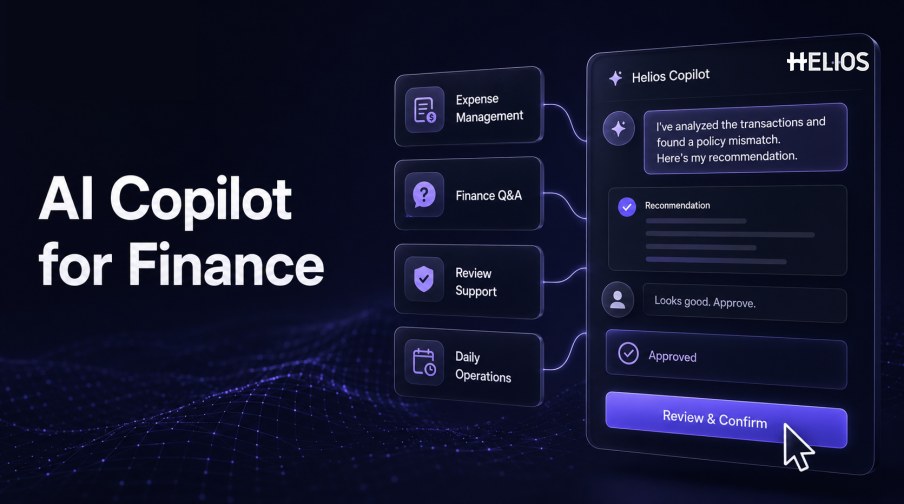
An AI copilot for finance works alongside employees, accountants, approvers, and finance leaders to reduce navigation, data entry, document reading, repetitive checks, and information retrieval. It turns a user’s request into a draft, explanation, summary, or recommended next step while leaving defined decisions and high-impact actions under human control.
In expense management, a copilot can guide an employee through a claim, answer a policy question, summarize evidence for an approver, or help finance teams focus on exceptions. In broader daily operations, it can retrieve permitted information, prepare a report, explain a variance, or organize follow-up work.
This guide explains practical copilot use cases, collaboration patterns, benefits, limitations, and implementation controls, then connects them with Helios and the four Spark AI copilots.
What Is an AI Copilot for Finance?
An AI copilot for finance is an assistive interface that combines natural-language interaction with approved finance data, documents, policies, and workflow functions. It helps a user complete a task but does not automatically receive unrestricted authority over financial decisions or systems.
A copilot differs from a conventional search box because it can maintain task context, interpret documents, assemble information from permitted sources, propose steps, and communicate with the user through a back-and-forth workflow. The user should still be able to inspect sources, correct values, and control material outcomes.
AI Copilot Use Cases in Expense Management
Expense workflows contain repetitive tasks where conversational assistance can remove friction.
- Pre-submission guidance. Answer policy, receipt, category, limit, and approval questions before the user creates a claim.
- Conversational claim creation. Ask for business purpose, attendees, project, missing evidence, or other required information and prepare the draft.
- Receipt and invoice assistance. Use recognized document fields to reduce typing and ask the user to confirm uncertain values.
- Policy-aware review. Summarize the claim, show relevant rules, identify missing evidence or conflicts, and help an approver focus attention.
- Exception resolution. Explain what is missing, collect a reason or document, and route the expense to an authorized reviewer.
- Status questions. Tell permitted users where a claim sits, what action is required, and which step follows.
A Simple Human–Copilot Collaboration Flow
A useful copilot makes the division of work explicit.
- User states the objective. The employee or finance user describes the task in ordinary language.
- Copilot retrieves permitted context. It gathers relevant documents, expense fields, policy content, workflow status, and reference records.
- Copilot asks focused questions. It resolves missing, ambiguous, or conflicting information instead of silently guessing.
- Copilot prepares a draft. It creates the report, summary, explanation, recommendation, or next-step proposal.
- User reviews evidence. The user confirms fields, sources, policy context, calculations, and assumptions.
- Controlled action occurs. The system submits, routes, approves, returns, or posts only within the user’s authority and configured workflow.
- Outcome is recorded. The final values, edits, decision, actor, timestamp, and system result remain traceable.
Use Cases in Financial Operations
Beyond claim submission, a finance copilot can assist bounded operational tasks.
- Finance Q&A. Retrieve approved definitions, procedures, policy text, close instructions, account guidance, or report context with source references.
- Review summaries. Organize supporting records, highlight differences, and prepare a concise explanation for an accountant or manager.
- Accounting preparation. Map approved expense data to a controlled journal-entry proposal for review before posting.
- Queue management. Summarize pending items, identify aging or blocked records, and recommend follow-up priority.
- Reporting assistance. Turn permitted data into a draft narrative about trends, exceptions, or operational performance.
- Service operations. Answer common status and process questions so finance specialists can focus on judgment-intensive work.
Benefits and Success Measures
Copilot value should be measured through workflow outcomes rather than conversation volume.
- Less manual navigation. Measure fewer screens, searches, handoffs, and repeated questions needed to complete a task.
- Faster submission and review. Track cycle time, time per claim, queue age, and time spent locating evidence.
- Better data completeness. Monitor missing fields, evidence requests, returns, corrections, and first-pass completion.
- More consistent policy application. Track recurring violations, reviewer agreement, overrides, and resolution of legitimate exceptions.
- Improved service. Measure response time, self-service completion, escalation rate, and user satisfaction for approved questions.
- Stronger traceability. Confirm that sources, drafts, edits, approvals, actions, and final records can be retrieved.
Boundaries and Implementation Best Practices
A copilot should be helpful without obscuring accountability.
- Ground answers in approved sources. Show the policy, document, record, or dataset supporting material statements.
- Make uncertainty visible. Ask for confirmation when fields, context, or policy interpretation are incomplete.
- Use least-privilege access. Limit data and actions to the user’s role, entity, responsibility, and current task.
- Separate assistance from authority. Distinguish drafts and recommendations from approvals, payments, postings, and policy changes.
- Keep reversible stages. Use previews, confirmation steps, validation, and recovery for operations that change financial records.
- Monitor continuously. Review answer quality, corrections, failure modes, access events, overrides, user behavior, and changing source content.
- Train finance users. Explain when to rely on the copilot, when to inspect evidence, and how to escalate an uncertain result.
How Spark AI Works as an Expense Management Copilot
Helios provides the expense records, policy controls, approval workflows, accounting connection, and reporting foundation. Spark AI adds conversational Travel, Claim, Approval, and Service Copilots. The published capabilities map to five finance-copilot needs:
- Guide users through questions. Service Copilot provides context-aware answers about policy and travel.
- Simplify expense submission. Claim Copilot supports conversational claim creation instead of relying only on forms.
- Assist the reviewer. Approval Copilot checks claims against company policy and helps finance teams review evidence.
- Keep workflow controls. Helios policies and configurable approvals define how claims and exceptions move.
- Connect with downstream finance. Accounting-entry generation, dashboards, and reports carry approved expense data into finance operations.
Helios also presents itself as an enterprise-grade provider with global experience and information-security credentials. Buyers should validate source grounding, permissions, supported questions, editable drafts, confirmation gates, multilingual performance, accounting actions, logging, integrations, security, and implementation scope.
FAQs About an AI Copilot for Finance
Is an AI copilot for finance the same as an autonomous agent?
No. A copilot is primarily assistive and user-directed. An agent may be allowed to plan or execute more steps, but its autonomy still depends on explicit permissions and controls.
What is a copilot finance agent best used for?
Strong early use cases include policy questions, draft creation, document summaries, review assistance, status queries, and other bounded tasks with trusted sources.
Should a finance copilot approve expenses?
Only within formally authorized low-risk rules. Material, uncertain, conflicting, or exception cases should follow the organization’s human approval process.
How can teams evaluate copilot accuracy?
Test representative questions and workflows, then measure grounded answers, field accuracy, corrections, completion, review time, escalation, and control outcomes.
What does Spark AI provide?
Spark AI publicly presents Travel, Claim, Approval, and Service Copilots for conversational expense tasks, policy-aware checks, and contextual answers.
Finance teams can test Helios and Spark AI copilot workflows using common employee questions, representative claims, policy exceptions, review scenarios, accounting handoffs, permissions, and measurable success criteria.