
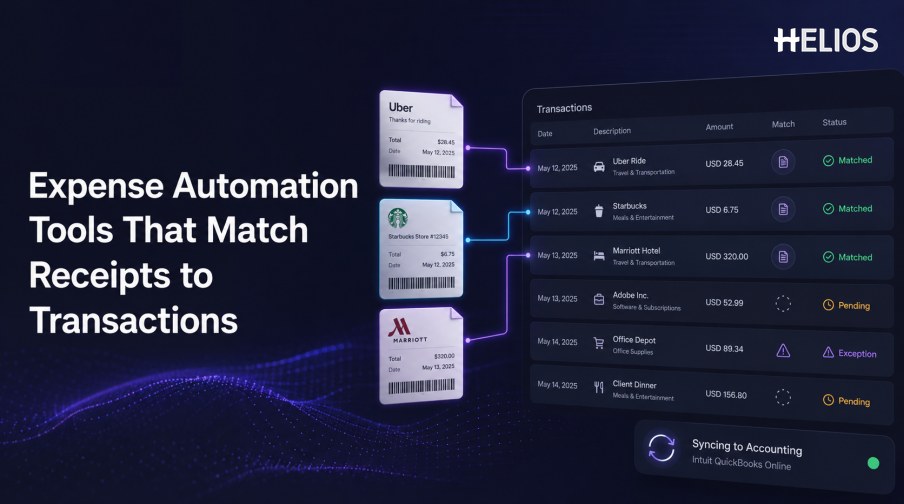
Expense automation tools that match receipts to transactions reduce one of the most repetitive parts of employee expense reporting. Instead of manually locating a charge and copying receipt details into a form, the system extracts receipt data, finds candidate transactions, and proposes or confirms a relationship.
The feature is useful only when it deals responsibly with exceptions. Merchant names may differ, card charges may post later, tips may change the final amount, currencies may be converted, and one receipt may support more than one transaction. A trustworthy workflow makes those differences visible and preserves human control over material decisions.
This article explains the required capabilities, operating process, metrics, and how Helios can connect receipt capture and expense approval with accounting preparation and reporting.
What These Expense Automation Tools Do
A receipt-matching tool combines a document source with a transaction source. It extracts structured fields from the receipt, normalizes transaction data, proposes candidate relationships, applies rules and tolerances, and sends unresolved items into an exception queue.
The result may create a new expense line, attach evidence to an imported card charge, complete an expense report, or update the reconciliation status. The exact outcome should be defined before implementation.
Key Capabilities
The strongest tools combine recognition, matching, controls, and workflow.
- Mobile and digital receipt capture. Accept camera images, files, and other governed channels while preserving the original.
- Field extraction. Identify merchant, date, currency, subtotal, tax, tip, total, and payment clues.
- Transaction ingestion. Import card or other authorized transactions with identifiers, employee ownership, status, and reversals.
- Configurable matching. Use exact references, normalized merchant, amount, currency, date windows, and one-to-many rules.
- Exception management. Explain missing receipts, mismatches, duplicates, splits, foreign-currency differences, and unreadable evidence.
- Workflow integration. Connect the matched expense with policy, approval, accounting, reporting, and audit retention.
A Simple Receipt-to-Transaction Workflow
The employee experience can be simple even when finance controls are rigorous.
- Import the transaction. Receive the authorized charge and assign it to the correct employee or account.
- Capture the receipt. Photograph or upload the complete supporting document.
- Extract and normalize fields. Create consistent merchant, date, currency, tax, tip, and total values.
- Propose the best relationship. Compare identifiers and contextual fields within approved tolerances.
- Confirm and add context. The employee verifies the result and adds purpose, category, participants, project, or cost center.
- Apply policy and approval. Route exceptions and material claims according to company rules.
- Prepare accounting and reporting. Use approved data for mappings, journal entries, status tracking, and analysis.
Exception and Control Design
An exception should be understandable and actionable.
- Missing receipt. Request evidence, allow an authorized declaration, or block submission according to policy.
- Amount difference. Show whether tax, tip, deposit, currency conversion, partial refund, or incorrect extraction caused it.
- Date difference. Compare transaction, posting, service, and receipt dates using approved windows.
- Merchant difference. Display normalized and original merchant descriptions rather than hiding the variation.
- Duplicate or reused receipt. Show the related claim and transaction before a reviewer decides.
- Override governance. Restrict who can accept, split, merge, unmatch, reject, or release a material difference.
Accounting Integration and Performance Metrics
Matching should improve the full finance process, not only the employee interface.
- Accounting dimensions. Map entity, account, tax code, cost center, project, currency, and other required fields.
- Transfer status. Track draft, approved, exported, rejected, retried, posted, and adjusted outcomes.
- Source-to-ledger link. Keep the receipt, transaction, expense, approval, journal entry, and correction connected.
- Auto-match quality. Measure false matches and missed matches as well as overall match rate.
- Operational effort. Track employee touch time, exception aging, reviewer time, resubmissions, and failed integrations.
- Financial quality. Monitor accounting rejections, duplicate reimbursements, unsupported expenses, and post-close adjustments.
How Helios Connects Receipt Capture with Finance Workflows
Helios publicly combines mobile expense submission, OCR receipt capture, automated policy controls, configurable approvals, accounting-entry generation, and multi-dimensional reporting. Spark AI adds conversational claim and approval support. This creates five useful connections:
- Capture evidence close to purchase. Employees can photograph or upload documents through a mobile-first process.
- Convert evidence into data. OCR auto-fills receipt or invoice information and reduces transcription.
- Apply company controls. Policy rules evaluate the expense before approval and accounting.
- Route accountable decisions. Configurable workflows and Spark AI support claim and exception review.
- Continue into finance. Approved reports can generate journal entries and feed reporting views.
Helios also presents itself as an enterprise-grade provider with global experience and information-security credentials. Its public product page does not specify every corporate-card feed or universal automatic receipt-to-transaction matching. Organizations should validate transaction ingestion, matching rules, tolerances, splits, reversals, confidence, duplicate handling, exception actions, accounting mappings, and regional coverage.
FAQs About Expense Automation Tools That Match Receipts to Transactions
How do expense tools match a receipt to a transaction?
They compare identifiers and normalized merchant, date, amount, currency, employee, and payment clues using defined rules and tolerances.
What happens if the amounts are different?
The workflow should show whether tax, tip, conversion, deposit, refund, split, or extraction error explains the difference and route the case appropriately.
Can one receipt match several transactions?
Some systems support one-to-many or many-to-one relationships, but buyers should test the exact split and merge behavior they require.
Which metrics matter?
Track false matches, missed matches, correction effort, exception aging, missing-receipt rate, accounting rejection, and audit-trail completeness.
How does Helios support the process?
Helios connects OCR receipt capture, policy, approvals, journal-entry generation, and reporting. Exact transaction-feed and automatic matching functions should be confirmed for the implementation.
Finance teams can evaluate Helios expense management and accounting integration with actual transaction feeds, receipts, exceptions, approval routes, accounting mappings, integration failures, and performance measures.