
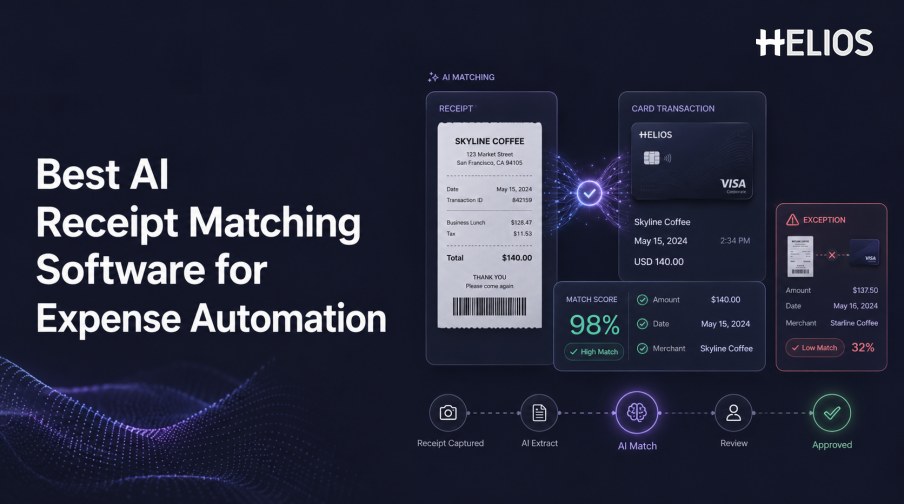
AI receipt matching software for expense automation connects receipt evidence with corporate-card charges or other authorized transactions. It reduces the work of searching for a receipt, selecting a transaction, copying values into an expense line, and checking whether the records agree.
Reliable matching requires more than merchant and amount similarity. The software needs transparent logic for dates, currencies, tips, tax, payment processors, split transactions, duplicates, and missing evidence. It also needs an exception workflow for cases that should not be matched automatically.
This guide explains the matching process, evaluation criteria, controls, and the role Helios expense capture, policy, approvals, accounting integration, and Spark AI can play in a broader automated expense workflow.
How AI Receipt Matching Works
A typical workflow combines document extraction, transaction data, matching rules, and human confirmation.
- Capture the receipt. Photograph or upload the complete document and preserve the original image.
- Extract structured fields. Identify merchant, date, currency, subtotal, tax, tip, total, and payment clues.
- Import candidate transactions. Receive authorized card or other transaction records with stable identifiers and status.
- Generate candidate matches. Compare exact references and normalized merchant, date, amount, currency, employee, and context.
- Score and validate the relationship. Apply tolerances, duplicate checks, policy rules, and materiality conditions.
- Confirm or route an exception. Automatically accept only governed cases and send uncertain records to the appropriate owner.
- Continue the expense workflow. Route the matched expense to approval, accounting preparation, reporting, and retention.
Matching Accuracy Criteria
Measure the quality of both accepted matches and rejected candidates.
- True-match rate. Track genuine receipt-to-transaction relationships found by the software.
- False-match rate. Measure incorrect pairings, because these can hide missing evidence or misstate the expense.
- Missed-match rate. Count valid relationships unnecessarily sent to manual review.
- Field-level agreement. Test merchant, date, currency, subtotal, tax, tip, total, card suffix, and transaction reference.
- Coverage. Include digital receipts, mobile photos, long receipts, foreign currencies, refunds, credits, and difficult images.
- Correction effort. Measure the time required to understand, change, unmatch, and document a result.
Exceptions the Software Must Handle
Real expense data contains legitimate differences that need clear explanations.
- Posting-date differences. A card charge may post later than the printed receipt date.
- Tip and final-charge differences. The card amount may include a gratuity added after the original receipt was printed.
- Currency and conversion differences. The receipt currency may differ from the billed or reimbursement currency.
- Split and combined relationships. One receipt may relate to several charges, or several receipts may support one transaction.
- Merchant-name variation. A receipt brand may differ from the legal merchant or payment-processor description.
- Missing, duplicate, or unreadable evidence. The process must request evidence, block duplicates, or route uncertain documents.
Workflow and Audit Requirements
The reviewer should see the entire relationship, not separate records in separate systems.
- Unified evidence. Present receipt image, extracted fields, candidate transaction, employee context, and policy result together.
- Explainable result. Show the fields, rules, tolerances, and confidence context behind the match or exception.
- Controlled actions. Define who can attach, confirm, correct, split, merge, unmatch, override, reject, or escalate.
- Segregation of duties. Separate configuration, submission, approval, exception resolution, and accounting authority where required.
- Complete history. Retain source records, original result, edits, approvals, comments, export status, and final accounting outcome.
- Reprocessing control. Prevent corrected, reversed, or late transactions from creating silent duplicate matches.
Integration and Selection Checklist
A strong demonstration should run through the actual data and systems in scope.
- Transaction feeds. Validate card issuers, regions, timing, reversals, pending charges, employee assignment, and stable identifiers.
- Expense integration. Confirm how matches create or update expense lines without losing evidence or user edits.
- Accounting mapping. Test entity, account, tax, currency, cost center, project, and journal-entry requirements.
- Failure handling. Test duplicates, missing records, rejected imports, retries, partial success, and outages.
- Security. Review card-data handling, access, encryption, retention, monitoring, and administrator privileges.
- Measured pilot. Compare auto-match quality, review time, missing-receipt rate, accounting corrections, and employee effort.
How Helios Supports Receipt-to-Expense Automation
Helios publicly describes mobile expense submission, OCR receipt capture, automated policy controls, configurable approvals, journal-entry generation, and reporting. Spark AI adds Claim Copilot and Approval Copilot for conversational submission and AI-assisted review. Together, these capabilities support five stages:
- Capture receipt evidence. Employees can photograph or upload documents within a mobile-first workflow.
- Create structured expense data. OCR auto-fills document information and reduces initial transcription.
- Apply company rules. Policy controls evaluate the resulting expense before reimbursement or accounting.
- Route review. Configurable approvals and Spark AI support accountable handling of claims and exceptions.
- Connect approved expenses with finance. Journal-entry generation and accounting integration reduce downstream rekeying.
Helios also presents itself as an enterprise-grade provider with global experience and information-security credentials. Its public page does not specify universal automatic receipt-to-card matching or particular card feeds. Buyers should validate transaction sources, matching logic, tolerances, split handling, confidence, duplicate controls, exception actions, accounting connectors, and country requirements.
FAQs About AI Receipt Matching Software for Expense Automation
What does AI receipt matching software match?
It typically compares receipt evidence and extracted fields with corporate-card or other authorized transaction records.
Can the software handle tips and date differences?
A capable system can apply governed tolerances and rules, but the organization must define when a difference is acceptable and when review is required.
What is the most important accuracy metric?
Use true matches, false matches, missed matches, field-level agreement, coverage, and correction effort together.
Should high-confidence matches be approved automatically?
Only when required evidence, policy, materiality, segregation, and audit conditions also pass. Confidence alone is not sufficient.
Does Helios publicly claim receipt-to-card matching?
Helios publicly describes OCR capture and an end-to-end expense workflow, but exact receipt-to-card matching and feed coverage should be validated for the intended configuration.
Organizations can assess Helios expense automation with representative receipts, card records, tips, foreign currencies, splits, duplicates, exceptions, accounting mappings, and measured reviewer effort.