
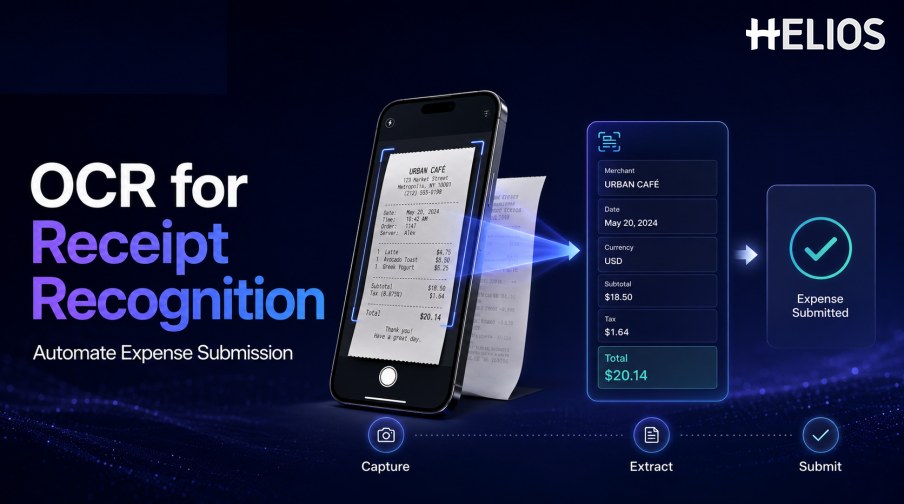
A receipt is evidence of a business purchase, but it is rarely ready for an expense system. Employees may carry paper slips, download digital receipts, photograph restaurant bills, or receive documents in different currencies and formats. Manual submission requires them to read and retype the merchant, date, amount, tax, and other details.
OCR for receipt recognition converts the visual document into machine-readable text and maps relevant values into expense fields. A good workflow then asks the employee to confirm the result, add the business purpose and coding context, and submit the claim for policy review and approval.
This article explains the complete capture-to-submission process and shows how Helios AI-Powered Receipt Capture connects OCR output with downstream expense controls.
What Is OCR for Receipt Recognition?
OCR for receipt recognition is the process of reading receipt text and converting selected values into structured expense data. Basic OCR identifies characters and words. A recognition layer uses labels, position, formats, and business logic to determine which text represents the merchant, transaction date, currency, subtotal, tax, tip, and total.
The distinction matters because a page of searchable text is not yet a usable expense record. The workflow needs field mapping, normalization, confidence, validation, user confirmation, and a controlled handoff to policy and approval steps.
A Simple Receipt-to-Expense Workflow
OCR receipt recognition can automate expense submission through the following stages:
- Capture the receipt. The employee photographs a paper receipt or uploads a supported image or document.
- Prepare the image. The system detects boundaries, rotates, crops, deskews, denoises, and improves contrast where needed.
- Read text and layout. OCR identifies words, numbers, lines, and their location on the receipt.
- Extract expense fields. Recognition logic proposes merchant, date, amount, currency, tax, tip, payment data, and line details when supported.
- Normalize and validate values. Dates, decimal separators, currencies, totals, and required evidence are checked against expected formats and arithmetic.
- Confirm and add context. The employee verifies the receipt data and supplies purpose, category, project, cost center, attendees, or other required information.
- Submit and trigger controls. The completed expense enters policy checks, duplicate review, approval routing, finance review, accounting, and reporting.
Which Receipt Fields Can OCR Extract?
Field coverage varies by receipt type, country, image quality, and product configuration. Common fields include:
- Merchant information. Merchant name, address, tax identifier, branch, and contact details where present.
- Transaction information. Transaction date and time, receipt number, order number, terminal, and payment reference.
- Amounts. Subtotal, discounts, service charge, tax, tip, total, paid amount, and change.
- Currency. Currency symbol or code, with validation when symbols could refer to more than one currency.
- Line items. Description, quantity, unit price, tax, and line total when item-level extraction is supported and required.
- Payment clues. Payment method, card suffix, cash, or other non-sensitive settlement indicators included on the receipt.
- Expense context. Suggested category or other coding can be proposed, but business purpose and organizational dimensions often require user or rule-based confirmation.
How Receipt Data Triggers Review and Approval
The value of OCR for receipt recognition appears when confirmed fields immediately support the next control.
- Required evidence. The system can check whether a receipt is attached for categories or amounts that require one.
- Policy limits. Amount, category, location, date, and employee context can be evaluated against configured spending rules.
- Duplicate signals. Receipt images and key fields can be compared with existing claims to flag possible repeated submission.
- Approval routing. Amount, department, role, cost center, project, entity, or exception type can determine the review path.
- Finance review. Reviewers can see the original receipt, extracted values, corrections, policy results, and approval history together.
- Accounting preparation. Approved data can be mapped to accounts, dimensions, taxes, currencies, and journal references.
Benefits and Limitations
Receipt recognition can improve the submission experience, but responsible automation keeps limitations visible.
- Faster employee entry. Employees confirm proposed fields instead of typing the receipt from scratch.
- Fewer transcription errors. Captured values reduce keying mistakes, especially for dates, currencies, taxes, and totals.
- More timely expense data. Mobile capture encourages submission closer to the transaction, improving status visibility.
- Earlier compliance checks. Structured fields can be checked before the claim reaches a manager or finance reviewer.
- Image sensitivity. Blur, glare, folds, faded print, handwriting, long receipts, and cropped totals can reduce recognition quality.
- Context still matters. A receipt rarely proves business purpose, attendee details, project coding, or whether an expense is allowable.
- Human confirmation remains important. Low-confidence, high-value, tax-sensitive, duplicate, or conflicting fields require review.
Implementation Best Practices
Teams should evaluate OCR for receipt recognition with the documents and controls they actually use.
- Test representative receipts. Include restaurants, hotels, taxis, retail, digital receipts, multiple languages, currencies, tax formats, and difficult photos.
- Measure by critical field. Track exact match, normalized match, missing values, false values, and correction time for date, currency, tax, and total.
- Design confirmation for speed. Show the source beside the proposed value and make corrections easy on mobile and desktop.
- Use risk-based thresholds. Route uncertain or material fields for review instead of silently accepting every OCR result.
- Connect the full workflow. Test submission, policy, duplicates, approval, finance review, accounting, errors, and reporting end to end.
- Monitor after launch. Review correction patterns, failed captures, processing time, exception volume, late submissions, and user adoption.
How Helios Automates Receipt-Based Expense Submission
Helios provides mobile-first expense workflows and AI-Powered Receipt Capture that uses OCR to populate information from receipts and invoices. Spark AI adds conversational assistance for claims and approvals. Together, they address five practical needs:
- Capture receipts where spending happens. Employees can photograph a receipt or upload a document instead of waiting to retype it later.
- Auto-fill relevant expense details. OCR reduces manual entry while keeping the source available for confirmation.
- Complete the claim with business context. Users add purpose, category, project, attendees, or other required information.
- Trigger policy and approval workflows. Configured controls and routes act on the confirmed expense record.
- Connect approved expenses with finance. Accounting-entry generation and reporting carry the record beyond submission.
Helios also presents itself as an enterprise-grade provider with global experience and information-security credentials. Buyers should confirm supported receipt types, formats, languages, image conditions, field coverage, confidence handling, duplicate logic, mobile experience, integrations, security, and implementation scope.
FAQs About OCR for Receipt Recognition
Is receipt OCR the same as receipt recognition?
OCR reads visible text. Receipt recognition uses that text, layout, labels, and validation to map values into fields such as merchant, date, currency, tax, and total.
Can employees submit expenses from a phone?
A mobile-first system can allow employees to photograph receipts, review recognized data, add business context, and submit claims, subject to the product and company configuration.
Can OCR read handwritten tips?
Some systems may recognize handwriting, but performance varies significantly. Handwritten and material values should be tested and routed for confirmation when uncertain.
Does receipt recognition prevent duplicate claims?
It provides images and structured fields that can support duplicate detection. A flagged match should be reviewed with document similarity, amounts, dates, merchants, and business context.
What happens after the receipt is recognized?
The employee confirms the data and adds context, after which the expense can enter policy checks, approval, finance review, accounting, reimbursement, and reporting.
Organizations can evaluate Helios AI-Powered Receipt Capture with real receipts, mobile capture conditions, field-level targets, policy cases, duplicate scenarios, and downstream accounting tests.