
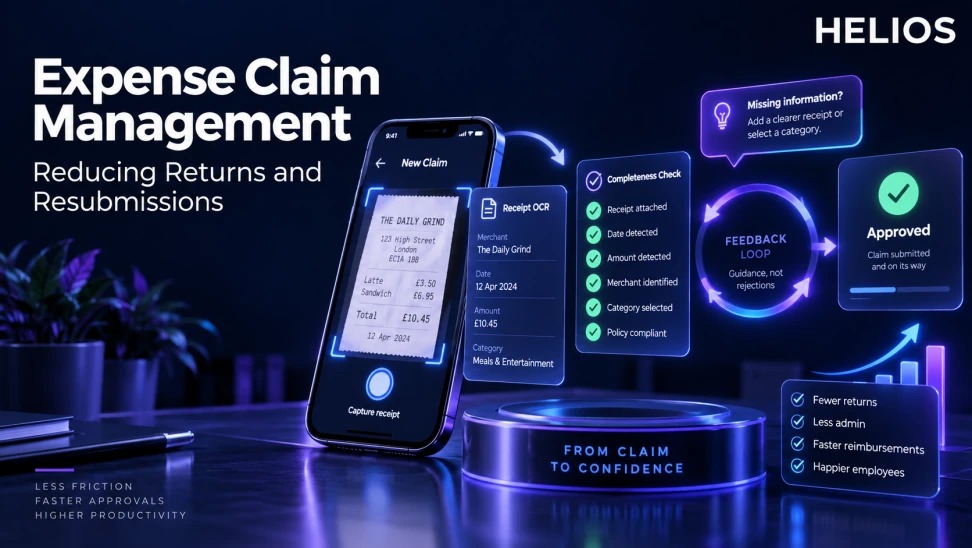
Why do expense claims get returned?
Expense claim management covers the complete path from employee capture and submission through review, approval, reimbursement, accounting, and reporting. A return occurs when a reviewer sends a claim back because information, evidence, coding, or approval conditions are incomplete.
Returns are expensive even when the claim is legitimate. Employees reopen old receipts, managers repeat decisions, finance rechecks the same transaction, and reimbursement slows. The best control catches predictable problems before submission and reserves human review for judgment.
For related guidance, see expense reimbursement software.
This guide focuses on return and resubmission operations rather than a general description of reimbursement software. It provides a cause framework, pre-submission checklist, feedback loop, and metrics.
Expense Claim Management at a glance
| Return reason | Pre-submission check | Employee prompt | Owner |
|---|---|---|---|
| Unreadable receipt | Image quality and full edges | Retake or upload a clearer image | Employee |
| Missing business purpose | Required purpose and context | Explain who, what, and why | Employee |
| Wrong category | Valid category and coding | Choose from relevant categories | Employee and finance |
| Duplicate claim | Receipt and transaction match | Review possible prior submission | Finance |
| Policy exception | Limit and approval condition | Add justification or approval | Employee and approver |
For related guidance, see AI expense reports and automated submission.
Common return causes should lead to specific checks, prompts, and targeted finance feedback.
Map return reasons before changing the workflow
Create a controlled list of return reasons from reviewer data and sample claims. Separate unreadable evidence, missing purpose, wrong coding, duplicate risk, policy exception, ineligible expense, and payment or master-data problems.
Do not use a generic “needs more information” reason. It hides the root cause and gives employees no reliable action. Allow a short comment after the reviewer selects a structured reason.
For related guidance, see receipt data extraction and capture.
Build a pre-submission completeness check
Check required receipt, amount, date, merchant, currency, category, business purpose, project, attendees, and pre-approval where relevant. A completeness check should confirm presence and basic validity without pretending every claim can be approved automatically.
Show the problem beside the field and preserve the employee’s work. If the rule depends on entity, country, role, or expense type, display only the requirement that applies.
Improve receipt capture and OCR verification
Mobile capture should warn about blur, cropping, glare, and incomplete pages. OCR can extract fields, but the employee should verify low-confidence or material values against the source image.
Electronic receipts, multi-page invoices, foreign languages, mixed personal and business items, and missing documents need explicit paths. A forced workaround creates unreliable data.
Make finance feedback actionable
A return message should identify the exact issue, required correction, relevant policy, and deadline. Where possible, send the employee directly to the field that needs attention.
If finance changes coding without returning the claim, record the adjustment and reason. Repeated corrections may indicate unclear categories or bad default suggestions.
For related guidance, see automated expense approval workflows.
Design the resubmission loop
A resubmitted claim should retain the original submission, return reason, reviewer, timestamps, employee changes, and final result. Reviewers should see what changed instead of rechecking every field.
Escalate aging returns and provide delegation when an employee or manager is unavailable. Separate returned claims from rejected nonreimbursable expenses in employee status.
Measure whether the process improves
Track first-pass acceptance, return rate, resubmission cycle time, repeat return rate, return reasons, approval time, and total reimbursement cycle. Segment by entity, category, device, team, and reviewer.
Balance speed with duplicate alerts, accounting corrections, policy outcomes, and audit quality. A lower return rate is meaningful only if incomplete claims are not passing downstream.
How Helios can reduce claim returns
Helios connects mobile claim creation, OCR, policy controls, approval workflows, Claim Copilot, accounting integration, and reporting. These capabilities can move routine completeness checks earlier and preserve a traceable review record.
For related guidance, see duplicate detection across claims and transactions.
- Capture receipts and claim context on mobile.
- Extract and structure receipt fields with OCR.
- Use Claim Copilot to guide employees through required information.
- Apply configured policy and evidence rules before approval.
- Route exceptions through role-based approval workflows.
- Analyze return reasons, cycle times, and correction patterns.
A practical conclusion
Reducing returns requires clearer inputs, earlier checks, specific feedback, and a measurable resubmission loop. The goal is not zero questions. It is fewer preventable handoffs and faster resolution when judgment is necessary.
See how Helios can support this workflow. Request a Helios demo.
FAQ about expense claim management
What is expense claim management?
It is the process for capturing, checking, approving, reimbursing, accounting for, and reporting employee expense claims.
Why are expense claims commonly returned?
Common reasons include unreadable receipts, missing business purpose, incorrect categories, duplicates, policy exceptions, and incomplete approval evidence.
What is first-pass acceptance rate?
It is the share of submitted claims that move forward without being returned for correction.
Can OCR prevent all claim returns?
No. OCR reduces data entry, but employees and reviewers still handle unclear documents, business context, exceptions, and judgment.
How should finance write a return reason?
Name the exact issue, state the required action, point to the applicable rule, and avoid vague requests for more information.
How does Helios support expense claim management?
Helios combines mobile capture, OCR, Claim Copilot, policy controls, approvals, integration, and reporting. Deployment requirements should be validated.