
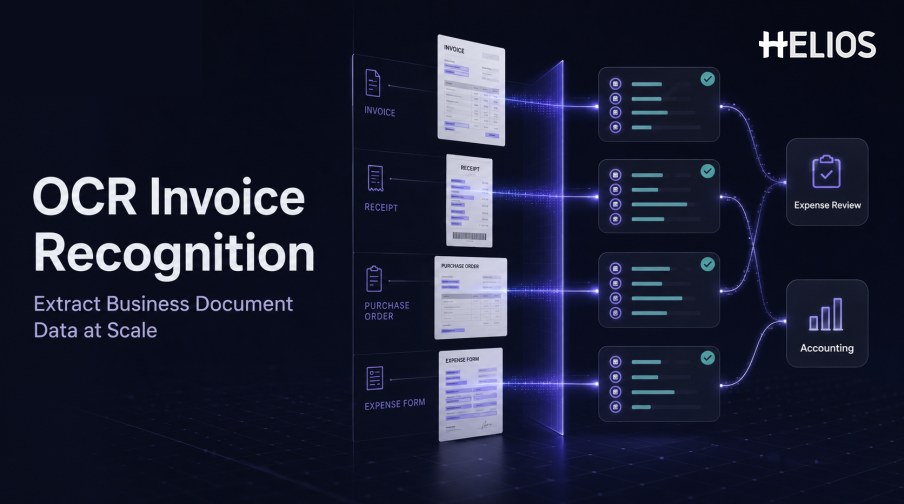
Business documents contain critical financial information in many forms. A supplier invoice may arrive as a PDF, an employee receipt as a mobile photo, a purchase order as a multi-page document, and an expense form as a scan. The text is visible to a person, but it is not automatically usable by an expense or accounting system.
OCR invoice recognition converts visual text into machine-readable content and then maps relevant values into structured fields. The workflow must account for image quality, layout, tables, languages, formats, field confidence, validation, and exceptions. Recognition is valuable only when the confirmed result moves cleanly into the next business process.
This guide focuses on the OCR pipeline for invoices and related business documents. It explains how text and fields are extracted and how Helios carries recognized information into expense submission, review, approval, accounting, and reporting.
What Is OCR Invoice Recognition?
Optical character recognition, or OCR, converts characters in an image or scanned document into machine-readable text. OCR invoice recognition applies that capability to invoices and uses position, labels, patterns, and document structure to identify business fields.
Basic OCR may return a stream of words. A useful invoice workflow must preserve layout, detect tables, associate labels with values, normalize formats, and provide confidence or source coordinates. Rules or AI models can then determine which text represents the supplier, invoice date, number, currency, tax, total, and other required data.
Which Business Documents Can OCR Process?
The supported scope should match the organization’s real document flows.
- Supplier invoices. Standard invoices, tax invoices, credit notes, debit notes, service invoices, and multi-page documents.
- Receipts. Retail, restaurant, transport, hotel, fuel, and other employee expense evidence.
- Purchase documents. Purchase orders, order confirmations, delivery notes, and goods-receipt documents where relevant to the workflow.
- Expense forms. Scanned reimbursement forms, mileage records, exception declarations, and supporting schedules.
- Statements and supporting evidence. Transaction records, supplier statements, proof of payment, and related attachments when included in scope.
- Regional documents. Documents with local languages, scripts, tax fields, date formats, currencies, stamps, or seals.
How the OCR Extraction Pipeline Works
The technical and business workflow typically includes these stages:
- Ingest the file. Receive a mobile photo, image, scan, PDF, or other supported document through an authorized channel.
- Detect and prepare pages. Identify boundaries, orientation, perspective, page order, resolution, and document type.
- Improve the image. Apply crop, rotation, deskew, denoise, contrast adjustment, and background removal where appropriate.
- Recognize characters and words. OCR detects text while retaining coordinates, lines, blocks, and confidence information.
- Analyze layout and tables. The system identifies headings, labels, values, rows, columns, repeated headers, and reading order.
- Extract structured fields. Rules or models propose supplier, dates, references, currency, amounts, taxes, and line items.
- Normalize and validate. Values are converted to expected formats and checked against arithmetic, master data, policy, and duplicates.
- Confirm and transfer. Users resolve uncertain fields before the data enters expense review, accounting, or reporting.
Field Extraction, Tables, and Data Quality
Invoice documents are difficult because the same business field can appear in different positions, languages, labels, and formats. Tables add another challenge because the system must preserve relationships between descriptions, quantities, unit prices, taxes, and totals.
- Field location. Retain the page and coordinates that support each extracted value.
- Reading order. Distinguish headers, sidebars, tables, footers, and repeated page content.
- Date interpretation. Separate invoice, service, due, and posting dates and normalize regional formats.
- Amount relationships. Identify subtotal, discount, tax, surcharge, total, paid amount, and balance with defined tolerances.
- Currency and locale. Handle currency codes and symbols, decimal and thousands separators, language, and regional conventions.
- Table structure. Preserve rows and columns across pages and distinguish line-level amounts from document totals.
- Confidence and correction. Present uncertain values with the source image and retain every user correction.
How OCR Results Enter Expense and Finance Processing
OCR output should become part of a controlled business record rather than a disconnected text file. The user adds context that the document cannot provide, and the system carries the confirmed data through downstream decisions.
- Create the expense line. Recognized fields populate the claim while the user confirms category, purpose, entity, project, cost center, or attendees.
- Apply policy and completeness checks. Structured values support evidence, date, amount, category, duplicate, and required-field controls.
- Route review and approval. The report moves according to amount, department, role, entity, cost center, and exception type.
- Prepare accounting data. Approved values pass through controlled mappings for accounts, dimensions, taxes, currencies, and journal references.
- Return downstream status. Integration success, rejection, correction, journal references, and reimbursement outcomes remain connected to the source document.
- Support reporting and audit. Dashboards and audit history link the original image with extraction, corrections, decisions, accounting, and final status.
Implementation Checklist for OCR Invoice Recognition
Use a controlled rollout that measures both recognition and downstream process quality.
- Inventory document types and channels. List invoices, receipts, purchase documents, expense forms, languages, formats, volumes, and intake methods.
- Define the required schema. Specify fields, formats, tax data, line items, source coordinates, confidence, and audit requirements.
- Create a labeled test set. Include ordinary and difficult documents, rare layouts, bad images, multi-page files, stamps, handwriting, and foreign currencies.
- Measure by document and field. Track exact values, normalized values, missing fields, false values, correction time, and complete-document success.
- Design exception ownership. Route uncertain, incomplete, conflicting, or higher-risk documents to authorized reviewers.
- Test accounting integration. Validate mappings, journal output, response messages, retries, corrections, and duplicate prevention.
- Monitor production performance. Review volumes, latency, correction patterns, false alerts, failures, backlog, user adoption, and accounting errors.
How Helios Connects OCR Invoice Recognition with Expense Processing
Helios combines mobile expense workflows, OCR invoice and receipt capture, automated policy controls, configurable approvals, accounting-entry generation, and reporting. Spark AI adds conversational assistance across claims, approvals, travel, and service. Together, these capabilities connect OCR output with five downstream needs:
- Recognize documents. OCR fills fields from photographed or uploaded invoices and receipts.
- Add business context. Employees confirm data and supply required coding details.
- Apply controls. Policy checks and approvals govern extracted values.
- Generate accounting data. Approved reports can produce journal entries.
- Retain visibility. Dashboards, reports, and Spark AI support analysis.
Helios also presents itself as an enterprise-grade provider with global experience and information-security credentials. Buyers should validate their documents, fields, confidence handling, integrations, security, and implementation scope.
FAQs About OCR Invoice Recognition
Can OCR read both invoices and receipts?
Yes, when the product supports the relevant document types and layouts. Field performance should be tested separately for invoices, receipts, purchase documents, and other business forms.
Does OCR return structured fields automatically?
OCR returns characters and words. A recognition layer uses labels, layout, rules, or models to map that text into supplier, dates, identifiers, amounts, tax, currency, and line-item fields.
What image quality does OCR require?
Requirements vary, but low resolution, blur, skew, shadows, glare, folds, handwriting, stamps, and poor contrast can reduce performance. Test the real capture conditions.
How should uncertain OCR results be handled?
Show field confidence and source location, apply business validation, and send low-confidence or material values to an authorized user for confirmation or correction.
Organizations can evaluate Helios OCR invoice recognition with representative invoices, receipts, business documents, image conditions, field requirements, and accounting workflows.