
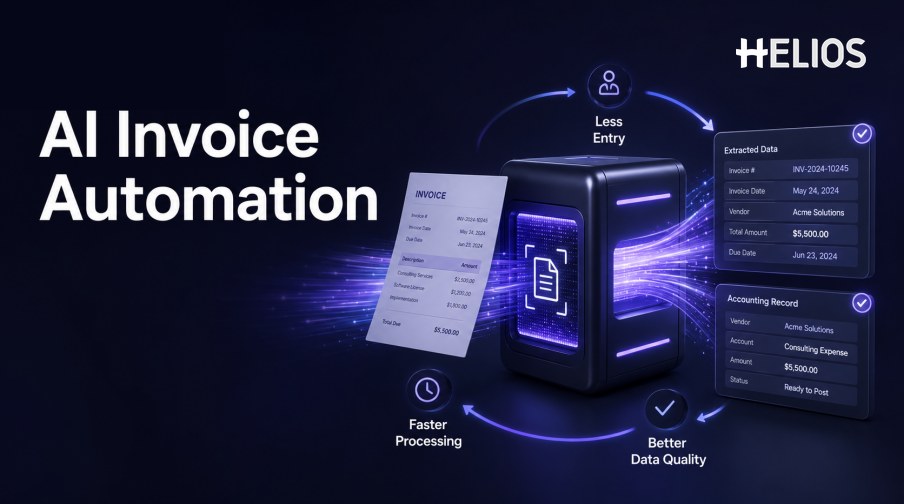
Invoice work often includes repetitive document handling, typing, field checking, coding, follow-up, approval routing, and accounting preparation. AI invoice automation applies OCR, document intelligence, validation, and workflow rules so that finance teams can focus on exceptions instead of re-entering every value.
The value is not simply faster OCR. Automation creates value when the extracted data is reliable enough for the next step, uncertain fields are visible, exceptions reach the right owner, and approved values remain traceable through accounting and reporting.
This guide explains how AI invoice automation works, where it can reduce effort and improve quality, and how Helios OCR, expense workflows, and accounting integration relate to the process.
What Is AI Invoice Automation?
AI invoice automation uses document recognition and workflow technology to convert invoice files into structured data, validate the result, route records and exceptions, and prepare authorized downstream actions. It combines learned document patterns with deterministic business rules and human review.
Invoice automation AI should not be treated as a single invisible decision. The process should expose the source document, recognized fields, confidence, validation results, corrections, routing logic, and final outcome.
How AI Invoice Automation Works
A typical automated flow includes the following steps:
- Ingest the invoice. Receive the supported file and retain the original image or document.
- Recognize and classify. Read text, detect layout, identify the document type, and separate pages or attachments.
- Extract structured data. Identify supplier, invoice number, dates, currency, amounts, tax, line items, and other fields.
- Validate the values. Check formats, arithmetic, duplicates, reference data, policy, context, and required dimensions.
- Request confirmation. Send low-confidence, missing, conflicting, or unusual fields to an authorized user.
- Route for approval. Apply the correct workflow based on entity, role, department, cost center, amount, category, or exception.
- Prepare accounting. Map approved data to a controlled accounting proposal and validate it before transmission.
- Record the result. Retain sources, changes, decisions, system responses, and final status for reporting and audit.
Where AI Invoice Automation Creates Value
Value appears across effort, speed, quality, control, and visibility.
- Less manual entry. Common fields are captured from the source document and presented for confirmation rather than typed from scratch.
- Faster processing. Routine records can move sooner while finance teams prioritize exceptions, missing evidence, and material issues.
- Better data completeness. The system can request missing fields, dimensions, documents, or explanations before the record reaches accounting.
- More consistent validation. The same format, arithmetic, duplicate, policy, and coding checks can apply across relevant invoices.
- Fewer downstream corrections. Earlier validation reduces rework caused by incorrect amounts, dates, currencies, tax, categories, or accounting dimensions.
- Improved visibility. Structured data supports status tracking, exception analysis, cycle-time measurement, and spend reporting.
Data Quality, Policy, and Exception Controls
Automation should increase control quality rather than move errors faster.
- Field-level confidence. Use source highlighting and confidence to focus review on uncertain values.
- Required evidence. Check whether the appropriate invoice, receipt, supporting document, or explanation is present.
- Policy validation. Apply limits, category restrictions, business-purpose requirements, timing, and approval conditions.
- Duplicate protection. Compare document images and normalized supplier, invoice number, date, amount, and currency fields.
- Exception ownership. Route missing, conflicting, low-confidence, or out-of-policy records to a named responsible role.
- Correction history. Retain original extraction, user changes, reviewer decisions, and final approved values.
Connecting Invoice Automation with Accounting
The accounting handoff determines whether automation eliminates rekeying or merely moves it.
- Approved source data. Only confirmed values and resolved exceptions should enter accounting preparation.
- Configured mappings. Map entity, account, tax, cost center, project, category, and other dimensions consistently.
- Journal validation. Check balancing, periods, required fields, duplicate references, permissions, and system acceptance.
- Reliable interfaces. Manage authentication, schema changes, rejected records, retries, idempotency, and reconciliation.
- Source-to-ledger traceability. Link the invoice and expense workflow with the accounting entry and later adjustments.
- Management reporting. Analyze processing time, correction patterns, exceptions, accounting status, and spend dimensions.
How to Build an AI Invoice Automation Business Case
A business case should compare baseline work with measured pilot results.
- Establish the baseline. Measure invoice volume, fields entered, handling time, cycle time, error rate, return rate, exceptions, and downstream corrections.
- Segment the workload. Separate simple and complex invoices, languages, entities, currencies, channels, and line-item requirements.
- Pilot representative documents. Test both frequent layouts and difficult cases rather than only clean native PDFs.
- Measure automation quality. Track critical-field accuracy, correction time, straight-through rate, exception usefulness, and accounting acceptance.
- Include operating cost. Account for implementation, integration, configuration, monitoring, support, change management, and ongoing ownership.
- Expand by evidence. Automate additional fields or actions only after measured quality and control outcomes support the change.
How Helios Supports AI Invoice Automation
Helios combines invoice upload and OCR-based detail capture with policy controls, configurable approvals, accounting-entry generation, and reporting for expense management. Spark AI adds conversational assistance for claims and approvals. These capabilities support five sources of automation value:
- Reduce rekeying. OCR auto-fills relevant invoice details for user confirmation.
- Improve process completeness. Expense records can collect required fields, evidence, and business context.
- Automate checks and routing. Policy controls and approval workflows manage routine conditions and exceptions.
- Prepare accounting outcomes. Approved expense reports can generate journal entries through the accounting engine.
- Support continuous improvement. Dashboards and reports provide data for reviewing spend and process performance.
Helios also presents itself as an enterprise-grade provider with global experience and information-security credentials. Organizations should validate document accuracy, field and line-item scope, exception handling, duplicate controls, languages, tax rules, accounting mappings, interface behavior, supplier or PO needs, payment scope, security, and implementation effort.
FAQs About AI Invoice Automation
What is the difference between invoice automation and AI invoice automation?
Traditional automation follows predefined formats and rules. AI can help recognize varied layouts, identify fields, classify documents, and prioritize uncertain or unusual records.
Where does invoice automation create the most value?
Common value areas are reduced data entry, faster processing, better completeness, earlier exception detection, fewer downstream corrections, and improved visibility.
Does automation eliminate invoice review?
No. Review remains important for uncertain fields, exceptions, unusual transactions, policy conflicts, accounting impacts, and high-risk or high-value outcomes.
How should straight-through processing be used?
Limit it to well-tested, low-risk conditions with reliable data, explicit authority, validation, monitoring, and a clear exception path.
How does Helios support invoice automation?
Helios publicly describes invoice OCR and auto-fill within expense management, plus policy, approval, accounting-entry, and reporting capabilities.
Organizations can test Helios OCR and accounting automation with representative invoices, critical fields, policy exceptions, approval paths, accounting mappings, integration failures, and a measured manual-work baseline.