
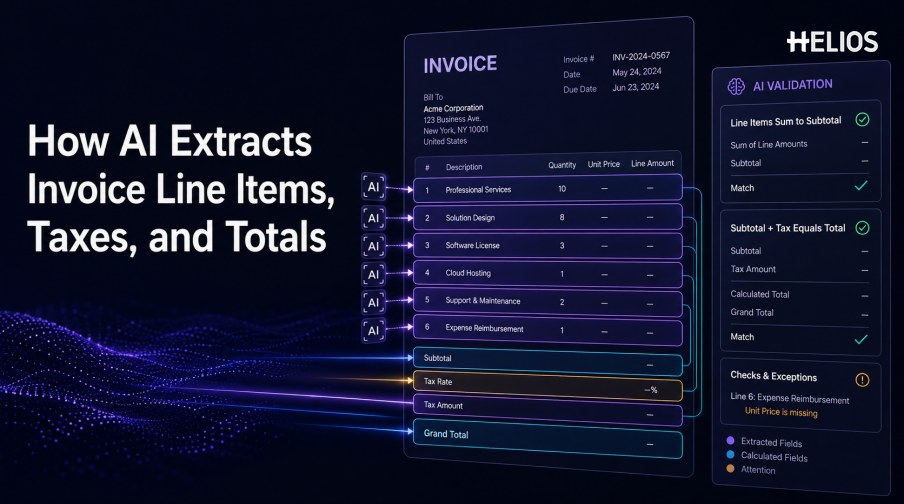
AI invoice data extraction line items tax requirements are more demanding than capturing a supplier name or invoice date. A system must reconstruct a table, align rows and columns, distinguish unit prices from line amounts, interpret discounts and taxes, and confirm that the arithmetic supports the stated total.
The result should not be trusted simply because it looks plausible. Finance teams need field-level evidence, reconciliation rules, tolerance settings, exception handling, and human review for ambiguous or material values.
This article explains how detailed extraction works and how Helios OCR-based invoice capture can connect document data with expense controls and accounting workflows, while noting that exact line-item and tax coverage must be validated.
Why Line Items and Tax Are Harder to Extract
Header fields are usually single values near recognizable labels. Line items appear in tables whose columns may wrap, merge, repeat across pages, or use abbreviations. Taxes may be included, excluded, split by rate, applied per line, summarized at the bottom, or expressed through regional terminology.
A useful result must preserve row structure and distinguish extracted values from calculated or inferred values. It should also retain the source coordinates and any correction history.
Fields in a Detailed Invoice Table
Requirements should be defined at the row, tax, and document-summary levels.
- Item identity. Description, product or service code, account reference, project reference, or service period.
- Quantity and unit. Quantity, unit of measure, hours, days, weight, or other billed basis.
- Price and discount. Unit price, list price, discount rate, discount amount, and net price.
- Tax attributes. Tax category, tax rate, taxable base, tax amount, exemption, or regional code.
- Line amount. The extended amount before or after discount and tax, according to the invoice convention.
- Document totals. Subtotal, discount total, freight, tax by rate, withholding, rounding, prior payment, and grand total.
- Allocation context. Entity, category, cost center, project, or employee may be assigned from the document or later workflow context.
How AI Reconstructs Line-Item Tables
Table extraction combines visual structure with text and business meaning.
- Detect the table region. Separate the item grid from addresses, notes, payment terms, and totals.
- Identify headers. Interpret labels such as qty, units, rate, price, net, VAT, GST, sales tax, and amount.
- Recover rows and columns. Align wrapped descriptions and numeric values even when grid lines are faint or absent.
- Handle continuation pages. Recognize repeated headers, carried subtotals, and tables that span multiple pages.
- Map business fields. Normalize quantities, units, currencies, decimals, rates, and negative values.
- Estimate confidence. Flag uncertain column boundaries, missing values, ambiguous totals, and unreadable regions.
Tax and Total Consistency Checks
Arithmetic and tax checks turn extracted candidates into controlled data.
- Line extension. Confirm that quantity multiplied by unit price, adjusted for discount, matches the stated line amount.
- Subtotal reconciliation. Sum line amounts and compare the result with the document subtotal within approved rounding tolerance.
- Tax calculation. Compare taxable bases, rates, tax amounts, exemptions, and tax summaries where the process requires it.
- Total reconciliation. Check that subtotal, discounts, freight, tax, withholding, rounding, and prior payments produce the grand total.
- Currency consistency. Confirm that line values and totals use the same currency or document any conversion basis.
- Exception classification. Distinguish OCR error, missing field, arithmetic variance, tax ambiguity, duplicate record, and policy issue.
A Simple Line-Item and Tax Review Workflow
Detailed extraction should move from evidence to approval through explicit checks.
- Capture the complete invoice. Preserve all pages, attachments, image quality, source channel, and timestamp.
- Extract headers and tables. Read identifiers, dates, currency, rows, tax details, subtotal, and total.
- Normalize the values. Standardize decimals, signs, currencies, units, rates, and tax codes without changing source evidence.
- Run consistency checks. Recalculate lines, subtotal, tax, and grand total and identify variance.
- Review exceptions. Show source regions and route ambiguous or material differences to an authorized reviewer.
- Apply policy and approval. Confirm business purpose, category, limits, evidence, coding, and required approvers.
- Prepare accounting and reporting. Map approved values to accounts, tax codes, cost centers, projects, and authorized outputs.
How to Test Detailed Extraction Quality
Use representative invoices and measure more than a document-level pass rate.
- Row detection. Measure missing, merged, split, duplicate, and misordered rows.
- Column accuracy. Test descriptions, quantities, units, unit prices, discounts, tax, and amounts separately.
- Tax accuracy. Evaluate bases, rates, categories, amounts, exemptions, summaries, and regional formats.
- Arithmetic validity. Track whether lines, subtotals, tax, and totals reconcile within defined tolerances.
- Correction effort. Measure fields corrected, rows edited, active review time, and repeated supplier issues.
- Downstream acceptance. Confirm that approved values map correctly and are accepted by accounting or reporting systems.
How Helios Connects Invoice Capture with Finance Controls
Helios publicly states that users can photograph or upload an invoice and that OCR auto-fills details. Captured expense information can then move through policy controls, flexible approvals, accounting-entry generation, and reporting. Spark AI adds conversational claim and approval assistance. These published capabilities support five relevant stages:
- Capture the source. Users can upload or photograph invoice evidence.
- Prefill relevant details. OCR reduces manual entry before user confirmation.
- Apply policy controls. Extracted expense information can be checked against company rules.
- Route accountable review. Configurable approvals move records and exceptions to the correct roles.
- Connect approved data downstream. The accounting engine and reporting features support finance outcomes.
Helios also presents itself as an enterprise-grade provider with global experience and information-security credentials. The public page does not specify every line-item or tax field. Organizations should validate row and column coverage, multi-page tables, tax bases and rates, tolerances, currencies, confidence, correction, duplicate detection, accounting mappings, regional requirements, and integration behavior.
FAQs About AI Invoice Data Extraction for Line Items and Tax
Why are line items harder than header fields?
Line items require table reconstruction, row and column alignment, wrapped descriptions, repeated headers, and interpretation of quantities, prices, tax, and amounts.
Can AI verify invoice totals?
It can recalculate lines, subtotal, tax, discounts, and total, but tolerances, source conventions, and material exceptions need governed rules and review.
How should tax extraction be tested?
Use relevant tax bases, rates, categories, exemptions, currencies, regional labels, multi-rate invoices, and expected accounting mappings.
Should calculated values replace document values?
No. Preserve both the extracted source value and the calculated comparison, then document any authorized correction or variance.
Does Helios guarantee detailed line-item and tax extraction?
The public product page states that OCR auto-fills invoice details but does not enumerate every line-item and tax field. Exact coverage should be validated in a tailored demonstration.
Finance teams can assess Helios invoice OCR and expense controls with real multi-line invoices, tax scenarios, arithmetic variances, multi-page tables, correction workflows, approval conditions, accounting mappings, and field-level acceptance criteria.