
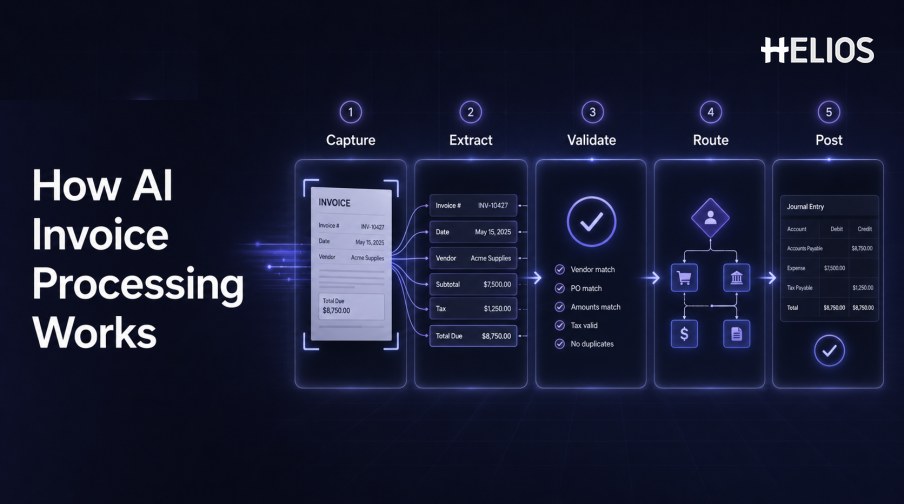
Invoices arrive as PDFs, scans, photographs, email attachments, and structured files. Before finance can use them, the organization must capture the document, identify its fields, confirm the values, connect it with the right expense or business context, route it for review, and prepare an accounting outcome.
AI invoice processing automates parts of this sequence by combining OCR, document classification, field extraction, validation, exception detection, and workflow orchestration. The objective is not to accept every recognized value without review. It is to reduce rekeying, surface uncertainty earlier, and move reliable data into controlled financial processes.
This guide explains the complete automation path and shows how Helios OCR, policy and approval workflows, and accounting integration can connect invoice capture with expense management and finance operations.
What Is AI Invoice Processing?
AI invoice processing converts an invoice image or file into structured, validated data that can enter an expense, approval, accounting, or other financial workflow. OCR reads visible text, document intelligence identifies the meaning and location of fields, and validation rules compare the result with expected formats and business context.
The scope varies by platform. Some systems focus on capture and extraction; others add workflow, accounting mappings, purchase-order matching, supplier controls, or payment functions. Buyers should define the exact invoice process they need instead of treating all products as equivalent.
The End-to-End AI Invoice Processing Workflow
A controlled invoice-processing flow can follow these stages:
- Capture the source. Receive a scan, image, PDF, mobile photo, or other supported file and preserve the original document.
- Classify the document. Determine whether the file is an invoice, receipt, credit note, supporting document, or another record type.
- Extract fields. Read supplier, invoice number, dates, currency, subtotal, tax, total, line items, payment terms, and other required values.
- Normalize the data. Convert dates, decimal formats, currencies, tax representations, units, and identifiers into expected structures.
- Validate and compare. Check arithmetic, required fields, duplicates, document-to-claim consistency, policy, coding, and reference data.
- Resolve exceptions. Ask a user or finance reviewer to confirm low-confidence, conflicting, missing, or unusual information.
- Route the record. Send the invoice or related expense through the appropriate approval path based on role, department, cost center, amount, or condition.
- Prepare the financial outcome. Use approved data and configured mappings to create an accounting proposal or other authorized downstream record.
- Retain the audit trail. Keep the original document, extracted values, edits, checks, approvals, accounting result, and timestamps.
Data Capture and Field Extraction
Capture quality determines how much later review is required.
- Image preparation. Correct orientation, crop the page, improve contrast, detect multiple pages, and identify unreadable areas.
- Text recognition. OCR converts visible characters into machine-readable text while retaining position and page context.
- Field identification. The system maps text to invoice number, supplier, date, amount, tax, currency, and other business fields.
- Table and line-item extraction. Rows, descriptions, quantities, unit prices, tax, and totals require structure beyond simple text recognition.
- Confidence and evidence. Every material field should retain its source location, confidence, and a way for the reviewer to compare it with the document.
- Human correction. Users need a controlled method to fix values while preserving the original extraction and correction history.
Validation, Exceptions, and Approval Routing
Recognition creates candidate data; validation determines whether the data is ready to move.
- Format checks. Confirm required values, date formats, currency codes, tax identifiers, invoice-number patterns, and permitted characters.
- Arithmetic checks. Recalculate line totals, subtotal, tax, discounts, and grand total within approved tolerances.
- Duplicate checks. Compare document images and key fields with prior invoices or claims before reimbursement or posting.
- Context checks. Compare the invoice with employee, trip, entity, category, cost center, project, policy, or approved reference data.
- Exception prioritization. Use materiality, confidence, missing evidence, policy severity, and conflicting values to determine review priority.
- Accountable routing. Send the exception to the appropriate business owner, manager, finance reviewer, or escalation path.
From Approved Invoice Data to Accounting
Approved invoice information becomes financially useful when it carries consistent accounting context.
- Entity and account mapping. Assign the correct legal entity, account, expense category, tax treatment, cost center, project, and other dimensions.
- Controlled journal preparation. Generate an entry proposal from approved expense data and configured accounting rules instead of rekeying values.
- Validation before posting. Check balanced debits and credits, closed periods, required dimensions, duplicate references, and user authority.
- System integration. Transfer approved data through supported APIs, files, or connectors while tracking success, failure, retries, and reconciliation.
- Traceability. Link the accounting outcome to the source invoice, expense report, corrections, policy checks, and approvals.
- Reporting. Use structured data to analyze spend, tax, exceptions, processing time, and data quality across relevant dimensions.
How to Implement AI Invoice Processing
Implementation should begin with representative documents and measurable controls.
- Define the process boundary. Specify document types, channels, entities, languages, currencies, fields, validations, approvals, accounting outputs, and systems in scope.
- Create a document test set. Include clear and difficult invoices, multiple layouts, scans, photographs, multi-page files, line items, taxes, credits, and legitimate exceptions.
- Set field-level acceptance criteria. Measure critical fields separately rather than relying on one overall accuracy number.
- Design exception ownership. Assign who corrects extraction, resolves policy conflicts, approves business purpose, and validates accounting.
- Test downstream failures. Simulate rejected records, unavailable integrations, duplicate submissions, incorrect mappings, and retry behavior.
- Release progressively. Begin with assisted extraction and human confirmation, then expand automation only when quality supports it.
- Monitor production. Track accuracy, correction rate, straight-through rate, exceptions, cycle time, failures, and audit retrieval.
How Helios Supports AI Invoice Processing
Helios publicly presents AI-Powered Receipt Capture that accepts a photo or uploaded invoice and uses OCR to auto-fill details. Helios also provides policy controls, configurable approvals, accounting-entry generation, and reporting. Spark AI adds conversational claim and approval assistance. Together, these published capabilities support five stages:
- Capture invoice evidence. Users can photograph or upload an invoice while OCR extracts relevant information.
- Confirm structured fields. Recognized data enters a controlled expense record instead of relying only on manual entry.
- Apply policy and workflow controls. Automated Policy Control and flexible approvals route records and exceptions.
- Prepare accounting entries. The accounting engine generates journal entries from approved expense reports.
- Analyze the process. Multi-dimensional dashboards and customizable reports support finance visibility.
Helios also presents itself as an enterprise-grade provider with global experience and information-security credentials. Organizations should validate invoice formats, languages, field and line-item coverage, confidence handling, supplier and purchase-order controls, tax logic, duplicate detection, accounting mappings, payment scope, integrations, and implementation requirements.
FAQs About AI Invoice Processing
Is AI invoice processing the same as OCR?
No. OCR converts visible text into machine-readable text. AI invoice processing also identifies fields, validates data, handles exceptions, routes records, and connects approved information with financial workflows.
Can every invoice be processed without human review?
Not reliably. Low-confidence fields, unusual layouts, missing information, conflicts, exceptions, and material financial outcomes may require authorized review.
Which invoice fields are most important?
Common critical fields include supplier, invoice number, invoice date, currency, subtotal, tax, total, line items, payment terms, and required accounting dimensions.
How should accuracy be measured?
Measure critical fields separately on representative documents and track exact-match accuracy, correction rate, exception rate, and downstream acceptance.
How does Helios relate to invoice processing?
Helios publicly describes OCR-based invoice upload and auto-fill within expense management, plus approval, policy, accounting-entry, and reporting capabilities. Buyers should validate broader AP requirements.
Finance teams can evaluate Helios invoice capture and accounting workflows using representative documents, field-level accuracy tests, approval scenarios, accounting mappings, integration failures, and complete audit-trail requirements.