
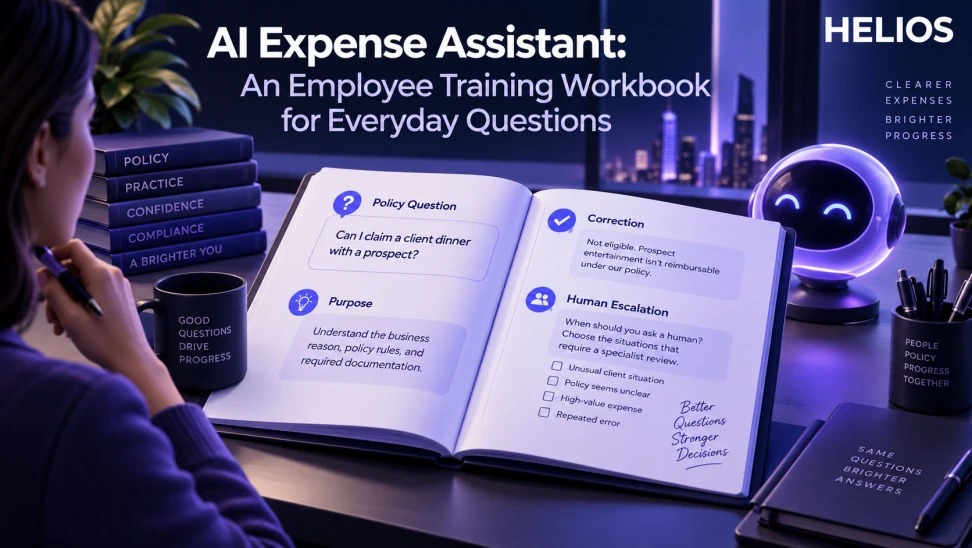
A practical employee workbook for asking policy questions, writing business purposes, correcting AI misunderstandings, and escalating to a person.
A practical framework for finance teams
A practical employee workbook for asking policy questions, writing business purposes, correcting AI misunderstandings, and escalating to a person.
This workbook trains employees to use an AI expense assistant responsibly. It does not promise that every answer is correct, replace the employee’s duty to submit accurate information, or replace finance judgment.
For related guidance, see Spark AI.
The framework below starts with the business task, defines the required data and human responsibility, and sets a clear test for whether the workflow produces a useful finance outcome.
AI Expense Assistant at a glance
| Exercise | Employee task | Good behavior | Escalate when |
| Policy question | Ask with relevant country and expense type | Check source and date | Rule conflicts |
| Business purpose | Provide real activity and objective | Verify every fact | Sensitive context |
| Missing information | Answer follow-up prompts | Attach evidence | Evidence unavailable |
| Correction | Point out the exact error | Confirm revised field | Error persists |
| Human handoff | Summarize the unresolved issue | Preserve context | High-impact decision |
For related guidance, see AI finance operations use cases.
A useful workflow connects reliable inputs, accountable decisions, and measurable outcomes.
Exercise 1: ask a useful policy question
Weak: “Can I claim this?” Better: “Can a Canada-based employee claim a taxi from a client site to the airport after a late meeting, and what evidence is required?”
Practice including country, expense type, business event, timing, amount, and the decision needed. Check the cited policy version or ask finance when the answer lacks support.
For related guidance, see AI expense copilot data protection.
Exercise 2: write a truthful business purpose
Prompt: “Help me structure this purpose: I travelled to the Berlin office for the Q3 product-security workshop, September 14–16.” Review the assistant’s wording and remove any invented customer, outcome, or attendee.
Add project, client, route, attendees, or approval only when factual and required. A polished sentence does not make an inaccurate claim acceptable.
Exercise 3: complete missing context
When the assistant asks for merchant, date, currency, receipt, attendee, project, or route, answer with the exact record and attach the evidence. Say that information is unavailable when it is unavailable.
Use the lost-receipt or exception process rather than guessing. Limit personal or confidential details to what the approved workflow requires.
Exercise 4: correct a misunderstanding
Use a direct correction: “The amount is CAD 86.40, not USD 86.40,” or “This was an internal training session, not a client meeting.” Then inspect the revised fields and totals.
If the system repeats the error, stop and use manual editing or contact support. Preserve the original evidence.
For related guidance, see business purpose examples.
Exercise 5: know when to ask a person
Escalate conflicting policy, legal or tax questions, sensitive relationships, high-value exceptions, suspected duplicate or fraud, payment failure, confidential data, or an answer without an approved source.
Provide the human reviewer with the question, facts, evidence, assistant response, correction attempted, and decision needed.
Manager-led practice and scoring
Run realistic cases for travel, meals, equipment, training, multi-currency, missing receipts, and policy exceptions. Score factual accuracy, complete context, evidence, safe data handling, correction, and escalation.
Track completion, later claim returns, employee confidence, unsafe disclosures, unsupported answers, and time to resolution. Update exercises when policy changes.
How Helios supports this workflow
Helios can connect mobile expense capture, multilingual OCR, configurable policy controls, role-based approvals, accounting preparation, integration, multidimensional reporting, and confirmed Spark AI conversational scenarios. Voice input, predictive cleaning, autonomous decisions, project forecasting, asset management, procurement, and subscription or cloud-cost optimization should not be assumed and require separate validation.
For related guidance, see AI expense management practices.
- Use Claim Copilot for confirmed submission-assistance scenarios.
- Use Service Copilot for confirmed employee support scenarios.
- Connect questions with approved policy and workflow context.
- Ask for missing information and allow employee correction.
- Route exceptions and unresolved questions to accountable people.
- Preserve final employee-confirmed claim data and evidence.
A practical conclusion
Start with a narrow task and reliable data. Give employees and reviewers a clear next step, preserve corrections and exceptions, and measure whether the process improves accuracy, speed, control, and business decisions.
See how Helios can support this workflow. Request a Helios demo.
FAQ
What is an AI expense assistant?
It is a conversational tool that can help employees understand policy, provide context, complete claims, and find the next step.
What should employees include in a policy question?
Include country, expense type, business event, timing, amount, relevant role, and the specific decision needed.
Can the assistant create a business purpose?
It can structure employee-provided facts, but the employee must verify every statement and remove invented details.
How should an employee correct AI?
State the exact incorrect field and replacement, review the revision, and use manual editing or support if the error continues.
When is human escalation required?
Escalate conflicting rules, unsupported answers, sensitive matters, legal or tax questions, high-impact exceptions, and unresolved errors.
Which Helios copilots are relevant?
Claim Copilot and Service Copilot support confirmed employee-facing assistance scenarios within Spark AI.