
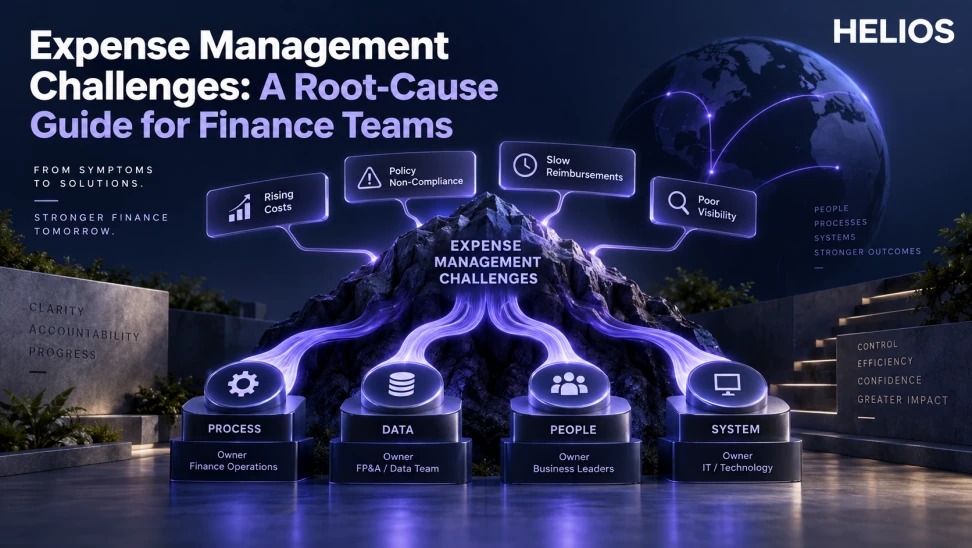
A diagnostic guide that maps employee complaints, approval backlogs, receipt errors, exceptions, and posting rework to root causes and owners.
A practical framework for finance teams
A diagnostic guide that maps employee complaints, approval backlogs, receipt errors, exceptions, and posting rework to root causes and owners.
A symptom can have several causes. This guide does not invent customer outcomes or assume automation fixes unclear policy, weak ownership, poor data, or broken integrations.
For related guidance, see expense automation reporting.
The framework below connects the visible symptom or cost with the underlying workflow, required evidence, accountable owner, and a measurable decision.
Expense Management Challenges at a glance
| Symptom | Likely process cause | Data to inspect | Primary owner |
| Employees complain | Too many fields or unclear guidance | Abandonment and return reasons | Expense operations |
| Approvals age | Missing authority or poor routing | Queue age by step and owner | Business and finance |
| Receipt errors | Late capture or extraction gaps | Correction by field and source | Employee and finance |
| Exceptions rise | Bad threshold or changed behavior | Rule, reason, category, entity | Policy owner |
| Posting rework | Mapping or integration failure | Rejected records and retries | Accounting and IT |
For related guidance, see expense platform pilot KPIs.
A useful operating model connects scope, evidence, ownership, and follow-through.
Start with a precise symptom
Replace “expenses are broken” with a measurable observation: median reimbursement time rose, returned reports increased, a specific approval step aged, or ERP rejection doubled.
State period, population, entity, category, channel, numerator, denominator, and business impact. Separate employee perception from transaction evidence while using both.
For related guidance, see automated expense tracking.
Map employee complaints to workflow friction
Common causes include too many fields, unclear purpose examples, inaccessible policy, duplicate entry, slow status updates, poor mobile experience, or reimbursement uncertainty.
Inspect abandonment, completion time, field corrections, return reasons, support contacts, and status age. Interview representative employees before removing a control.
Diagnose approval backlogs
Aging may come from manager absence, invalid role data, excessive steps, unclear authority, conflicts, missing context, unnecessary senior approval, or notification failure.
Segment by workflow step, approver, entity, amount, exception, and readiness. Give every old item an owner and resolve routing before telling managers to work faster.
Trace receipt and policy errors
Receipt problems may begin with delayed capture, unreadable evidence, unsupported formats, OCR error, merchant complexity, or unclear lost-receipt rules. Exceptions may reflect behavior, outdated thresholds, wrong category, local-rule mismatch, or incomplete fields.
Review error distributions and verified samples. Do not treat every automated flag as confirmed noncompliance.
For related guidance, see receipt data extraction guide.
Find accounting and integration causes
Posting rework can result from invalid GL, tax code, entity, project, employee, currency, dimension, duplicate send, closed period, or failed acknowledgment.
Trace approved, exported, accepted, rejected, retried, posted, reversed, and reconciled amounts. Assign mapping, interface, and close issues to accounting and IT owners.
Prioritize fixes by impact and confidence
Score employee impact, financial or control risk, volume, close impact, root-cause confidence, effort, dependency, and reversibility. Pilot the smallest change that tests the cause.
Track the original symptom, safeguard, expected change, actual outcome, side effects, and follow-up date. Reopen the diagnosis if the measure does not move.
How Helios supports this workflow
Helios can connect mobile expense capture, multilingual OCR, configurable policy controls, role-based approvals, accounting preparation, integration, multidimensional reporting, and confirmed Spark AI conversational scenarios. Customer outcomes, prices, automated root-cause findings, predictive models, and capabilities outside the confirmed product scope should not be assumed.
For related guidance, see ERP integration test cases.
- Provide end-to-end workflow and status data.
- Use mobile capture and OCR to reduce evidence friction.
- Apply configurable policies and approvals.
- Report returns, exceptions, aging, categories, entities, and users.
- Connect approved expenses with accounting systems.
- Provide data for finance-owned root-cause analysis without claiming automatic diagnosis.
A practical conclusion
Define the work before selecting the feature. Preserve evidence and ownership, test representative cases, and measure the full operational outcome rather than a single attractive number.
See how Helios can support this workflow. Request a Helios demo.
FAQ
What are common expense management challenges?
Common challenges include employee friction, missing receipts, vague purposes, approval delays, policy exceptions, payment delays, and posting errors.
How should finance start root-cause analysis?
Define one measurable symptom with period, population, workflow step, denominator, and business impact.
Why do expense approvals become backlogged?
Causes may include absence, invalid roles, too many steps, unclear authority, conflicts, missing context, or failed notifications.
What causes accounting rework?
Invalid mappings, tax or entity fields, currency, duplicates, closed periods, failed transfers, and unclear error ownership are common causes.
How should fixes be prioritized?
Use impact, risk, volume, root-cause confidence, effort, dependencies, and reversibility, then test the change.
Can Helios identify every root cause automatically?
No. Helios provides workflow data and controls; finance, business, accounting, and IT teams own diagnosis and action.