
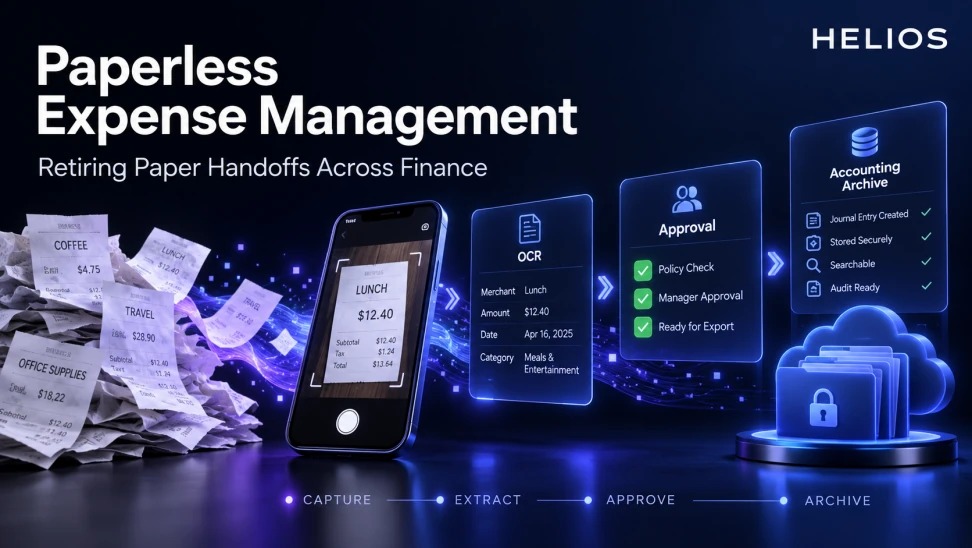
What is paperless expense management?
Paperless expense management replaces physical receipt collection, folders, stamps, signatures, interoffice mail, scanning queues, and manual filing with controlled digital capture, review, approval, accounting, retention, and retrieval.
Scanning paper is only one step. A process remains partly paper-based when employees still deliver originals, approvers sign separate sheets, finance rekeys data, or teams keep duplicate paper archives without a documented requirement.
For related guidance, see electronic accounting records for expenses.
Legal validity, tax evidence, original-document rules, data location, privacy, and retention vary by jurisdiction. Finance must confirm local requirements with qualified legal, tax, records, and audit teams before destroying originals.
Paperless Expense Management at a glance
| Handoff | Paper-state problem | Digital replacement | Control |
|---|---|---|---|
| Employee to manager | Lost or delayed receipts | Mobile image and claim record | Timestamp and identity |
| Manager to finance | Separate signature or email | Workflow approval | Decision and comments |
| Finance to accounting | Manual rekeying | Structured export or integration | Mapping and reconciliation |
| Finance to archive | Duplicate folders and scans | Governed digital record | Retention and access |
| Archive to auditor | Slow retrieval | Search and controlled export | Audit trail |
For related guidance, see AS Watson paperless expense operations case study.
A paperless transition maps every handoff from capture and verification through approval, accounting, retention, and audit access.
Inventory every paper handoff
Observe the real process across offices and entities. List who creates, transports, scans, stamps, approves, rekeys, stores, retrieves, and destroys each document.
Record why paper is used: legal requirement, customer request, habit, system gap, poor mobile capture, or lack of trust. Do not remove a handoff until its control purpose is understood.
For related guidance, see OCR document recognition for expense management.
Define the digital evidence package
Specify the receipt or invoice image, extracted fields, original file, metadata, employee declaration, business purpose, coding, policy result, approval, payment, accounting entry, and audit trail required for each expense type.
Define accepted formats, image quality, multi-page handling, corrections, and version history. A screenshot may not meet the same requirement as an original electronic receipt.
Remove duplicate retention
If paper and digital copies are both kept, document the reason, owner, retention period, and disposal trigger. Duplicate archives increase search time, privacy exposure, and inconsistent destruction.
Create a country matrix for original-document and electronic-record requirements. Revisit it when rules or operations change.
Redesign approval and accounting handoffs
Replace handwritten signatures and email approvals with a workflow that records identity, authority, time, comments, and decision.
Transfer approved structured data to accounting with mapping validation, error queues, and reconciliation. Paperless does not mean invisible integration failures.
For related guidance, see receipt data extraction and capture.
Plan migration and cutover
Pilot with a defined population and document type. Train employees on capture quality, verify retrieval and audit export, and set a clear effective date for retiring the old route.
Handle in-flight claims and legacy paper explicitly. Avoid an indefinite transition in which every team follows a different process.
Measure paperless operations
Track paper submissions, duplicate storage, scan time, missing evidence, capture quality, approval time, posting errors, retrieval time, and audit requests.
Use exceptions to improve the digital workflow. A recurring paper workaround often reveals a missing document type, mobile limitation, or unresolved local rule.
How Helios supports paperless expense workflows
Helios combines mobile receipt capture, OCR, digital policy checks, approval workflows, accounting integration, reporting, and electronic accounting archive capabilities described in the provided brand materials. Legal treatment of originals still requires local confirmation.
For related guidance, see multilingual invoice and receipt OCR accuracy.
- Capture receipts and electronic documents through digital channels.
- Extract structured fields with multilingual OCR.
- Preserve claim, evidence, policy, and approval records.
- Route expenses without paper signatures or physical transfer.
- Connect approved data with finance and accounting processes.
- Support search, reporting, and audit retrieval from structured records.
A practical conclusion
A paperless expense program succeeds when every control previously carried by paper has a reliable digital equivalent. Map the handoffs, define evidence, remove unjustified duplicates, validate local rules, and prove that records remain complete and retrievable.
See how Helios can support this workflow. Request a Helios demo.
FAQ about paperless expense management
Does paperless expense management mean scanning receipts?
Scanning is one part. A fully digital process also covers data extraction, approval, accounting, retention, retrieval, and audit trail.
Can companies destroy original paper receipts?
Requirements vary by country and document. Obtain local legal, tax, records, and audit confirmation before destruction.
What should a digital expense record contain?
It may include the source document, fields, metadata, purpose, coding, policy result, approvals, payment status, accounting entry, and history.
How should a company phase out paper handoffs?
Inventory the current process, define evidence, pilot, validate retrieval and controls, train users, set a cutover date, and handle legacy records.
What are useful paperless expense KPIs?
Track paper volume, duplicate storage, capture quality, missing evidence, cycle time, posting errors, and retrieval time.
How can Helios support paperless expenses?
Helios supports mobile capture, OCR, workflows, policy controls, finance integration, reporting, and structured digital records. Local requirements still need validation.